

Paperguide
Keevs Health Inc · Writing · Business
Paperguide is an AI research assistant that searches 200 million papers, manages your references, and drafts cited writing, with auditable systematic reviews built in.
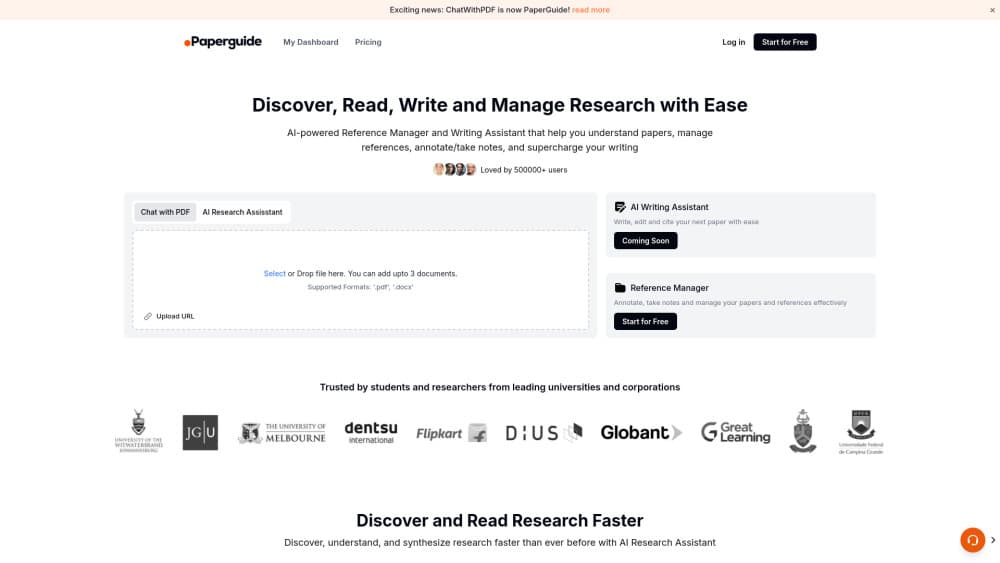
About Paperguide
What Is Paperguide
Paperguide is a web platform for the part of research that happens before and during writing: finding papers, keeping them organized, pulling numbers out of them, and turning the pile into something you can cite. It runs on a library of more than 200 million peer-reviewed papers drawn from PubMed, arXiv, OpenAlex, and Semantic Scholar, plus whatever you import from Zotero or Mendeley. Most literature review tools stop at search and export. This one keeps going through screening, extraction, and drafting.
The company behind it is Keevs Health Inc, a Delaware corporation based in Alpharetta, Georgia. The product started in 2023 as a citing tool. Today it's sold as systematic review software as much as a writing aid, and it covers literature review, data extraction, plagiarism checking, and PRISMA reporting. Around a million researchers use it, according to the company.
The limit worth knowing early: Paperguide is strongest on published literature and structured review work. It won't design your study, run your statistics, or replace a methods expert, and the review workflows assume you already know what your inclusion criteria are. Teams that need audit trails and dual screening pay for the Evidence plan, not the student one.
Getting Started
- Create an account at paperguide.ai with an email address or a Google login. The free plan needs no card.
- Ask a research question in the search box, or import your existing library from Zotero or Mendeley. Papers you save land in the reference manager with metadata and open access PDFs attached.
- Open the Research Agent on a question or a set of papers to compare findings, then use Chat with PDF when you need details from one full text.
- Draft in the AI Writer, or export your references to RIS, BIB, CSV, PDF, or DOCX and keep working in Word or LaTeX.
Product Information
A quick look at Paperguide's pricing, supported platforms, and performance.
Best for
The users, tasks, and scenarios where this tool fits best.
Users
- Students writing a thesis or a first literature review
- Faculty and lab leads who supervise several projects
- Medical and health researchers running systematic reviews
Tasks
- Building a literature review
- Extracting data for a meta-analysis
- Drafting a cited first draft
Scenarios
- Thesis and dissertation writing over several months
- Grant applications and health technology assessments
- Journal submission prep
Key features
AI Search Across 200 Million Papers
Type a question in plain language and Paperguide returns a synthesized answer instead of a list of ten blue links. Every claim in that answer links to the paper it came from, so you can check the reasoning before you trust it. The index covers PubMed, arXiv, OpenAlex, and Semantic Scholar, and results show SJR, SNIP, and citation signals, which makes a weak journal visible before you cite it.
Research Agent and Chat With PDF
The research agent runs a multi-step investigation across the index and your own library, comparing methods and findings and flagging where studies agree, clash, or leave a gap. Chat with PDF works on one paper or several at once. You can ask about sample sizes, the statistical test used, or what the authors admit in their limitations section, and the answer stays tied to the full text.
AI-Native Reference Manager
Paperguide's reference manager isn't a separate product bolted onto a search tool. Import from Zotero or Mendeley, or add a paper by DOI, and the metadata plus an open access PDF arrive on their own. Annotations and notes stay attached to each paper across projects. You can also ask the library a question and get an answer grounded in the papers you saved.
Extract Data Into Cited Tables
Extract Data turns a stack of papers into a structured table. You define the columns, point the tool at your papers, and it fills each cell with the value plus the statement it came from, so a reviewer can audit the table row by row. Column and paper limits depend on your plan: 5 columns and 10 papers on the free tier, 50 and 100 on Plus and above.
Systematic Review With PRISMA Reporting
The systematic review workspace holds a predefined protocol, a documented search, and recorded screening decisions in one place. Two reviewers screen independently with a conflict resolver, and the AI prepares cited evidence for each criterion rather than making the call. A verifier signs off at each stage, and the final PRISMA diagram is built from your actual counts, not typed in by hand.
AI Writer That Cites Real Sources
The AI Writer drafts from a research question or sits beside you while you type. Passages it generates are grounded in real literature and cited, and you can pull references from your own library and the 200 million paper index in the same document. Citation styles switch without manual reformatting, and exports cover RIS, BIB, CSV, PDF, and DOCX.
Pros and cons
Pros
- Traceability down to the sentence: click a claim and land on the exact line in the source paper, which is the part most AI research tools gloss over.
- One library feeds every step, so search, reading, extraction, and writing share the same references instead of four disconnected tools.
- Import from Zotero or Mendeley is native, so you don't abandon a library you spent years building.
- The free tier is genuinely usable for a single literature review, and paid seats start at $12 per month on annual billing.
- Search access through the Paperguide API and MCP lets you wire the paper index into your own scripts and agents.
Cons
- The Evidence plan at $89 per seat per month is what unlocks dual reviewer screening, so solo students can't run a PRISMA grade review cheaply.
- Systematic reviews cap at 1,000 papers on Plus and 5,000 on Pro, and going past that means the Enterprise contract.
- Image and table extraction is still marked coming soon, so figures inside PDFs need manual handling for now.
- The AI Writer produces a grounded draft, not a finished paper. You still supply the argument, the methods, and the interpretation.
Frequently asked questions
Paperguide handles the research work around writing: finding papers, organizing them into a library, comparing studies, extracting data into tables, and drafting text with citations attached. It also runs systematic reviews with recorded screening decisions and a PRISMA diagram.
Related content
Explore related tools, skills, and articles for Paperguide.
Paperguide Alternatives

Claude for Google Workspace
Anthropic · Writing · Productivity · BusinessClaude for Google Workspace puts Claude in a sidebar inside Google Docs, Sheets, and Slides, where it reads the file you have open and edits it in place.

Claude Haiku 5.5
Anthropic · Writing · Coding · ChatbotClaude Haiku 5.5 is Anthropic's fastest and cheapest small model, built for high volume tasks at $0.10 per million input tokens with a 1M token context window.

NoteWorthy
Suman Hansada · Writing · Productivity · AI AssistantNoteWorthy is a notes app for iPhone, iPad and Mac that writes titles, tidies formatting, summarizes long notes and files each one with on-device AI. No account, no upload, no network requests.