

Paraphrase Online
Paraphrase Online · Writing
Paraphrase Online is a free web-based paraphrasing tool that rewrites sentences, paragraphs, and uploaded documents in five AI modes, from a simple word changer to an academic rewriter.
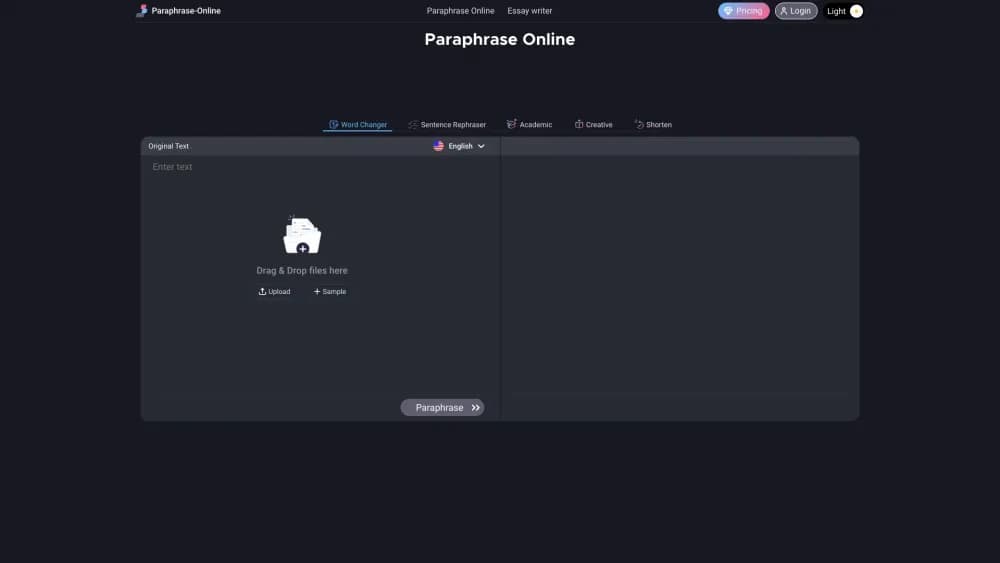
About Paraphrase Online
What Is Paraphrase Online
Paraphrase Online is a browser-based paraphrasing tool. It rewrites text you paste or upload, keeps the meaning, and changes the wording. It runs entirely in the browser, needs no install, and costs nothing. The pitch is speed and access: no signup gate, no word counter pushing you toward a paywall, and no waiting on a queue.
Most people reach for it to avoid accidental plagiarism when reusing source material, and that's the use case it's built around. You paste a sentence, a paragraph, or a full essay, pick a mode, and get a rewritten version you can copy or download.
Two limits matter. The tool works best on English text, and while it runs on AI algorithms, the output is a rewrite rather than a fact check. If a source sentence is wrong, the paraphrase will carry the same error in different words. It's an editing aid, not a replacement for reading what you submit.
Getting Started
- Open paraphrase-online.com in any browser. No account or download is needed.
- Paste your text into the input box or drag a .doc, .docx, .pdf, or .txt file into the drop zone.
- Pick one of the five paraphrasing modes: Word Changer, Sentence Rephraser, Academic, Creative, or Shorten.
- Click Paraphrase and read the output in the right-hand pane. Switch modes to compare different versions of the same text.
- Copy the result to your clipboard or download it for later use.
Product Information
A quick look at Paraphrase Online's pricing, supported platforms, and performance.
Best for
The users, tasks, and scenarios where this tool fits best.
Users
- Students
- Bloggers and content writers
- Non-native English speakers
Tasks
- Rewording a paragraph you want to keep but not repeat verbatim
- Trimming a passage that runs too long
- Uploading a document instead of copy-pasting
- Quick synonym swaps on a single sentence
Scenarios
- Tightening a draft the night before a deadline
- Checking two versions of the same paragraph
- Reworking study notes into study-ready wording
- Rewriting a passage on a shared or borrowed computer
Key features
Five Paraphrasing Modes
Paraphrase Online offers five modes instead of one generic rewrite button, and each targets a different goal. Word Changer only swaps words for synonyms and leaves the sentence structure alone. Sentence Rephraser rebuilds the sentence as a whole, changing both words and phrasing. Academic mode pushes the text toward a more formal register for coursework and reports. Creative mode makes broader changes so the result reads differently from the source, which is the one to reach for when overlap matters most. Shorten mode rephrases and compresses at once, producing a summarized version rather than a straight rewrite. Having all five in one place means you can test a passage several ways and keep the version that reads best.
File Upload Support
Instead of forcing a copy-paste, the tool accepts .doc, .docx, .pdf, and .txt files through a drag-and-drop zone. That matters when the text you want to rework lives inside a Word document or a PDF and you'd rather not select and copy it by hand. Upload the file, run your chosen mode, and the output appears in the editor ready to copy or download. For anyone working from long documents, it removes a tedious manual step.
Paste In, Output Out Workflow
The layout is built around two panes: your input on one side, the paraphrased text on the other. You can change the mode and regenerate without losing your original text, so comparing versions is fast. The output pane supports copy and download, which keeps the last step short. The interface is plain and stays out of the way, which is what you want from a single-purpose web tool.
Plagiarism Focused Rewriting
The whole tool is framed around avoiding plagiarism when you reuse source material. Modes like Creative and Sentence Rephraser change wording and structure enough to lower the overlap between your draft and the original. The developer describes the output as plagiarism-free, treating the rewrite as a way to express a source in your own words. It's a rewriting aid, not a plagiarism scanner, so you still need a separate check if originality is a hard requirement.
Free Browser Based Access
Paraphrase Online runs in any modern browser with no install, account, or payment. There's no signup wall between you and a rewrite, and no pricing tier to weigh. That makes it usable from a library computer, a shared machine, or a phone browser in a pinch. The tradeoff is that it leans on the same free access for everyone, without the extras a paid suite would add.
Fast Results on Long Text
The tool returns a rewrite in seconds even when you feed it a full page of text, so it holds up when you're reworking more than a sentence. You can run several passes back to back and compare the results, which is handy when you're not sure which mode fits until you see the output. Speed matters most when the deadline is close, and that's where a browser tool earns its place over a slower desktop app.
Pros and cons
Pros
- Free with no signup, so you can start a rewrite the moment the page loads.
- Five modes cover different needs, from a light synonym swap to a full rewrite that lowers overlap with the source.
- File upload handles .doc, .docx, .pdf, and .txt, which saves the copy-paste step for long documents.
- Runs entirely in the browser, so it works on shared or borrowed computers with nothing to install.
- Output can be copied or downloaded straight from the result pane.
Cons
- No plagiarism scanner built in. You get a rewrite, but confirming originality still needs a separate tool.
- Best results are in English. Accuracy on other languages isn't guaranteed the way it is for English text.
- Rewrites can drift in meaning on complex or technical sentences, so you have to read the output rather than trust it.
- No API or account features, which rules it out if you want to plug paraphrasing into your own workflow.
Frequently asked questions
Paraphrase Online rewrites text while keeping its meaning, which is most useful when you want to reuse a source without copying it word for word. You paste or upload text, pick a mode, and get a rewritten version you can copy or download.
Related content
Explore related tools, skills, and articles for Paraphrase Online.
Paraphrase Online Alternatives

Google EmbeddingGemma 2
Google DeepMind · Writing · Image · CodingGoogle EmbeddingGemma 2 is a 740M-parameter open model that turns text, code, images, audio, and video frames into vectors in one 768-dimension space, running on phones and laptops.

MePersona
MePersona, Inc. · Writing · Productivity · MarketingMePersona is an AI unified inbox for creators. It learns your voice, drafts replies to fan messages from 12 platforms, and sends only what you approve.

Fluence
Yay Software (Yannick Huchard) · Writing · Voice & Language · ProductivityFluence is an Android app that reads PDFs, EPUBs, Word files and web articles aloud, follows each sentence as it speaks, and answers questions about the text on the phone itself.