
Paraphrase Tool
Paraphrase Tool · Writing
Paraphrase Tool is a free web paraphraser with six paraphrase modes, a word changer, an AI humanizer and a plagiarism remover, and it runs without sign-up.
About Paraphrase Tool
What Is Paraphrase Tool
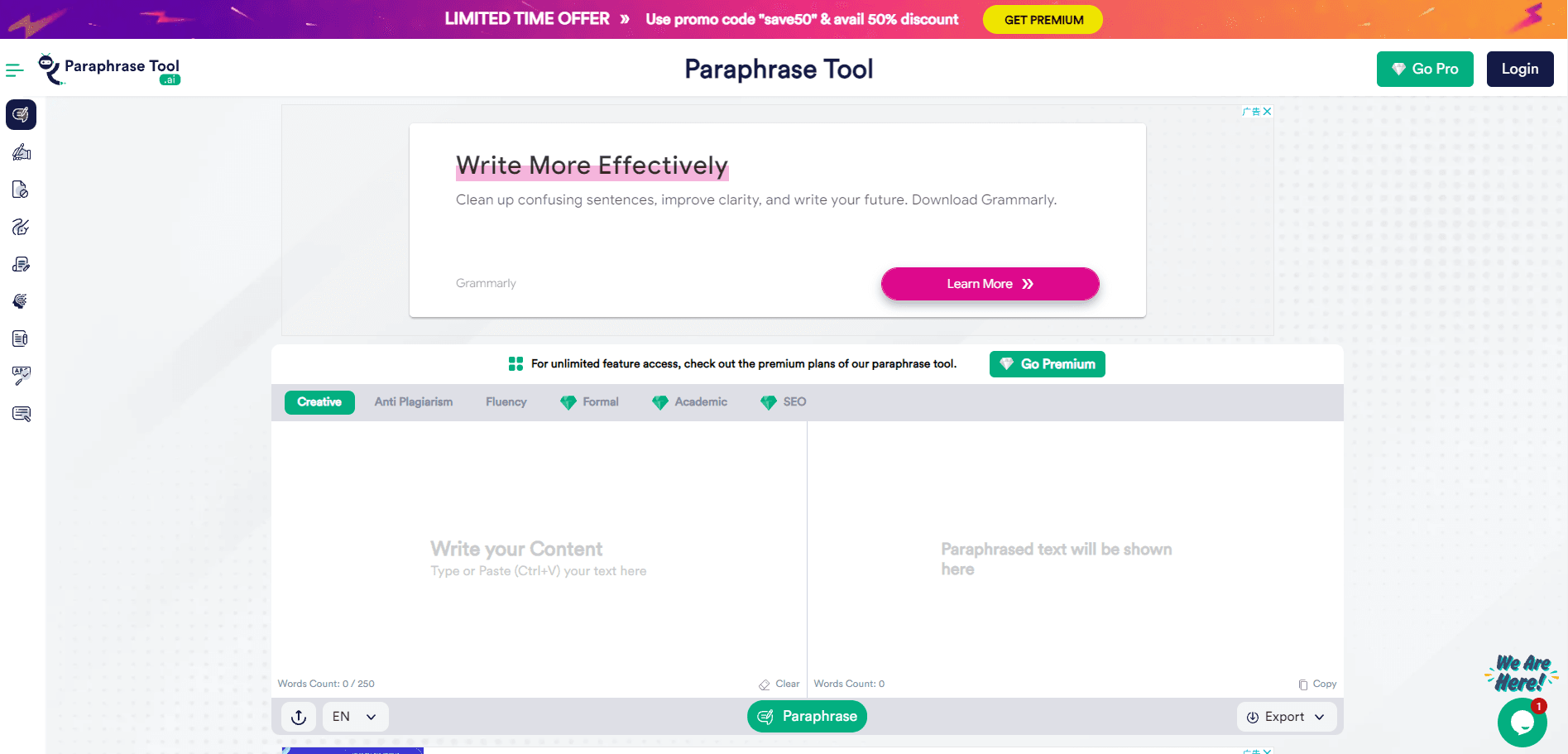
Paraphrase Tool is an online paraphraser from paraphrasetool.ai. You paste a sentence, a paragraph, or an uploaded document, choose one of six modes, and the AI paraphrasing tool returns a new version that holds on to the original point while changing the wording. There's no account to create, nothing to install, and no browser plugin.
The six modes split by job, not by language pair. Creative, Anti Plagiarism, and Fluency are open to everyone. Formal, Academic, and SEO sit behind the paid plan. That split matters more than the mode count, since two of the three locked modes are the ones students and search writers reach for. SEO mode keeps keyword order, frequency, and placement, and it lets you freeze terms you don't want touched. Academic mode aims at formal, logically ordered text and keeps references, citations, and quotes in place.
The free version caps a single request at 250 words, and the counter above the box shows the limit as you type. Long articles have to go through in sections. Premium raises the ceiling to 4,000 words per request, drops the ads and the reCAPTCHA, and adds a humanizer, a plagiarism remover, a grammar checker, and an article rewriter.
Getting Started
- Open paraphrasetool.ai in any browser. You can start typing without an account.
- Paste your text into the input box, or use the upload button if the draft lives in a file.
- Pick a mode from the row above the editor: Creative, Anti Plagiarism, Fluency, Formal, Academic, or SEO.
- Press Paraphrase and read the result. If the tone lands wrong, switch modes and run the same text again.
- Copy what you want to keep. For a full article, subscribe and paste up to 4,000 words at once.
Product Information
A quick look at Paraphrase Tool's pricing, supported platforms, and performance.
Best for
The users, tasks, and scenarios where this tool fits best.
Users
- Students
- Bloggers and content marketers
- Non-native English speakers
Tasks
- Rewording a paragraph that repeats the same phrase
- Cleaning up a rough AI draft
- Making a casual message sound formal
- Fixing grammar before publishing
Scenarios
- Sending a job application or a client email at short notice
- Reusing your own old copy on a new page
- Spotting repetitive phrasing in a draft you've already edited twice
Key features
Six Modes in One Editor
Six modes cover different jobs inside a single box. Creative produces alternate versions, Anti Plagiarism rewrites copied strings, Fluency simplifies heavy sentences, Formal raises the register, Academic keeps citations in order, and SEO protects keywords. Switching between them takes one click, so you can test two or three on the same paragraph and keep the best result.
Creative Mode (Free)
Creative mode generates several versions of the same passage without moving the meaning or the context. It's the mode to try first on headlines, product blurbs, and short paragraphs where you just need different wording. The variants land in seconds, and you can rerun the request for a fresh set.
Anti Plagiarism Mode (Free)
This mode rewrites text so the sentence strings no longer match the source, while the underlying idea stays where it was. It's a rewriting mode, not a scanner: nothing gets compared against a database of published work. Treat it as a first pass, then run the result through an originality checker if the stakes are high.
Fluency Mode (Free)
Fluency mode turns dense, clause-heavy sentences into plain ones. It suits translated text, academic abstracts written for a journal, and anything that reads like it went through three rounds of editing. The trade-off is that plain wording can flatten a subtle point, so compare it against your original before you keep it.
SEO Mode with Keyword Freezing (Paid)
SEO mode holds the order, frequency, and placement of important keywords while the rest of the text changes. You can freeze exact terms so they come back untouched. For affiliate pages and product copy, that's the difference between a usable rewrite and one that throws away the phrase you rank for.
Academic and Formal Modes (Paid)
Academic mode produces formal, logically ordered text and keeps references, citations, and quotes intact. Formal mode takes routine, casual writing and strips the slang and contractions out. Both are built for readers who judge the register before they judge the content, which is why they sit in the paid tier.
Humanizer, Plagiarism Remover, and Article Rewriter (Paid)
Premium adds a humanizer for AI-sounding drafts, a plagiarism remover, an article rewriter, and a grammar checker, all under the same login. Subscribers also get no ads, no reCAPTCHA, 10x speed, and 4,000 words per request. The site states that it doesn't keep your paraphrased content, which matters if you work with unpublished material.
Pros and cons
Pros
- The free tier needs no sign-up and covers 250 words per request, enough for emails, abstracts, and product blurbs.
- Three of the six modes are free, including the anti-plagiarism rewrite that most competing tools charge for.
- SEO mode keeps keyword order and placement intact, which ordinary paraphrasers tend to scramble.
- Premium bundles the humanizer, grammar checker, article rewriter, and plagiarism remover into one subscription instead of four.
- The first-month price of $9.95 makes it cheap to test the paid modes on real work.
Cons
- The 250-word cap pushes long documents into sections, and there's no way to lift it without paying.
- Formal, Academic, and SEO are locked behind the subscription, so you can't test the mode you'd actually use before buying.
- It rewrites text but doesn't scan against a source database, so originality still needs a separate check.
- There's no mobile app, desktop client, or public API, which rules it out for offline work and automated pipelines.
Frequently asked questions
It rewrites text so the wording changes and the meaning stays. You paste a passage, choose a mode, and get a new version you can use in an essay, a blog post, an email, or product copy. The same site also carries a humanizer, a grammar checker, and an article rewriter on the paid plan.
Related content
Explore related tools, skills, and articles for Paraphrase Tool.
Paraphrase Tool Alternatives

Google EmbeddingGemma 2
Google DeepMind · Writing · Image · CodingGoogle EmbeddingGemma 2 is a 740M-parameter open model that turns text, code, images, audio, and video frames into vectors in one 768-dimension space, running on phones and laptops.

MePersona
MePersona, Inc. · Writing · Productivity · MarketingMePersona is an AI unified inbox for creators. It learns your voice, drafts replies to fan messages from 12 platforms, and sends only what you approve.

Fluence
Yay Software (Yannick Huchard) · Writing · Voice & Language · ProductivityFluence is an Android app that reads PDFs, EPUBs, Word files and web articles aloud, follows each sentence as it speaks, and answers questions about the text on the phone itself.