

Paraphrase Tool
Paraphrase Tool · Writing · AI Detection
Paraphrase Tool is a web-based writing assistant that rewrites text in 20 modes across 100+ languages, with a plagiarism checker and AI detector in the same account.
About Paraphrase Tool
What Is Paraphrase Tool
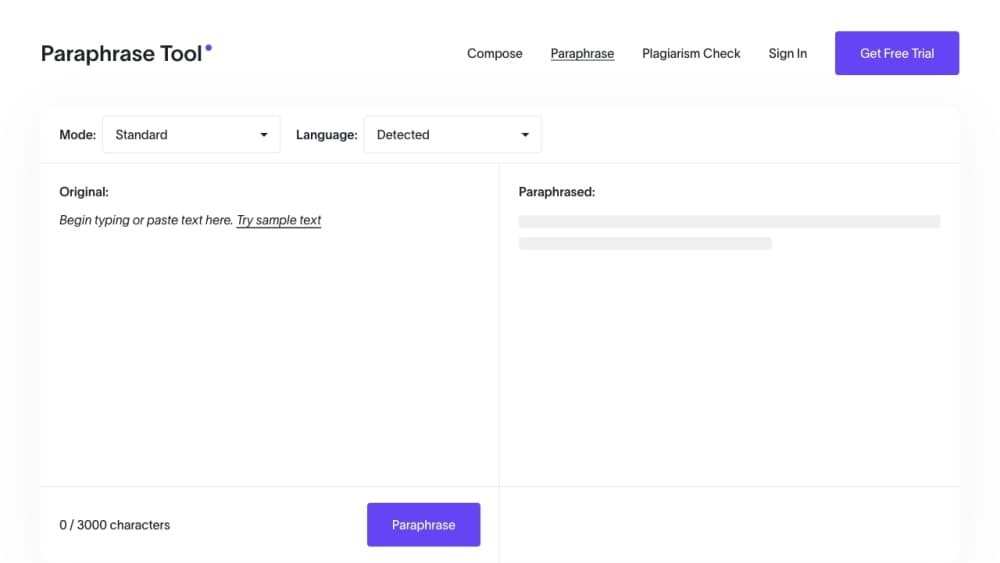
Paraphrase Tool is an online writing assistant built around rewriting text. You paste a sentence, paragraph, or document, pick one of its 20 modes, and get a version that keeps your meaning but changes the wording and sentence structure. The modes cover different jobs, so you're not stuck with one setting that sounds off for your text. There's a free grammar checker, a summarizer, a mode that simplifies dense passages, and a sentence shortener, among others.
The site has grown past paraphrasing. The same account holds a plagiarism checker, an AI detector, a translator, a citation maker, and a humanizer that smooths out robotic AI text. There's also a paragraph generator for when you're starting from keywords instead of a draft. For students and writers, the pull is having the rewrite, the originality check, and the AI check in one place instead of three tabs.
Two things define the fit. Everything runs on the site, so it's a browser tool rather than something you install on your desktop or phone. And you work inside a 3-day trial, so checking the output before you commit matters more here than with a free paraphrasing tool that has a permanent free tier.
Getting Started
- Go to paraphrasetool.com and open the Paraphrase tool. Sign in is optional to start.
- Paste your text into the input box, or upload a document if you'd rather not copy and paste.
- Pick a mode. The 20 options range from a basic rephrase to summarizing, simplifying, and shortening.
- Run it and review the output. Most results come back in seconds, and you can copy or export what you want to keep.
- Check the rewrite with the plagiarism checker and AI detector, then edit anything that reads off before you use it.
Product Information
A quick look at Paraphrase Tool's pricing, supported platforms, and performance.
Best for
The users, tasks, and scenarios where this tool fits best.
Users
- Students
- Content writers and bloggers
- Non-native English speakers
Tasks
- Rewording a paragraph to avoid repetition
- Cutting similarity before submitting
- Checking whether text reads as AI-written
- Turning keywords into a first draft
Scenarios
- Polishing an email or cover letter at the last minute
- Reusing your own past writing for a new post
- Running a quick originality check on a draft
Key features
20 Paraphrase Modes
The core of the tool is its mode list. Twenty modes each reshape text differently, so you pick based on what you need: a plain reword, a fluent rewrite, a formal register, a shorter version, or a simplified one for dense material. There's a grammar checker and a summarizer in the mix too, so a single account covers both polishing and condensing. Having that many options matters when one mode keeps a passage awkward and another handles it.
100+ Language Support
The paraphraser covers more than 100 languages, so you can rewrite in Spanish, German, Greek, or Malay without changing tools. The reword generator looks at context at both the sentence and paragraph level, which is what keeps output grammatical instead of a pile of swapped synonyms. For anyone working across languages, that's the difference between usable text and a rewrite that reads like a machine.
Plagiarism Checker
A built-in plagiarism checker compares your text against sources and highlights the areas that overlap, so you see exactly where to rewrite. It's aimed at the same audience as the paraphraser: students, writers, and anyone who needs to confirm a draft is original before it goes out. Running the check right after a paraphrase tells you whether the rewrite did its job.
AI Detector
The AI detector scans text and flags passages that read as machine-generated, which matters if you publish under your own name or submit work that's checked for AI use. It pairs with the humanizer, a mode that rewrites stiff, robotic phrasing into something more natural. Used together, they let you spot the problem and then fix it in the same session.
Paragraph and Content Generators
When you don't have a draft to rewrite, the paragraph generator builds text from keywords, linking your ideas into readable sentences. The same engine serves as a short story generator, an essay generator, and a poem generator, so it covers more than straight paragraphs. It's useful for breaking a blank-page stall and getting a rough version you then refine.
Grammar, Citation, and PDF Tools
Beyond the paraphraser, the site bundles a free grammar checker, a citation maker, and a set of PDF tools, plus a Document Q&A feature. You can copy the output or export it, and most results land in seconds. The combination turns the site into a small writing workspace rather than a single-purpose reworder.
Pros and cons
Pros
- 20 modes cover rephrasing, simplifying, shortening, and summarizing, so you can match the tool to the text.
- Support for 100+ languages means one account handles work in several languages.
- The plagiarism checker and AI detector sit beside the paraphraser, saving you a second subscription.
- Results come back in seconds, which suits short, fast edits like emails and captions.
- Everything runs in the browser, so there's nothing to install.
Cons
- Access is built around a 3-day trial, so there's no permanent free tier to fall back on for long-term use.
- Rewrites can shift tone or drop a detail, so you have to proofread output before publishing.
- It's a web tool only, with no desktop or mobile app for offline work.
Frequently asked questions
Paraphrase Tool rewrites text while keeping the original meaning. You paste a passage, pick one of 20 modes, and get a version with different wording and structure. The same site also carries a plagiarism checker, an AI detector, a translator, and a citation maker.
Related content
Explore related tools, skills, and articles for Paraphrase Tool.
Paraphrase Tool Alternatives

Google EmbeddingGemma 2
Google DeepMind · Writing · Image · CodingGoogle EmbeddingGemma 2 is a 740M-parameter open model that turns text, code, images, audio, and video frames into vectors in one 768-dimension space, running on phones and laptops.

MePersona
MePersona, Inc. · Writing · Productivity · MarketingMePersona is an AI unified inbox for creators. It learns your voice, drafts replies to fan messages from 12 platforms, and sends only what you approve.

Fluence
Yay Software (Yannick Huchard) · Writing · Voice & Language · ProductivityFluence is an Android app that reads PDFs, EPUBs, Word files and web articles aloud, follows each sentence as it speaks, and answers questions about the text on the phone itself.