
PDFMerse
PDFMerse · Coding · Productivity
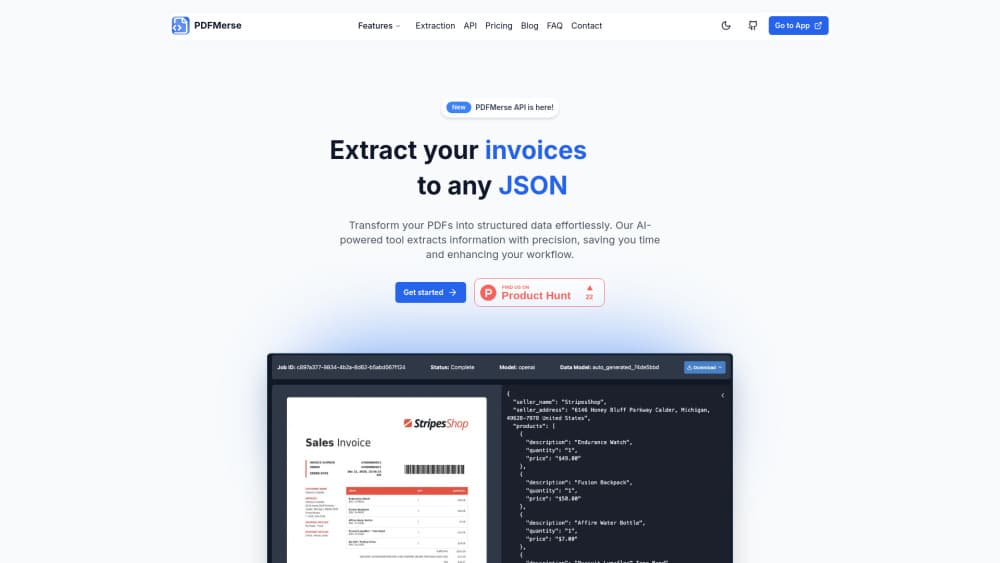
PDFMerse is an AI PDF data extraction tool that converts any PDF into structured data like JSON or CSV, built for teams that need documents turned into usable rows.
About PDFMerse
What Is PDFMerse
PDFMerse is an AI-powered PDF data extraction tool. You feed it a document, it reads the layout the way a person would, and it hands back structured data you can sort, filter, or load into a database. The pitch is simple enough: stop copying numbers out of invoices, reports, and statements by hand. That's the whole idea.
Many people first search for a way to extract data from PDF files when the manual route finally wears them down. PDFMerse answers that need directly.
The tool targets a specific pain. Most PDFs are built for printing, not parsing. Text sits in odd columns, tables break across pages, and scanned pages are really just pictures. Pulling data out of those files with a normal converter leaves you with a pile of garbled text that still needs hours of cleanup before it's usable. PDFMerse treats extraction as an understanding problem first, so the output keeps its structure.
The catch is that no extraction tool is perfect, and PDFMerse doesn't pretend otherwise. Accuracy depends on how clean your source files are. A crisp digital invoice parses far better than a crooked phone photo of a receipt. If you expect 100% accuracy on every page, you'll be disappointed, and that's true of every tool in this category no matter what the marketing says. Plan to spot-check the output, especially on the first run of a new document type.
Getting Started
- Create an account on the PDFMerse site and sign in to your dashboard.
- Upload a PDF, or connect the source your documents come from.
- Define the fields you want back, such as invoice number, date, total, or vendor.
- Run the extraction and let the AI read each page.
- Review the structured output, then export it as JSON or CSV for your spreadsheet, database, or API.
Product Information
A quick look at PDFMerse's pricing, supported platforms, and performance.
Best for
The users, tasks, and scenarios where this tool fits best.
Users
- Finance and accounting teams
- Operations and admin staff
- Data and ops engineers
Tasks
- Invoice data extraction
- Report digitization
- Form processing
Scenarios
- Month-end bookkeeping
- Research and survey work
- Migrating paper records
Key features
PDF to Structured Data
The core job is turning a PDF into structured data you can use elsewhere. PDFMerse reads the document, identifies the fields you care about, and returns them in an organized format rather than as a wall of text. The difference matters when you're feeding the result into a spreadsheet or a database, where a clean column beats a copy-paste any day. No cleanup. No retyping.
Custom Field Definition
You decide what to extract. Instead of hoping the tool guesses right, you set the field names you want, like invoice number, due date, or total amount. That keeps the output aligned with whatever system you're loading into, so you spend less time reshaping the data after the fact and more time using it for the decision it was meant to support in the first place. Results stay consistent across files.
JSON and CSV Export
Extracted data comes out in formats your other tools already speak. Want PDF to JSON for a developer workflow? Done. Need PDF to CSV for a spreadsheet instead? That works too. JSON suits developers and API workflows, while CSV drops straight into Excel or Google Sheets for anyone who lives in spreadsheets. Having both means you don't need a conversion step in the middle.
Handles Complex Layouts
Real PDFs aren't tidy. Tables span pages, columns run side by side, and headers repeat. So what happens when a table breaks across three pages with a repeated header you don't want copied twice? The AI is built to read these layouts in a sensible order instead of grabbing text by position and mangling it. That's the part that separates a useful extraction tool from a plain text dump.
Accuracy on Messy Documents
Documents vary wildly, and the extraction is meant to hold up across that range. A well-formed digital file extracts cleanly; a scanned page or a low-quality capture is harder and may need a once-over. A clean scan of a standard invoice from a known supplier tends to come back almost perfect, while a crumpled receipt shot on an old phone under bad light will test both the model and your patience. Knowing which camp your files fall into tells you how much review to budget.
Batch Document Processing
When you're working through more than one file, batch handling is what saves real time. A single perfect extraction is nice; clearing a queue of invoices or forms in one pass is the actual win. That's where a PDF data extractor earns its keep against doing the same job by hand. Feed it fifty statements and walk away. Come back to a table.
Pros and cons
Pros
- Turns PDFs into structured JSON or CSV instead of leaving you with raw text.
- Custom field definitions keep output shaped to your own workflow.
- Reads complex layouts, including multi-column pages and tables.
- Handles scanned and imperfect documents reasonably well.
- Cuts the manual typing on repetitive documents like invoices and forms.
Cons
- Accuracy drops on low-quality scans, so you'll need to review those results.
- Browser-based only, with no desktop app or mobile version for offline use.
- Exact pricing and plan tiers can change, so confirm current details on the official site before committing.
- Public details on API access are thin, which is a problem if you want to automate at scale.
Frequently asked questions
It extracts data from PDF documents and returns it as structured output like JSON or CSV. You upload a file, tell it which fields you want, and it reads the document to pull those values out.
Related content
Explore related tools, skills, and articles for PDFMerse.
PDFMerse Alternatives

Base Code
Base44 (Wix) · Coding · ProductivityBase Code is a shared cloud development environment from Base44. Teammates describe changes to an existing GitHub codebase in chat, preview them live and send them back as pull requests.

Google EmbeddingGemma 2
Google DeepMind · Writing · Image · CodingGoogle EmbeddingGemma 2 is a 740M-parameter open model that turns text, code, images, audio, and video frames into vectors in one 768-dimension space, running on phones and laptops.

GitGlow
GitGlow · Coding · ProductivityGitGlow is a local-first desktop Git client that lets independent developers review their own code and their AI agents' changes in one place before shipping.