

PenPilot AI
PenPilot AI · AI Detection
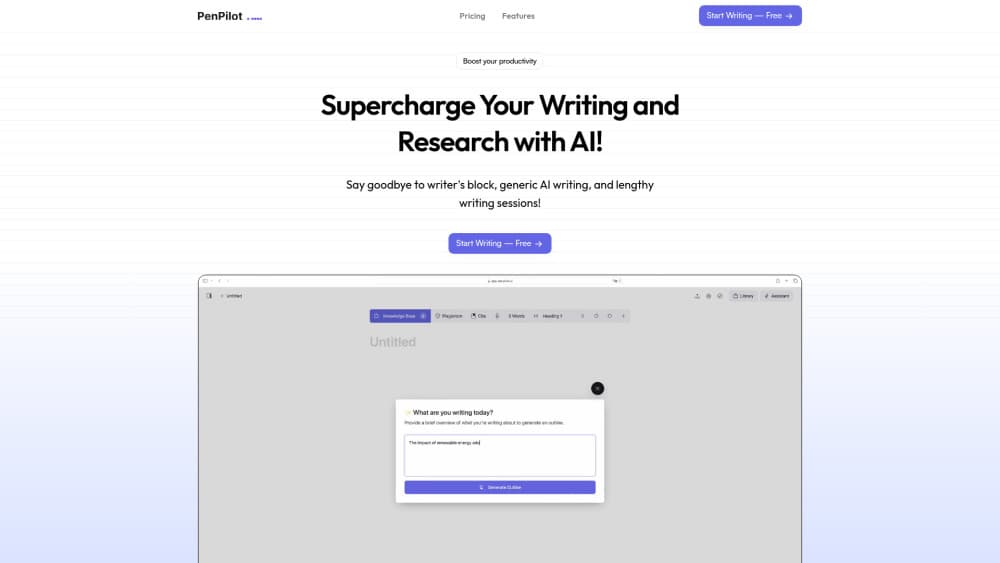
PenPilot AI is an AI writing assistant that trains on your own documents, drafts long-form content in more than 20 languages, and runs plagiarism and readability checks inside the editor.
About PenPilot AI
What Is PenPilot AI
PenPilot AI is a browser-based writing workspace built by the PenPilot AI team. It puts four tools in one tab: a chat assistant, a long-form editor, a research layer that reads your source files, and quality checks that run before you publish.
The selling point is voice matching. Most AI writers return the same smooth paragraph no matter who asks. PenPilot takes uploads of PDFs, web pages, and YouTube links, then writes in the register of the material you actually publish. A teacher can feed it lecture notes. An agency can feed it a client's brand deck. The company says training takes under a minute per document.
Limits sit in plain sight. There's no public API, so you can't wire PenPilot into your own product. The free tier caps output at 200 AI words a day, enough to test the editor and not much more. As with any AI content generator, you still check names, numbers, and quotes before anything goes live.
Getting Started
- Sign up at app.penpilot.ai. The free plan needs no payment details.
- Pick a use case from the template library or open a blank document.
- Upload source files if you want the AI writer to follow your voice. Training finishes in about a minute.
- Draft with the assistant, then run the plagiarism checker and the readability checker.
- Copy the text into your CMS or export it as a document.
Product Information
A quick look at PenPilot AI's pricing, supported platforms, and performance.
Best for
The users, tasks, and scenarios where this tool fits best.
Users
- Students and researchers
- Marketing teams
- Non-native English writers
Tasks
- Drafting SEO content
- Turning source material into briefs
- Rewriting existing drafts
- Checking originality before publishing
Scenarios
- Weekly newsletter production
- Thesis and paper writing
- Agency client work
Key features
Article and Use Case Templates
PenPilot ships a library of templates that covers the AI article generator basics: full articles, outlines, meta titles, meta descriptions, newsletters, and video scripts. Each template asks a few questions, then returns a structured draft with headings in place. The value is speed on routine formats, not a finished piece. Expect to rewrite the first paragraph every time.
Training on Your Own Documents
You can upload PDFs, web pages, and YouTube videos as reference material. The assistant pulls phrasing and subject vocabulary from them, which reduces the flat tone that gives generic AI drafts away. One document trains in under a minute according to the company, and your library keeps growing as you add sources. Teams with a house style guide get the most from this.
AI Personas
AI personas are saved voices you define once and reuse. Set a blunt editor for internal reviews, a warm writer for customer emails, a formal reviewer for academic work. Each persona holds its own instructions, so you stop retyping the same context paragraph. The catch is placement: personas sit on the Unlimited plan only.
Plagiarism Checker
The plagiarism checker compares your draft against online sources and marks passages that overlap. You can fix a flagged sentence with one click and let the assistant rewrite it. Monthly allowances run to 25,000 words on Hobby and 100,000 on Unlimited. For client deliverables, run the check right before export rather than at the end of the month.
Readability Checker
The readability checker scores how easily a draft reads and names the sentences dragging the score down. Fixes apply inside the document, so you don't paste text into another tab. Targets lean toward plain language, which suits web copy and help docs. Fiction writers often find the suggestions flatten rhythm.
Editor With Commands and Research Tools
The editor carries the day to day work. Highlight a sentence, issue a command, and the AI writer rewrites, shortens, or expands it in place. A citation tool handles references, dictation turns speech into text, and a chat panel answers questions about the documents you uploaded. Autocomplete keeps offering the next phrase while you type.
Pros and cons
Pros
- Free plan with daily AI words and no card, so you can test the editor before paying.
- Voice training on your own PDFs, web pages, and YouTube videos beats generic prompting for brand work.
- Plagiarism and readability checks live in the same window as the draft, which removes two extra subscriptions.
- More than 20 languages plus reusable personas cover multilingual teams on one plan.
Cons
- No public API means no way to plug PenPilot into an existing publishing pipeline.
- The free plan stops at 200 AI words a day and one generated image, which runs out inside a single draft.
- Personas and fine-tuning are locked to the $29.99 plan, so the $9.99 tier misses the features that make the tool different.
Frequently asked questions
PenPilot AI writes and edits text in a browser editor. It generates articles, outlines, newsletters, and video scripts, reads your uploaded PDFs and web pages for context, and checks drafts for plagiarism and readability before you publish.
Related content
Explore related tools, skills, and articles for PenPilot AI.
PenPilot AI Alternatives
Isgen AI
Isgen · AI DetectionIsgen AI is a web-based AI detector that scores text for machine authorship and shows you which sentences and phrases push the number up. It's built for teachers, editors, students, and writers. Their question is simple: did this draft come from ChatGPT, GPT-5, Claude, Gemini, DeepSeek, or another model? You paste or upload content, run a scan, and get a Human, AI, and Mixed breakdown in seconds. There's also a companion editor that scores text while you write it.
Humanizeai Tools
Humanizeai Tools · Writing · AI DetectionHumanizeai Tools is a web-based AI humanizer that rewrites machine-generated text so it sounds like a person wrote it, which is the whole point of the category it belongs to. Paste a draft from ChatGPT, Claude, or Gemini, run it through the tool, and it swaps out the phrases and sentence patterns that AI detectors flag. If your goal is to make AI text sound human before you publish it, this is the kind of tool built for exactly that. It suits students, bloggers, and marketers who need copy that reads naturally and clears tools like GPTZero, Copyleaks, and Winston AI after a single pass.

Hidemyai
Hidemyai · Writing · AI DetectionHidemyai is an AI content humanizer. It rewrites text from ChatGPT, Jasper, and similar tools so the result reads like a person wrote it. You paste your draft, pick a document type and tone, and the service returns a version meant to bypass AI detectors such as Originality.ai, Turnitin, and ZeroGPT. It targets writers, marketers, and students who lean on AI drafts but can't ship copy that sounds robotic. The promise is simple: make AI content undetectable.