

Phasr
Phasr Inc. · Coding
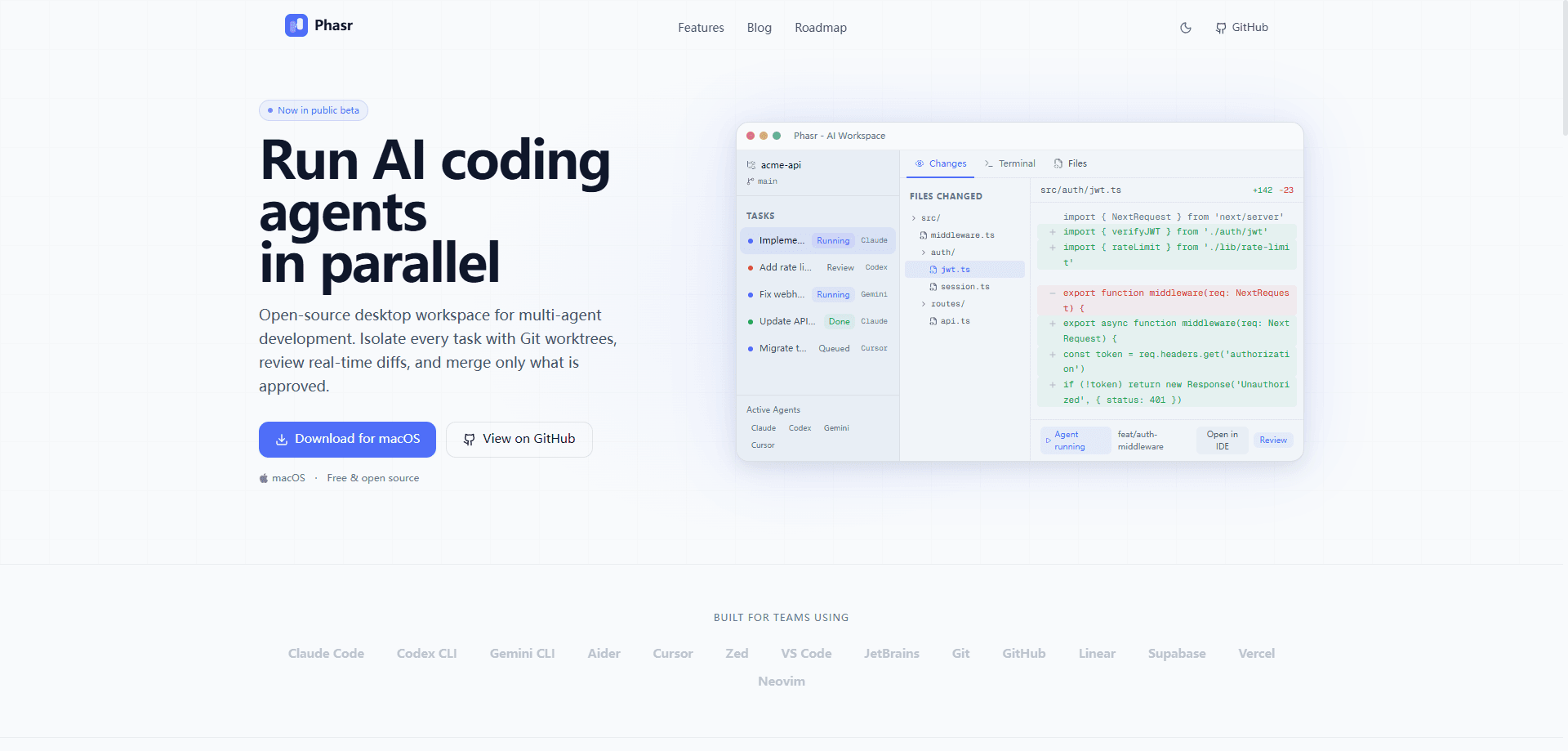
Phasr is a free, open-source AI coding agent workspace that runs several CLI AI coding agents at once, each in its own Git worktree. You open a repository, connect agents like Claude Code, Codex CLI, or Gemini CLI, and hand each one a separate task. Every agent works in an isolated branch, so their edits never overwrite each other. You then review each diff and merge the changes you actually want. It's a desktop workspace for developers who already use CLI coding agents and want to scale from one task at a time to a small fleet.
About Phasr
What Is Phasr
Phasr is a desktop application for orchestrating AI coding agents. It doesn't replace your agents or your editor. Instead, it sits above them and answers a problem that shows up the moment you run more than one: how do you keep parallel work from turning into a mess.
The core idea is branch-per-task isolation. Each task gets its own Git worktree, which is a separate working directory bound to its own branch but sharing the same repository history. Agent A can rewrite your authentication module while Agent B writes tests in another directory, and neither sees the other's half-finished edits. No stashing, no branch shuffling, no overwritten files.
The biggest limit is scope. Phasr is aimed at developers comfortable with Git and command-line agents, so it assumes you understand worktrees, branches, and merges. It runs on your local machine. It doesn't supply the AI models themselves. You bring your own agent and your own subscription. From what I can tell, the project is early, so expect rough edges and features still listed on the roadmap rather than shipped.
Getting Started
- Download Phasr from the official site or the GitHub repository and open the app on your desktop.
- Point it at a local Git repository so it can read your project and create worktrees from your history.
- Connect a CLI coding agent such as Claude Code, Codex CLI, Gemini CLI, or Aider using your existing credentials.
- Create a task, give it a narrow goal, and launch it. Phasr spins up a dedicated worktree for that task.
- When the agent finishes, open the diff, approve what looks right, and merge the branch into your main line.
Product Information
A quick look at Phasr's pricing, supported platforms, and performance.
Best for
The users, tasks, and scenarios where this tool fits best.
Users
- Developers already running CLI coding agents
- Solo builders and small teams
- Engineers new to multi-agent work
Tasks
- Parallel feature and bugfix work
- A/B implementation comparisons
- Review-and-merge cleanup
- Documentation backfill
Scenarios
- Dedicating a worktree per task during a busy sprint
- Running writer and reviewer agents in parallel
- Kicking off a long agent run before a meeting
- Comparing two models on the same task
Key features
Parallel agent execution
Phasr runs several parallel AI coding agents at the same time from a single desktop window. You assign a task to each agent and watch progress in one place. No more terminal per job. The payoff is throughput: three agents working for thirty minutes beat one agent working for ninety.
Git worktree isolation
So what makes the parallel work safe? Worktree isolation. This is the feature the rest of the product leans on. Every task gets its own worktree, a separate directory tied to a dedicated branch but sharing the same repository. Agents can't overwrite each other's edits, and your main branch stays untouched until you choose to merge. It's the cleanest fix I've seen for the classic "two agents, one folder" collision.
Review-first merge workflow
Nothing lands in your main branch without your approval. Phasr makes AI code review a built-in step, not an afterthought. It shows you the diff for each task, lets you run test commands, and then merges the branch when you're satisfied. Approval gates are configurable, so you can route high-risk changes through explicit human review and let low-risk ones move faster.
Agent-agnostic setup
Phasr doesn't lock you to one vendor. It connects to Claude Code, Codex CLI, Gemini CLI, Aider, and other terminal-native agents, using your existing subscriptions and credentials. If a new CLI agent appears, you can plug it in without changing your workspace.
Real-time diffs and IDE deep links
As an agent works, Phasr surfaces live diffs so you can see what's changing without waiting for completion. Think of it as a multi-agent workflow you can actually watch. Deep links jump you into your editor when you want to inspect or tweak a file by hand. That combination keeps the review step fast rather than a chore.
Branch naming for traceability
Each task carries a branch naming convention, so a worktree maps back to the objective that spawned it. When you have five or six tasks in flight, that naming discipline is what keeps the workspace readable a day later.
Pros and cons
Pros
- Worktree isolation removes file-collision anxiety when running agents in parallel.
- Works with the CLI agents you already pay for, so there's no new model subscription.
- Review-first merges keep a human in control of every change that reaches the main branch.
- Free and open source, with the code on GitHub for inspection and contribution.
- Desktop UI makes branch-per-task work easier to follow than raw Git commands.
Cons
- Assumes you're comfortable with Git concepts like worktrees and merges, so beginners will struggle.
- Brings no models of its own. Value depends entirely on the agents you connect and their costs.
- Documentation is still thin in places. First-time setup takes longer than it should.
- The project is early. Expect missing polish and features that live on the roadmap rather than in the build.
Frequently asked questions
Yes. Phasr is free and open source. The application itself costs nothing. The AI agents you connect, however, may bill you through their own subscriptions or API usage.
Related content
Explore related tools, skills, and articles for Phasr.
Phasr Alternatives
Forefront
Forefront · CodingForefront is a web platform for building with open-source AI. It lets you fine-tune leading open-source language models on your own data, evaluate how they perform, and run them through an API or export them to host yourself. Developers who want the convenience of a closed-source platform but insist on owning their models and data are the target audience here.

Startkit
StartKit.AI · CodingStartkit is a boilerplate for building AI SaaS and AI wrapper products. Think of it as an AI startup boilerplate with the boring parts already wired up: authentication, Stripe and Lemon Squeezy payments, usage limits, transactional email, and an AI API starter that talks to OpenAI, Anthropic, Groq, or Llama. You clone the repo, set your price, and start on the part of your product that people actually pay for. It's Next.js under React and Tailwind, so most of the boilerplate code already feels familiar.
Testim
Tricentis · CodingTestim is an AI-powered test automation platform for building and running end-to-end tests across web, mobile, and Salesforce applications. It leans on machine learning to keep tests stable when an interface changes, so teams spend less time fixing broken selectors. Not bad for an automated testing tool you can start using today. You create tests by recording actions in a browser, then optionally add JavaScript when you need more control. It's a solid pick for busy QA teams.