

Phrasly
Phrasly, LLC · Writing · AI Detection
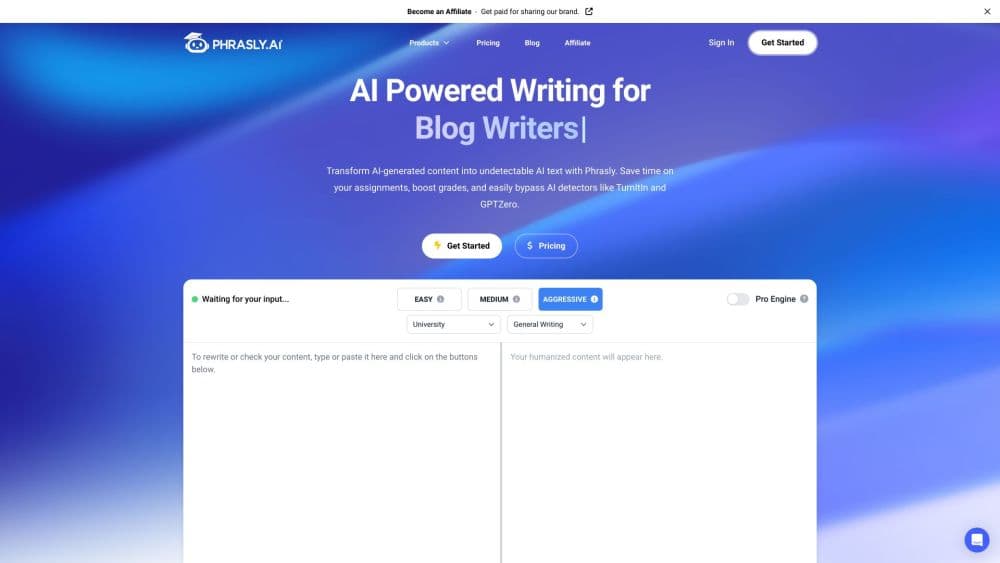
Phrasly is an AI humanizer and writing assistant that rewrites AI drafts into natural, human-sounding text and checks them for AI markers, all inside one browser workspace.
About Phrasly
What Is Phrasly
Phrasly is a web writing suite built around one job: making AI-generated text read like a person wrote it. People reach for it to humanize AI text after drafting with ChatGPT, Claude, or Gemini, then check the result with the built-in AI detector. The company, Phrasly, LLC, is based in San Diego and has run the product since 2023.
The tool targets a specific gap. AI detectors don't read for meaning. They measure statistical tells like even sentence length, repeated transitions, and flat rhythm. A factually solid draft can still trip them, and swapping a few synonyms rarely moves the needle. Phrasly rewrites structure and phrasing instead, trying to smooth the patterns that get flagged while keeping the point you made.
Phrasly sells itself on owning its models rather than reselling someone else's. It says its humanizer is trained on real human writing, not synthetic output, and that its releases are benchmarked against detectors like Turnitin and GPTZero before launch. Treat those claims as the vendor's own, since independent results vary.
Getting Started
- Go to phrasly.ai and create a free account, or start straight from the homepage.
- Paste your AI-assisted text into the AI Humanizer, or upload a document.
- Pick a mode in Phrasly Ultra, such as Balanced, Strong, or Max, to set how aggressively the text is rewritten.
- Run the rewrite, then send the result through the AI Detector to see if anything still reads as machine-written.
- Copy the finished text or export it, and check it once yourself before publishing or submitting.
Product Information
A quick look at Phrasly's pricing, supported platforms, and performance.
Best for
The users, tasks, and scenarios where this tool fits best.
Users
- Students
- Content writers
- Marketers
Tasks
- Humanizing an AI draft before publishing
- Checking a draft for AI markers
- Polishing academic or business writing
- Drafting content from scratch
Scenarios
- Finishing a paper the night before a deadline
- Prepping a client handoff
- Working across markets
Key features
AI Humanizer With Adjustable Strength
The core tool rewrites AI text into natural prose, and Phrasly Ultra adds modes like Balanced, Strong, and Max to control how far the rewrite goes. You keep the meaning but lose the flat cadence that detectors pick up. It's the feature most people come for, and the strength dial is what separates it from a plain paraphraser.
Built-In AI Detector
Alongside the humanizer sits a detector that scores text for AI-generated content across models like ChatGPT, Claude, and Gemini. You can check your own work before anyone else does, then loop back and humanize the parts that still read as machine-written. Having both in one place saves shuffling text between two services.
AI Writer and Content Generator
Beyond rewriting, Phrasly writes fresh material from a topic or outline, and the Content Generator can build longer pieces with citations pulled from live web searches. Monthly plans cap this at a set number of credits because verifying sources takes real compute. It suits people who want a first draft fast rather than a blank page.
Eight Tools in One Workspace
Every plan bundles the full set: humanizer, detector, document editor, content generator, plagiarism checker, flashcard maker, YouTube transcript generator, and Phrasly Neo, a free chatbot that reads PDFs. You move between them without leaving the editor or paying for separate apps. That bundling is the main reason teams pick it over single-purpose tools.
Plagiarism Checker
The plagiarism checker scans your text against billions of pages to confirm the writing is original before you submit or publish. It pairs with the humanizer, so you can check both authenticity and originality in the same session. For academic and editorial work, that combination covers the two biggest review questions.
API and MCP Server Access
Phrasly offers an API for businesses that want to plug humanization and detection into their own products, plus an MCP server for AI tooling. That opens up automated and pipeline use, not just the browser. Teams building on top of Phrasly can fold its models into their own workflow instead of copying text in and out by hand.
In-House Models and Watermark Position
Phrasly says it builds and runs its own models, trained on human writing rather than repackaged from a third-party API. The pitch is that when other providers add text watermarks, tools built on those APIs get exposed, while Phrasly controls its own stack. Whether that holds up depends on benchmarks you should check yourself.
Pros and cons
Pros
- Humanizer and detector live in one workspace, so you can rewrite and verify without switching apps.
- Ultra modes (Balanced, Strong, Max) give real control over how hard the text is rewritten.
- Every plan includes all eight tools, from plagiarism checks to flashcards and a PDF-reading chatbot.
- An API and MCP server make automated and pipeline use possible, not just manual pasting.
- The company states its models are trained in-house on real human writing and benchmarked before release.
Cons
- No humanizer can guarantee a pass on every detector, so a clean score is a signal, not a promise.
- The Content Generator is capped at a set number of monthly credits, which can run out fast for heavy users.
- It refines language, not substance, so thin research or weak arguments stay weak after the rewrite.
- API access is aimed at businesses, so individuals wanting automation may find the path unclear.
Frequently asked questions
It rewrites AI-generated text so it reads like a person wrote it, then checks that text for AI markers with a built-in detector. You paste a draft, humanize it, and verify the result in the same workspace.
Related content
Explore related tools, skills, and articles for Phrasly.
Phrasly Alternatives

Google EmbeddingGemma 2
Google DeepMind · Writing · Image · CodingGoogle EmbeddingGemma 2 is a 740M-parameter open model that turns text, code, images, audio, and video frames into vectors in one 768-dimension space, running on phones and laptops.

MePersona
MePersona, Inc. · Writing · Productivity · MarketingMePersona is an AI unified inbox for creators. It learns your voice, drafts replies to fan messages from 12 platforms, and sends only what you approve.

Fluence
Yay Software (Yannick Huchard) · Writing · Voice & Language · ProductivityFluence is an Android app that reads PDFs, EPUBs, Word files and web articles aloud, follows each sentence as it speaks, and answers questions about the text on the phone itself.