

PicAisso.xyz
Zeng (independent publisher) · Other
PicAisso is a hand-tested AI creative tools directory for art, video, music, design and 3D generators, with Midjourney SREF codes, LoRA galleries and short courses.
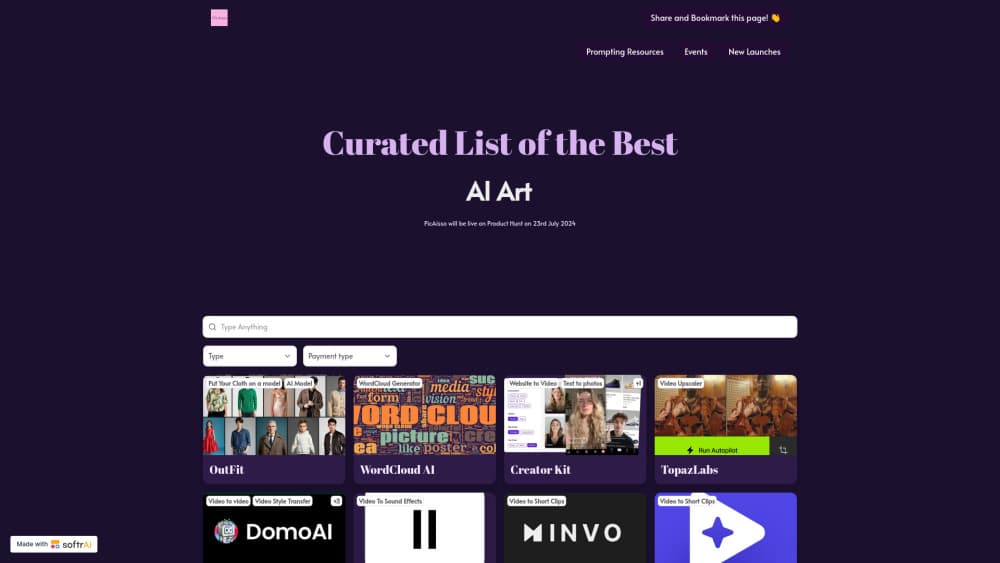
About PicAisso.xyz
What Is PicAisso
PicAisso is a curated AI tools directory built around creative work. Instead of ranking chatbots or coding assistants, it collects generators that produce images, video, music, 3D assets and design layouts, then adds the prompt material people need to actually use them.
The site is run by Zeng, an independent creator who says he has tested AI art and video tools since September 2022. That background shows in the structure. Listings sit next to Midjourney SREF collections, LoRA galleries and prompt libraries, which is where most beginners get stuck after picking a generator.
The main limit is scale. This is a one-person publication, not a lab with a benchmark rig. Coverage depends on what the curator has time to test, and some entries sit alongside partner or affiliate programs that the site discloses. Treat the directory as a shortlist, then check current pricing and limits on each vendor's own page.
Getting Started
- Open the homepage and pick an output type: AI art, video, music, design, 3D or faceless short video.
- Filter the list, then open a tool page to read what it does and who it suits.
- Visit the prompt hub if you need Midjourney SREF codes, LoRA models or a ready-made prompt library before you generate anything.
- Subscribe to the newsletter for new tool notes, or use the submission form if you make a tool of your own.
Product Information
A quick look at PicAisso.xyz's pricing, supported platforms, and performance.
Best for
The users, tasks, and scenarios where this tool fits best.
Users
- Beginners in AI art
- Small design teams
- Content creators on a budget
- Tool makers looking for distribution
Tasks
- Choosing a first AI art generator
- Finding Midjourney style references
- Planning a faceless video channel
- Learning a new creative workflow
Scenarios
- A weekend project where you want one image style and a matching prompt
- A client pitch where you need three visual directions fast
- A monthly review of new releases
Key features
Six Creative Tool Categories
The directory splits tools by what they produce: AI art generators, AI video generators, AI music generators, AI design tools, AI 3D tools and faceless or short video makers. That structure helps when you know the deliverable but not the product name. It also keeps image upscalers away from music models, which sounds obvious until you use a general AI tools directory that mixes everything together.
Midjourney SREF and LoRA Collections
This is the part that separates PicAisso from a plain list. The prompt hub gathers Midjourney SREF codes, LoRA model galleries and Stable Diffusion prompts, so you can pick a visual style before you open a generator. For anyone who has typed a vague prompt and gotten a generic result, a working SREF code saves a lot of trial and error.
Prompt Libraries and a Prompt Maker
Separate libraries cover art prompts and video prompts, and a prompt maker helps assemble the wording. The value is speed: you get a starting structure, then swap in your subject. Prompts are not magic, and results still vary by model version, but a decent template beats staring at an empty box.
AI Learning Lab Courses
The Learning Lab lists courses on AI art, AI video and AI animation, including walkthroughs built around tools such as RunwayML. Each course entry points to the creator's own page, so you buy or enroll there. Course quality varies by instructor, and the site does not publish completion data, so read the syllabus before paying.
Free Tool Submissions and Paid Course Placement
Tool makers can submit an AI tool for free through a short form. Course creators pay a $25 one-time fee to be listed in the Learning Lab. That split is worth knowing as a reader: free tool listings and paid course listings do not carry the same weight, and the disclosure matters when you compare options.
Newsletter and Consulting
A newsletter sends updates on new AI creative tools, and the blog carries short guides such as how to use AI design tools or how to create AI art. Zeng also sells one-on-one consulting calls for people who want a personal shortlist. The consulting is optional, and the free directory covers the basics if you prefer to research alone.
Pros and cons
Pros
- Free to browse with no account, so you can evaluate the AI tools directory before committing to anything.
- Prompt assets sit beside tool listings, which shortens the gap between picking a generator and producing a usable image.
- Categories follow output type, making it easier to compare AI video generators with each other instead of with unrelated apps.
- Course listings and tool listings share one site, which suits people learning a workflow from scratch.
- A free submission path gives small AI tool makers a realistic chance at visibility.
Cons
- One curator sets the pace, so new releases can take time to appear and niche categories stay thin.
- Partner and affiliate programs fund part of the site, which means a listing is not an independent lab test.
- There are no user reviews or side-by-side spec tables, so you still need to open several vendor pages.
- Listed prices and free tiers change often, and the directory may lag behind an update.
Frequently asked questions
Yes. Browsing the directory, the prompt hub and the blog costs nothing and needs no account. Paid items are separate: consulting calls and the $25 course listing fee for instructors.
Related content
Explore related tools, skills, and articles for PicAisso.xyz.
PicAisso.xyz Alternatives

Odyssey 3
Odyssey · OtherOdyssey-3 is Odyssey's foundation world model. It simulates physics in real time, turns a prompt into an interactive environment, and adapts to robots, cars and games.

JarvisCore
Prescott Data · Coding · Productivity · OtherJarvisCore is an open source Python runtime where AI agents work as equal peers on an agent mesh, claim tasks from a shared ledger, and reach external services through a zero-trust broker.
Clef
Cloudflare · Business · OtherClef is Cloudflare's open-source decision model for Workers AI. It returns calibrated probabilities for typed questions, not generated text, so agents can classify, route, and act fast.