
Picture to Text Converter
Picturetotext.info · Writing · Image
Picture to Text Converter is a free online OCR tool that turns photos, screenshots and scanned pages into editable text in over 20 languages, with paid plans for batch work.
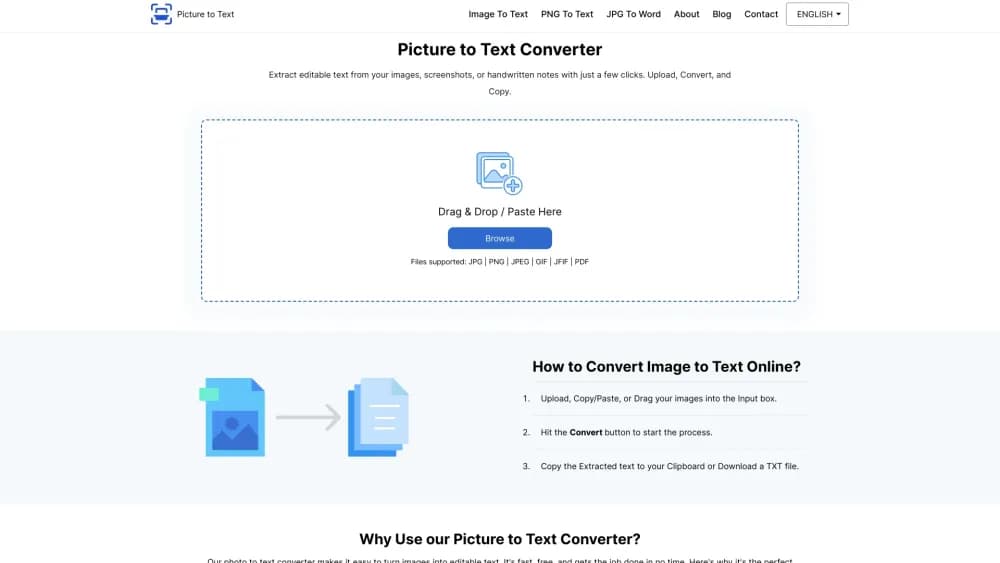
About Picture to Text Converter
What Is Picture to Text Converter
Picture to Text Converter is a browser based OCR tool from Picturetotext.info. To extract text from image files, you drop the picture into the page, press convert, and get editable text back in a few seconds. No install, no plugin, no desktop app.
The tool leans on OCR to read printed characters and ICR to interpret handwriting, which is where most cheap converters fall apart. Scans, phone photos, screenshots and handwritten notes all go through the same pipeline, and the output lands in your clipboard or a plain TXT file. Small jobs need no account at all.
The limits start early. Free users get 5MB per file, three files per submission, and only JPG, PNG or JPEG on upload, although the site markets wider format support. Batch work, 10MB files and the full format list sit behind a subscription starting at $2.99 a week.
Getting Started
- Open picturetotext.info in any browser. Nothing to download.
- Drag an image in, paste it from the clipboard, or use the camera button on a phone.
- Press convert and wait a few seconds while the OCR tool reads the text.
- Check the result for misread characters, then copy it or download it as a TXT file.
- Register an account only if you want batch uploads, larger files or an ad free workspace.
Product Information
A quick look at Picture to Text Converter's pricing, supported platforms, and performance.
Best for
The users, tasks, and scenarios where this tool fits best.
Users
- Students
- Office workers
- Researchers
- Travelers
Tasks
- Handwriting to text
- Photo to text from a phone
- Pulling text out of scanned PDFs
- Copying text that sites block
Scenarios
- Digitizing a stack of old paperwork
- Sorting receipts during tax season
- Studying in a second language
- Working on a shared or borrowed computer
Key features
OCR and ICR in One Pipeline
Printed text goes through optical character recognition, handwriting goes through intelligent character recognition. The vendor says the mix handles blurry photos, low resolution scans and poorly written notes. In practice, clean printed pages are near perfect while messy handwriting still needs a read through.
More Than 20 Languages
The image to text converter recognizes English, Spanish, French, German, Italian, Portuguese, Russian, Arabic, Chinese, Japanese, Korean, Dutch, Turkish, Thai, Vietnamese, Indonesian, Polish, Czech, Swedish, Finnish, Danish, Georgian and Romanian. That covers most of the languages people photograph on travel.
Batch Uploads on Paid Plans
A free user uploads three files per submission. Premium raises that to 50 images at once, with 3,000 images a week on the weekly plan, 10,000 a month on the monthly plan and 120,000 a year on the yearly plan. Large archive projects therefore need a subscription, not the free tier.
Clipboard, Camera or Drag and Drop
There are three ways in: drag a file onto the page, paste an image straight from the clipboard, or shoot a page with the phone camera. Pasting is the fastest route for screenshot to text work, since the image is already on the clipboard.
Copy or Save as TXT
The extracted text appears in an editable box. You can fix OCR mistakes before copying, or download the whole result as a TXT file. Plain text opens anywhere, including Notepad, Word and Google Docs.
No Stored Images
The site states that images and extracted text are never kept, and that uploads are deleted once the converted text reaches you. That claim comes from the vendor's privacy policy rather than a third party audit, so treat it as the vendor's own statement.
Pros and cons
Pros
- No signup needed for a quick conversion, which keeps one off jobs frictionless.
- Handwriting support through ICR covers a task many free OCR sites skip.
- 20 plus languages make it usable for foreign documents and travel photos.
- Results can be edited before export, so obvious OCR errors get fixed on the spot.
- A $2.99 weekly plan lets you test batch processing without a yearly commitment.
Cons
- Free tier caps files at 5MB and three per submission, so any real archive work hits the wall fast.
- Free uploads only accept JPG, PNG and JPEG despite the wider format list shown on the front page.
- The site contradicts itself on the free batch limit, showing three files in one place and ten in the FAQ, which makes planning hard.
- No API is offered, so developers cannot wire text extraction into their own apps.
- Managing a subscription means contacting support by email instead of a self serve billing page.
Frequently asked questions
Yes for small jobs. Conversions, copying and TXT downloads cost nothing and need no account, as long as each file is under 5MB and you upload three or fewer at a time. Batch limits, 10MB files and the full format list require a paid plan.
Related content
Explore related tools, skills, and articles for Picture to Text Converter.
Picture to Text Converter Alternatives

Google EmbeddingGemma 2
Google DeepMind · Writing · Image · CodingGoogle EmbeddingGemma 2 is a 740M-parameter open model that turns text, code, images, audio, and video frames into vectors in one 768-dimension space, running on phones and laptops.

MePersona
MePersona, Inc. · Writing · Productivity · MarketingMePersona is an AI unified inbox for creators. It learns your voice, drafts replies to fan messages from 12 platforms, and sends only what you approve.

Fluence
Yay Software (Yannick Huchard) · Writing · Voice & Language · ProductivityFluence is an Android app that reads PDFs, EPUBs, Word files and web articles aloud, follows each sentence as it speaks, and answers questions about the text on the phone itself.