

Pigeon
Pranith · Coding · Marketing
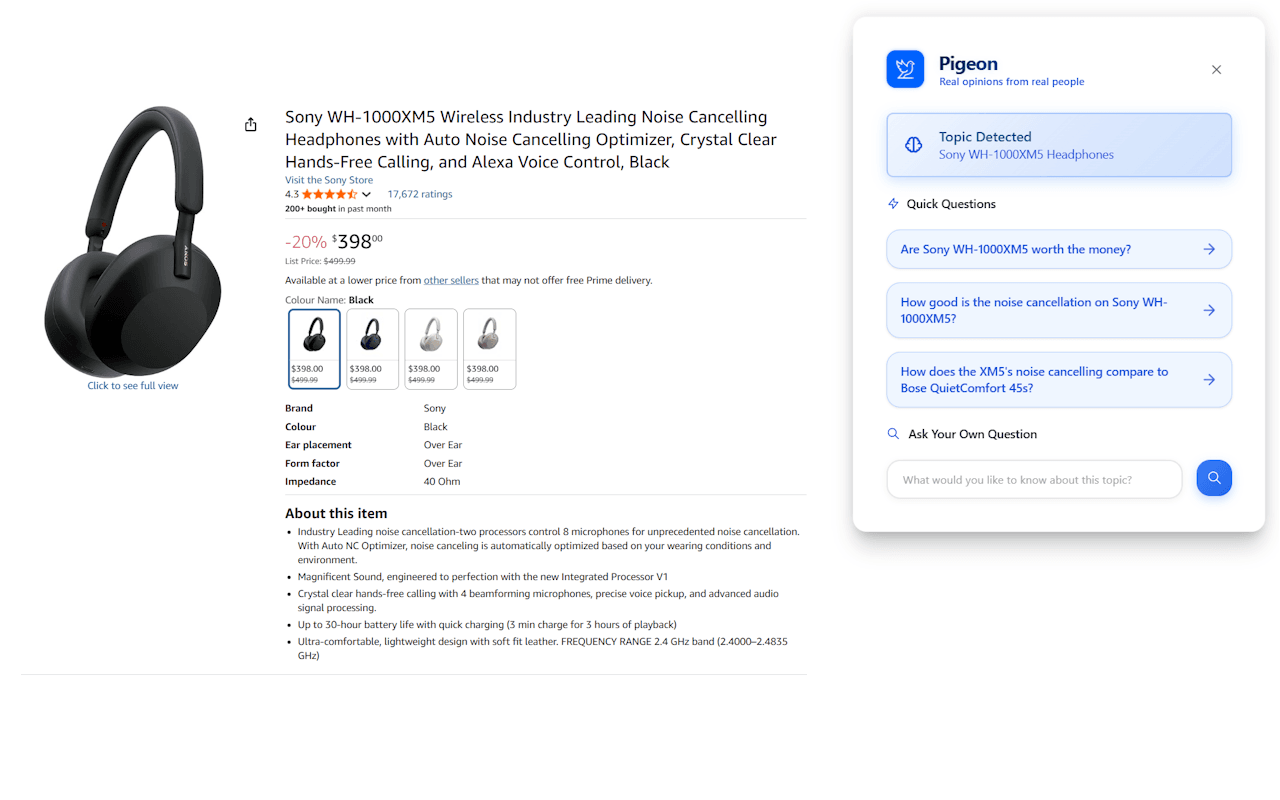
Pigeon is a lightweight Chrome extension that surfaces real Reddit discussions about whatever page you're reading. Click the Pigeon icon on a product page, an article, or a service listing, and it pulls up relevant Reddit threads, highlights the most useful comments, and answers questions you'd otherwise have to dig through search results to find. It's a Reddit insights tool built for people who want real user opinions before they spend money or time on something. What do actual owners think? Pigeon answers that in a click.
About Pigeon
What Is Pigeon
Pigeon is a browser extension for Chrome that turns Reddit into a research assistant sitting in your toolbar. The idea is simple. When you land on a page about a product, a service, or a topic, you probably want to know whether other people trust it. Instead of opening a new tab, typing the name into Google, adding "reddit" to the query, and sifting through threads, you click one icon and let Pigeon do the digging.
It works by scanning Reddit for discussions that match what you're looking at, then pulling out the comments that carry the most signal. You don't get a wall of links. You get a short list of standout opinions plus suggested questions you can ask, or you can type your own.
The pitch is speed and honesty, because real users say things that marketing pages never will, and that gap is exactly where Pigeon is trying to land.
The main limitation is scope. Pigeon only draws from Reddit, so niche or brand-new products with little Reddit presence won't return much. It's a research shortcut, not a full review platform.
Getting Started
- Open the Pigeon listing on the Chrome Web Store and click Add to Chrome to install it.
- Pin the Pigeon icon to your toolbar so it's one click away.
- Browse to a page you're curious about, such as a product listing or an article.
- Click the icon, then either pick a suggested question or type your own.
- Read the surfaced Reddit comments and use them to guide your decision.
Product Information
A quick look at Pigeon's pricing, supported platforms, and performance.
Best for
The users, tasks, and scenarios where this tool fits best.
Users
- Online shoppers
- Researchers and students
- Casual readers
Tasks
- Vetting a product listing
- Comparing services
- Fact-checking a claim
Scenarios
- Online gift hunting
- Planning a purchase
- Exploring a new hobby
Key features
One-Click Reddit Lookup
The whole product lives behind a single toolbar icon. Land on a page, click Pigeon, and it scans Reddit for matching discussions instead of making you build a search query yourself. That shortcut matters most when you're comparing options across many tabs and don't want to repeat the same search routine each time.
Suggested Questions and Custom Prompts
Pigeon proposes questions you might want answered about the page in front of you, so you're not staring at a blank box wondering what to ask. You can also type your own question. This turns a passive feed of comments into something closer to a conversation with the community.
Highlighted Comment Extraction
Rather than dumping raw threads on you, Pigeon surfaces the comments it judges most helpful. The point is signal over volume: you get the standout takes without reading through hundreds of replies. Expect it to miss nuance in very long threads.
Unfiltered User Opinions
The value here is authenticity. Reddit users tend to say what a marketing page won't, including flaws, hidden costs, and buyer's remorse. Pigeon packages those opinions in a readable form, which is useful for anyone who's been burned by a too-polished product page.
Lightweight and Fast
The extension installs at under a megabyte and runs without turning your browser into a resource hog. It isn't a full dashboard. No setup wizard. No account screen. You click, you read, you move on, which suits people who want a quick answer, not another app to manage.
Privacy-Friendly by Design
Pigeon is pitched as privacy-friendly and doesn't ask for an account to work. For a tool that reads the page you're on, that's worth noting. Fewer hoops mean lower friction, so you should still review the listing's privacy disclosure before installing.
Pros and cons
Pros
- Cuts out the manual "add reddit to my search" routine with one click.
- Surfaces highlighted comments, so you skip the low-signal noise.
- Suggested questions make it useful even when you don't know what to ask.
- Small install size and no account requirement keep it low-effort.
- Works inline while you browse, so research stays in one tab.
Cons
- Only pulls from Reddit, so products with no community presence return little or nothing.
- Highlighted comments can miss context that a full thread would show.
- Coverage depends on how actively a topic is discussed, which you can't control.
- As a newer extension with a small user base, long-term support is hard to judge.
Frequently asked questions
Pigeon is a Chrome extension that finds real Reddit discussions about the page you're viewing and shows you the most helpful comments. You click the icon, pick or type a question, and read what people said.
Related content
Explore related tools, skills, and articles for Pigeon.
Pigeon Alternatives
Forefront
Forefront · CodingForefront is a web platform for building with open-source AI. It lets you fine-tune leading open-source language models on your own data, evaluate how they perform, and run them through an API or export them to host yourself. Developers who want the convenience of a closed-source platform but insist on owning their models and data are the target audience here.

Startkit
StartKit.AI · CodingStartkit is a boilerplate for building AI SaaS and AI wrapper products. Think of it as an AI startup boilerplate with the boring parts already wired up: authentication, Stripe and Lemon Squeezy payments, usage limits, transactional email, and an AI API starter that talks to OpenAI, Anthropic, Groq, or Llama. You clone the repo, set your price, and start on the part of your product that people actually pay for. It's Next.js under React and Tailwind, so most of the boilerplate code already feels familiar.
Testim
Tricentis · CodingTestim is an AI-powered test automation platform for building and running end-to-end tests across web, mobile, and Salesforce applications. It leans on machine learning to keep tests stable when an interface changes, so teams spend less time fixing broken selectors. Not bad for an automated testing tool you can start using today. You create tests by recording actions in a browser, then optionally add JavaScript when you need more control. It's a solid pick for busy QA teams.