

Pinery
Pinery · Writing
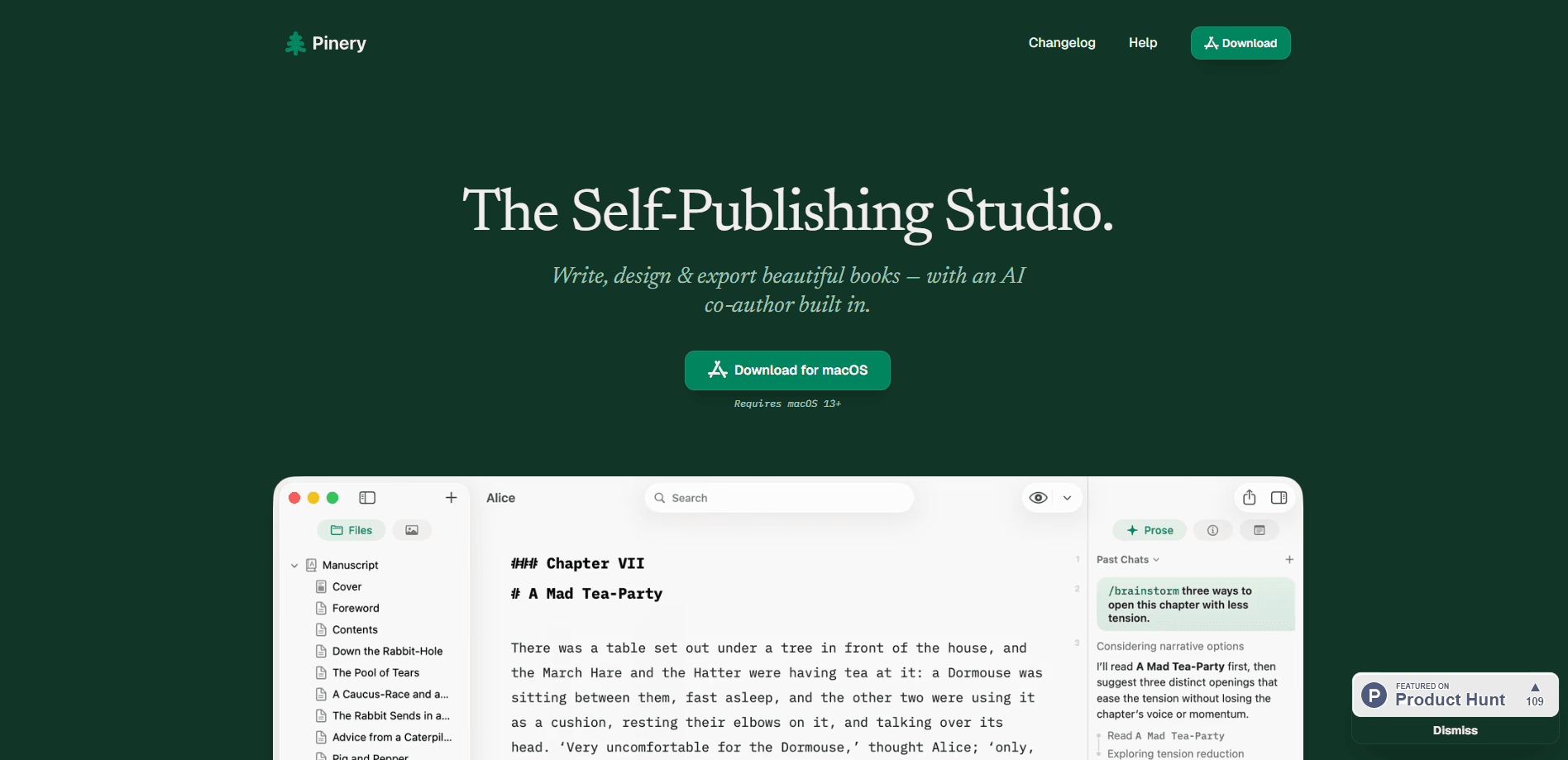
Pinery is a native macOS app for writing, editing, designing, and exporting full-length books without leaving a single window. It works as a Markdown editor for Mac that also handles book production, combining an in-margin AI co-author called Prose, built-in typesetting previews, and one-click export to ePub 3, PDF, and clean HTML. As book writing software, it keeps chapters, images, tables of contents, and illustrations in the same place you draft. It's a Mac-only tool, so Windows and Chromebook users are out of luck. Annoying, but that's the trade-off.
About Pinery
What Is Pinery
Pinery is a self-publishing studio built for people who write book-length work and want the production side handled too. The pitch is simple: your manuscript stays in plain Markdown on your Mac or in iCloud, and the app turns that file into a polished ePub, a print-ready PDF, or clean HTML when you're done.
It's a native macOS app, so it needs macOS 13 or later, and there's no web, Windows, or mobile version. That's the biggest limit. If your machine runs an older Mac OS, you can't use it at all. So who's it actually for? People who treat writing as a production job, not a hobby.
The studio logic is the interesting part. Instead of piping your draft into separate tools for editing, layout, and conversion, Pinery keeps those steps together. You write in one place, review AI suggestions in the margin of the same page, see how a chapter will look on a reader, and export from the same app.
Getting Started
- Download Pinery from its website and install it. It requires macOS 13 or newer.
- Create a new book or import an existing manuscript. A Word
.docxfile gets split into Markdown chapters automatically. - Write or paste your chapters in the Markdown editor. Drag in images and they land in a shared asset library you can reuse anywhere.
- Bring in Prose when you want help. Type a request in plain language, or call a skill like
/drafting-partneror/continue-chapter, then accept or reject each suggested change as a reviewable diff. - Export when the draft is ready. Choose ePub 3, PDF, or HTML and Pinery handles the formatting.
Product Information
A quick look at Pinery's pricing, supported platforms, and performance.
Best for
The users, tasks, and scenarios where this tool fits best.
Users
- Indie authors and self-publishers
- First-time book writers
- Technical and non-fiction writers
Tasks
- Drafting and structuring a novel
- Converting an existing Word draft
- Building tables of contents and illustrations
Scenarios
- Working through a first draft chapter by chapter
- Polishing a finished manuscript before release
- Preparing a multi-format release
Key features
Distraction-Free Markdown Editor
The editor is built for book-length manuscripts, not blog posts. It keeps you in Markdown so your files stay portable, and it handles the awkward parts of long projects like chapter splitting, reusable images, and notes that stay out of the final export. If you've ever lost an afternoon reformatting a Word file, the plain-text approach is a genuine relief. No fiddly styles panel. Just text.
Prose AI Co-Authoring
Prose is the newest piece of Pinery, and it works in the margin of your manuscript rather than in a separate chat window. You describe what you want in plain language, or reach for a skill like /drafting-partner to co-draft scenes from your beats and outline, or /continue-chapter to keep going where you stopped. Every change shows up as a reviewable diff, so your voice stays yours.
Grounded Illustrations
Ask Prose for an illustration and it draws artwork that belongs in your book, not generic stock output. It reads the scene before it draws, so the details are specific to your chapter, and the finished image saves to your assets ready to place. You can set a look once, from vintage engravings to modern styles, and every illustration keeps that style.
One-Click ePub 3 Export
Pinery produces ePub 3 files that behave on Apple Books, Kindle, Kobo, and other eReaders. The formatting is done for you, which matters because hand-building an ePub that renders correctly on every device is a chore few writers enjoy. PDF and clean HTML exports use the same manuscript, so you're not maintaining three versions.
Word Import and Asset Library
Importing a .docx file turns it into Markdown chapters, which is a lifeline if you've already started somewhere else. Images live in one shared library rather than scattered across chapter folders, so dropping the same diagram into two chapters doesn't mean hunting for the file twice.
Self-Building Table of Contents
Drop in a table of contents and it assembles itself, complete with page numbers that stay in sync as the manuscript changes. For non-fiction and reference work, this removes a step that's normally pure tedium at the end of a project.
Your Files Stay Yours
Manuscripts stay as plain Markdown on your Mac or in iCloud, readable with or without Pinery. That's a real difference from apps that lock your book inside their own format. If you stop using the app tomorrow, you still have your text.
Pros and cons
Pros
- Runs natively on macOS, so the editor and export tools feel fast rather than like a browser tab pretending to be an app.
- Manuscripts stay in plain Markdown you own, readable with or without the app, which makes backups and migrations painless.
- Prose shows edits as diffs in the margin, so you review each change instead of trusting the AI to rewrite your book.
- One manuscript exports to ePub 3, PDF, and HTML, cutting the usual multi-format rebuild work.
- Free to download, with the app itself costing nothing up front.
Cons
- Mac only and it needs macOS 13 or later, so Windows, Linux, and older Mac users can't run it at all.
- Pricing beyond the free download isn't clearly published, which makes it hard to know the real long-term cost before committing.
- Working in Markdown isn't for everyone. Writers who live in Word's track-changes workflow will find the shift jarring.
- No public API means you can't automate Pinery as part of a larger publishing pipeline.
Frequently asked questions
Pinery is a Mac app for writing and self-publishing books. You draft in a Markdown editor, get optional AI help through Prose, and export the finished manuscript as an ePub 3, PDF, or clean HTML file.
Related content
Explore related tools, skills, and articles for Pinery.
Pinery Alternatives

Google EmbeddingGemma 2
Google DeepMind · Writing · Image · CodingGoogle EmbeddingGemma 2 is a 740M-parameter open model that turns text, code, images, audio, and video frames into vectors in one 768-dimension space, running on phones and laptops.

MePersona
MePersona, Inc. · Writing · Productivity · MarketingMePersona is an AI unified inbox for creators. It learns your voice, drafts replies to fan messages from 12 platforms, and sends only what you approve.

Fluence
Yay Software (Yannick Huchard) · Writing · Voice & Language · ProductivityFluence is an Android app that reads PDFs, EPUBs, Word files and web articles aloud, follows each sentence as it speaks, and answers questions about the text on the phone itself.