

Plagiarismremover
Plagiarismremover.net · Writing
Plagiarismremover is a free online plagiarism remover that rewrites articles, essays, and research papers so the wording looks original. Paste your text or upload a file, pick a mode, then download the cleaned copy. It runs on AI and NLP, handles several languages, and costs nothing to use. The goal is simple: make content unique without changing what it says.
About Plagiarismremover
What Is Plagiarismremover
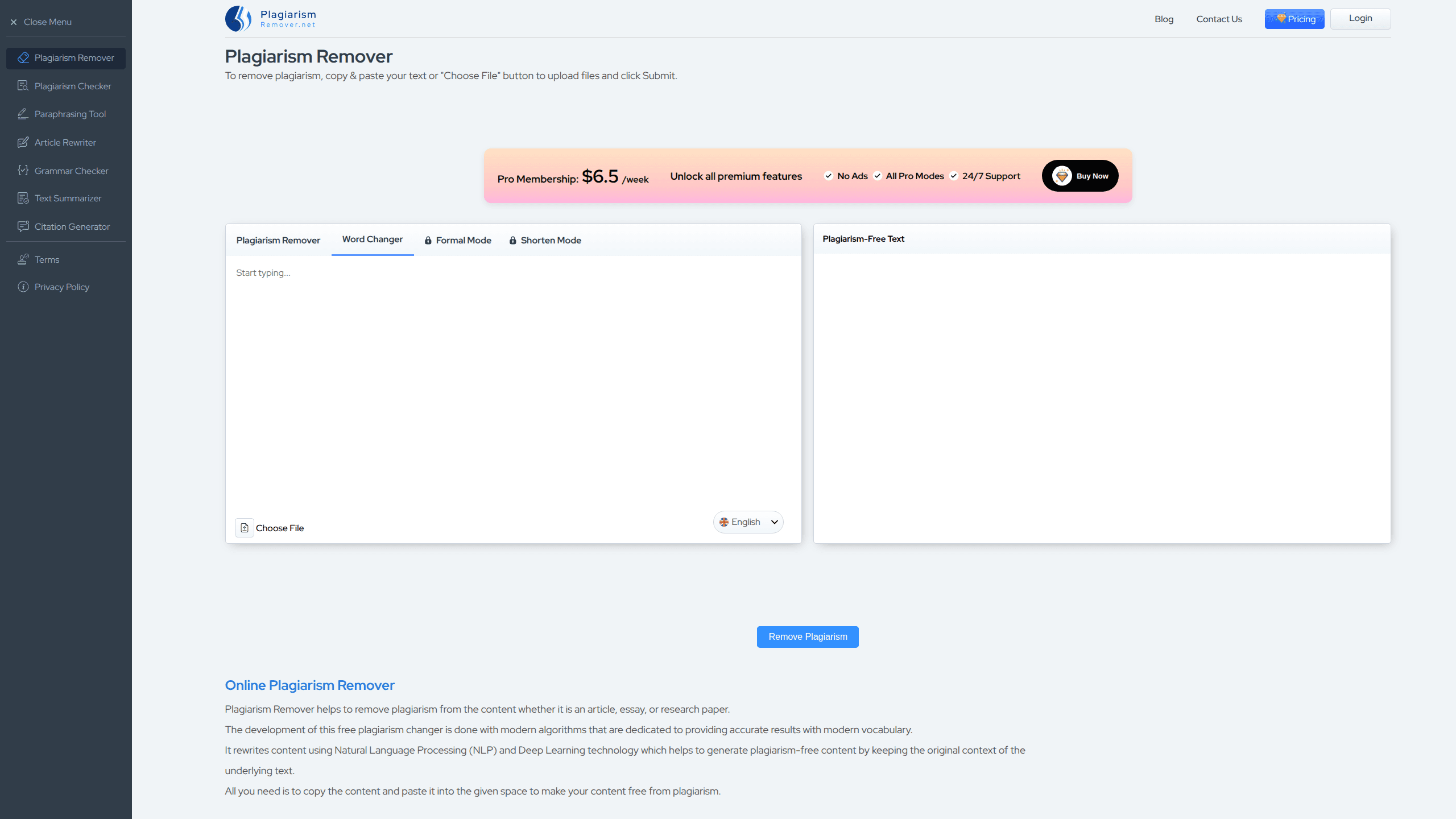
Plagiarismremover is a browser-based plagiarism changer. You drop in text that overlaps with existing sources, and the tool reworks the vocabulary and sentence structure so the output reads as your own. It targets students, bloggers, and writers who need to publish content without running into duplication flags.
The tool uses Natural Language Processing and deep learning to rephrase while holding onto the original meaning. That matters, because a rewriter that scrambles your point is worse than no rewriter at all. Plenty of low-cost rewriters trip over that exact problem: they swap words until a sentence technically differs from the source, and then the meaning drifts somewhere you never intended.
The catch is scope. Anyone can use the free plagiarism remover online, but it edits surface wording. It won't fix flawed arguments, missing citations, or ideas that were simply copied. Treat it as a drafting aid, not a free pass.
Getting Started
- Open plagiarismremover.net in your browser and paste your text, or click Choose File to upload a document from your device.
- Pick a mode: Plagiarism Remover, Word Changer, Formal, or Shorten.
- Choose the language for your content from the dropdown.
- Click Submit and let the tool reprocess your text.
- Download the unique content as a .txt or .doc file.
Product Information
A quick look at Plagiarismremover's pricing, supported platforms, and performance.
Best for
The users, tasks, and scenarios where this tool fits best.
Users
- Students
- Bloggers and content writers
- Non-native English speakers
Tasks
- Rewriting a paragraph that sounds too close to a source
- Simplifying dense text
- Learning new vocabulary
Scenarios
- Tight deadlines on a school paper
- Repurposing an old article
- Cleaning up AI-generated drafts
Key features
Four Rewriting Modes
Plagiarismremover gives you four ways to rephrase text. Plagiarism Remover does the heavy lifting with synonyms and sentence changes, Word Changer sticks to swapping words, Formal lifts the tone for professional writing, and Shorten cuts length. Picking the right mode up front saves you a second pass. Each mode targets a slightly different need, so it's worth thinking about what you actually want before you hit submit.
File and Text Upload
You don't have to paste anything. Click Choose File and the tool pulls a document straight from your device for processing. That's faster for long essays, where copy-paste runs the risk of dropping formatting. Clean, simple, done.
Multiple Language Support
The rewriter works across a range of languages, so you're not locked into English-only output. For people publishing in Spanish, French, or other markets, that opens the tool up beyond a single audience. If you run a blog that serves readers in several countries and you need each version to read naturally rather than like a machine translation, this is the feature that keeps you from juggling a separate rewriter for every market.
Tone Adjustments
Formal mode is the standout for anyone writing reports, cover letters, or academic work. It pushes the text toward a crisper, more professional register instead of leaving the casual phrasing in place. If your draft reads too loose, this is the switch to flip. Writers who need a consistent professional voice across a long document often find this mode does more of the work than the basic rewriter does.
Text Shortening
Shorten mode compresses your content, which helps when you've overwritten a section and need it tighter. It's also a quick way to summarize a long passage without doing the trimming by hand. Less text, same point.
No Sign-Up Required
You can use the plagiarism remover tool without creating an account. Land on the page, add your text, and get output. There's no email wall and no paywall standing between you and a finished draft. Not bad for something that costs zero dollars.
Pros and cons
Pros
- Free to use, with no account or subscription needed
- Four modes cover rewriting, word swaps, formal tone, and shortening in one place
- Accepts both pasted text and uploaded files
- Works with multiple languages, not just English
- Downloadable output in .txt or .doc format
Cons
- No API, so you can't automate it or plug it into a writing workflow
- Rewriting can shift meaning if the source text is complex or technical, so you still need to proofread
- It won't turn copied research into original work, and using it to dodge citation rules is a bad idea
Frequently asked questions
It rewrites text so the wording no longer matches existing sources, using synonyms and sentence restructuring while keeping the general meaning. It's a rephrasing tool that can rewrite text, not a citation checker.
Related content
Explore related tools, skills, and articles for Plagiarismremover.
Plagiarismremover Alternatives

Emailwritr
Emailwritr · Writing · MarketingEmailwritr is an AI email copywriting tool built for affiliates, course creators, and online businesses that want more revenue from the list they already own. Instead of blank pages or generic chatbot prompts, this AI email writer generates welcome sequences, launch campaigns, cart recovery emails, and promo series from frameworks modeled on well-known direct-response copywriters. You connect your autoresponder, answer a few questions about your offer, and it writes the copy for you.

Swms
Swms AI · Writing · Productivity · BusinessSwms is an AI safety compliance tool that turns a plain description of a job into ready-to-use safety documents. Describe your project, trade, and known hazards, and it writes a safe work method statement, job hazard analysis, safe work procedure, RAMS, or safety data sheet in seconds. It also ships with Oscar, a chat assistant that answers workplace safety questions in any language. Teams in construction, mining, transport, and warehousing use it to cut the paperwork that usually eats into a workday.

Prosp
Prosp · Writing · Voice & Language · MarketingProsp is an AI LinkedIn outreach tool built for agencies and sales teams, and it writes the message and the voice note in your own voice for each prospect so they actually reply. You connect your accounts, find leads, and let the AI draft and send personalized messages at scale, all from one inbox. It's built for people running outbound at volume. That's the whole pitch. Every touchpoint still has to feel human.