
Planly - Social Scheduler
Planly · Marketing
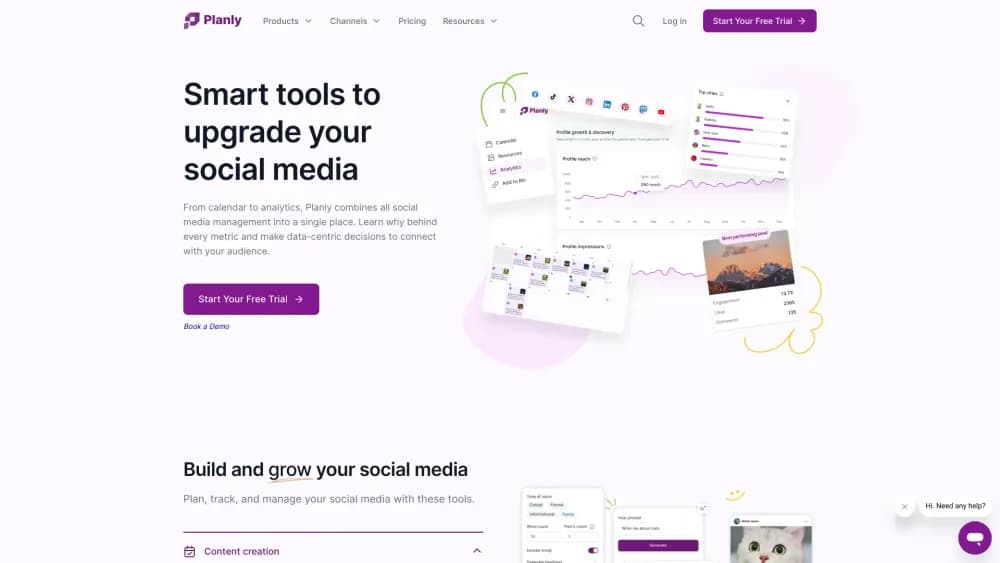
Planly is a social media scheduler for creators and small teams. It queues posts across 12 channels, writes captions with AI and tracks results from one calendar.
About Planly - Social Scheduler
What Is Planly
Planly is a social media scheduling tool built for people who publish on several networks every week and don't want to live inside each app. You connect your accounts, drop posts onto a calendar and let the platform publish them at the times you pick. The same workspace holds a media library, an AI writing assistant, performance reports and a shared inbox for comments and messages.
Most people find Planly while hunting for a TikTok scheduler or an Instagram scheduler, and the product started in 2022 with a narrow focus on those two networks. It has since grown into a broader social media management tool with 12 channels, including Threads, Bluesky and Mastodon. Teams can add roles, route drafts through an approval flow and hand clients a link in bio page through Addto.bio, which ships with every plan.
Two limits shape the fit. There's no free tier, only a 14 day trial, so anyone who wants a permanent zero cost option should look elsewhere. And the entry plan caps you at 100 scheduled posts and 4 channels, which is fine for one creator and tight for a small team.
Getting Started
- Create an account at app.planly.com and start the 14 day trial. No credit card is needed to look around.
- Connect your networks. Instagram needs a business or creator profile, and each channel is authorized through its own login screen.
- Build your first post in the composer. Upload media, pick the channels, write one caption or let the AI content assistant draft it, then adjust the wording per platform.
- Choose a slot on the calendar. Planly shows suggested times based on when your audience tends to be active.
- Review the queue and the analytics tab after the first week. Post level reports tell you which format earned the most reach.
Product Information
A quick look at Planly - Social Scheduler's pricing, supported platforms, and performance.
Best for
The users, tasks, and scenarios where this tool fits best.
Users
- Solo creators
- Small marketing teams
- Agencies
- Social media managers with several brands
Tasks
- Filling a weekly content calendar
- Repurposing one video across networks
- Writing captions and hashtags faster
- Reporting monthly results
Scenarios
- A product launch across six channels
- A client account that needs sign off
- A busy week with no time to post
Key features
Multi-channel scheduling calendar
The calendar is the center of the product. You see every queued post by day, drag it to a new slot and check which channels it targets. Instagram Reels, Stories and first comment scheduling are supported, and each platform gets its own caption so a LinkedIn post doesn't read like a TikTok caption.
AI content assistant
Every plan includes AI credits, from 100 on Individual to 1,000 on Agency. The assistant writes captions, suggests hashtags and can rework a draft for a different network. Credits are consumed per request, so heavy use on a small plan runs out before the month ends.
Best time to post and hashtag suggestions
Planly recommends posting windows from your account history instead of a generic chart. Hashtag suggestions sit next to the caption box, which saves a separate research step for creators who post several times a day.
Analytics and competitor tracking
The social media analytics view covers reach, engagement and top posts. Team and Agency plans unlock audience analytics, post level history for six months or a year, and competitor comparison. The custom report builder and CSV export are aimed at people who report to clients.
Unified engagement inbox
Comments, messages and mentions from connected accounts land in one inbox. You can reply without opening five tabs, which is the main reason small teams move off native apps.
Approval flow and team roles
Agency plans can route a draft to a reviewer before it goes live. Roles and permissions are available on Team and Agency, so a junior colleague can draft without the ability to publish to a client account.
Addto.bio link in bio pages
Each plan includes at least one Addto.bio page, a hosted link in bio with unlimited links, media embeds and custom styling. It's a small extra that saves a separate subscription for creators who push traffic from Instagram or TikTok.
Pros and cons
Pros
- 12 channels in one place, including Threads, Bluesky and Mastodon, which many schedulers still skip.
- Unlimited media storage on every paid plan, even the $15 tier.
- AI credits, hashtag suggestions and Addto.bio pages are bundled rather than sold as add ons.
- Yearly billing cuts the monthly rate by about a third, with Individual at $10 per month.
- Mobile apps for iOS and Android let you approve or reschedule from a phone.
Cons
- No free plan. The 14 day trial is the only way to test it without paying.
- The Individual plan allows 100 scheduled posts and 4 channels, so a creator on five networks hits the ceiling fast.
- Analytics history stops at six months on Team and one year on Agency, which hurts year over year comparisons.
- API access is excluded from the trial, so developers can't test an integration before subscribing.
Frequently asked questions
No. Planly offers a 14 day free trial with access to the Individual, Team or Agency feature set, and sometimes a $1 seven day trial promotion. After the trial you pick a paid plan or lose access.
Related content
Explore related tools, skills, and articles for Planly - Social Scheduler.
Planly - Social Scheduler Alternatives

ngram 2.0
ngram · Video · Marketingngram 2.0 is an AI video generator for teams. It turns a prompt, a screen recording, or a product URL into a narrated explainer, product demo, or AI avatar video, and every scene stays editable.

shippedit.me
Krawlup · Marketing · Businessshippedit.me now redirects to Krawlup, a web platform that audits SEO, AEO and page speed every week, then hands the fixes to AI coding agents over MCP.

MePersona
MePersona, Inc. · Writing · Productivity · MarketingMePersona is an AI unified inbox for creators. It learns your voice, drafts replies to fan messages from 12 platforms, and sends only what you approve.