

PodcastorAI
PodcastorAI · Voice & Language · Video
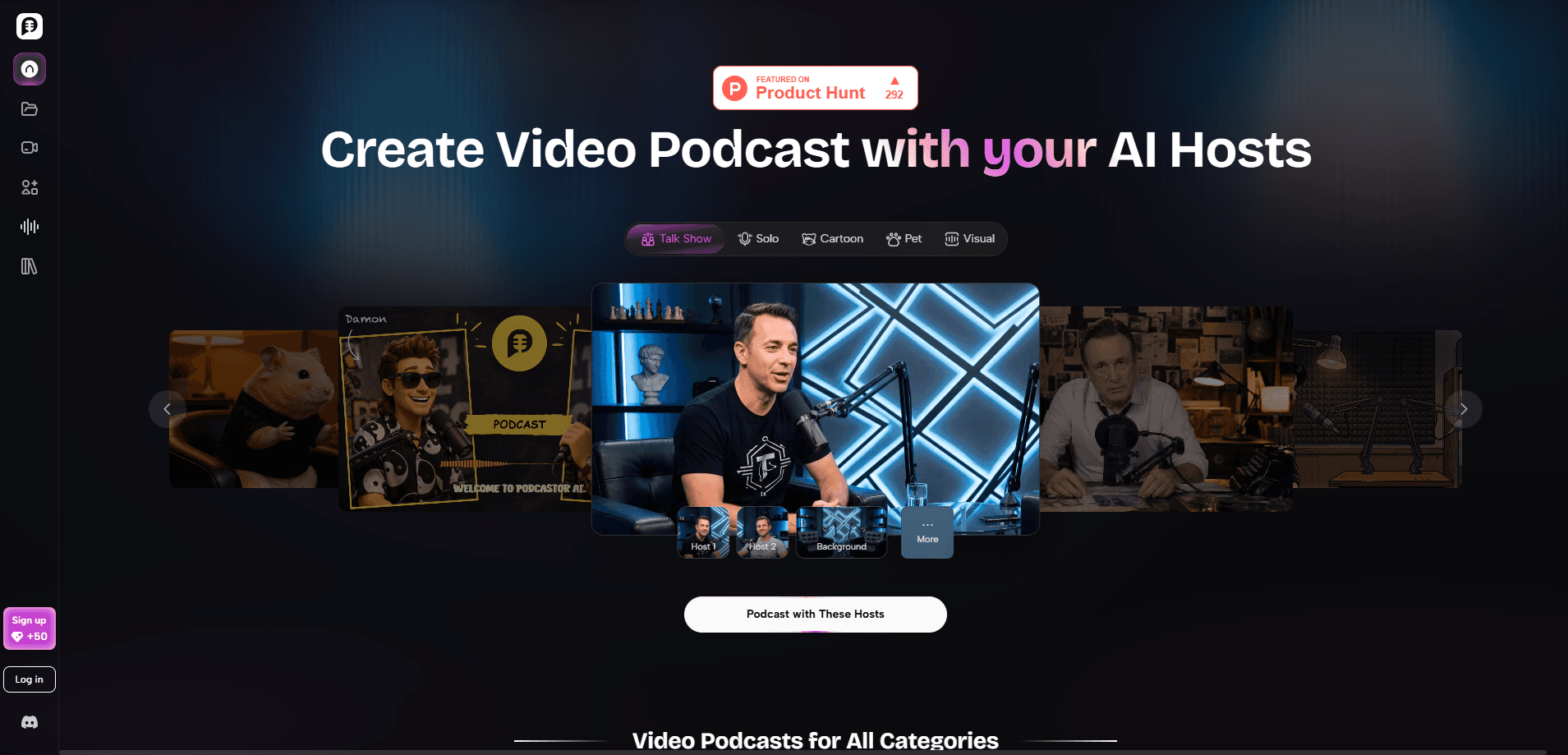
PodcastorAI is an AI podcast studio that turns PDFs, documents, URLs, notes, and recordings into finished episodes. It writes the script, generates the voices, and renders video with customizable AI hosts, layouts, and captions. You can publish the same episode as audio and as a YouTube-ready video without a camera or a recording room.
About PodcastorAI
What Is PodcastorAI
PodcastorAI is a web-based AI podcast generator built for people who have ideas but don't want to sit in front of a microphone. No camera, no microphone, no editing timeline. It reads your source material, pulls out the key points, and rewrites them as a natural back-and-forth conversation that sounds like two people actually talking. From there it produces the audio and, if you want, a video episode with a digital host on screen.
The pitch is simple. Most of the work in podcasting isn't the talking, it's the scripting, the voice work, and the editing. PodcastorAI handles those three steps in one workflow, so a blog post, a lesson plan, or a stack of research notes can become an episode in minutes rather than an afternoon.
Anyone who has stared at an empty recording session knows the script is the part that stalls everything else, and that's exactly the part this tool takes off your plate.
The limits are worth knowing up front. Video length is capped by plan, from 2 minutes on the free trial up to 30 minutes on Creator Pro, and credits rather than unlimited time drive monthly output, which means heavy users will feel the ceiling fast. This is a generation tool, not an editor. If you want frame-level control over your footage, it won't replace your editing software.
Plan your episodes around the credit budget before you commit to a workflow, because a weekly show with long videos will burn through the lower tiers much faster than a short audio series ever would.
Getting Started
- Sign up for the free trial and check the credits you get.
- Upload your source material, such as a PDF, a URL, notes, or an audio recording, and let the tool extract the key insights.
- Review the generated script, pick an AI voice, or clone your own.
- Choose a video format and host, like split-screen, talk show, or image and waveform.
- Preview the episode, generate subtitles, and publish to YouTube, Spotify, or Apple Podcasts.
Product Information
A quick look at PodcastorAI's pricing, supported platforms, and performance.
Best for
The users, tasks, and scenarios where this tool fits best.
Users
- Content creators
- Teachers and trainers
- Faceless channel owners
Tasks
- Turning documents into podcasts
- Repurposing written content
- Voice work without a studio
Scenarios
- Launching a YouTube presence from an audio-only show
- Producing a true crime or documentary-style series
- Keeping a weekly publishing schedule
Key features
Turn Any Content Into a Script
PodcastorAI works as a podcast script generator. It accepts PDFs, documents, URLs, notes, and recordings, then extracts the key insights and organizes them into a structured script. You can also start from a topic and let it draft the conversation. Want to turn a PDF into a podcast? This is the step that does it. It removes the blank-page problem, which is the reason most people come here in the first place.
Custom AI Hosts
Upload a photo to build a personalized AI podcast host, or pick from premade avatars in digital human, cartoon, and pet styles. Hosts come with different backgrounds and scene adaptations, so a true crime show and an educational series can look completely different. You can keep one host across every episode or change it per story.
Voice Cloning and AI Voices
Choose from natural AI voices or clone your own to keep a consistent sound. The free trial limits you to the MiniMax TTS model and two voices. Paid plans give you access to all TTS models. For creators building a recognizable show, voice consistency matters more than variety.
Flexible Video Formats
Video episodes can be rendered as image and waveform for audio-first narration, split-screen to show your host alongside visuals, or same-screen to overlay the host on any background. Each format is production-ready without editing software. The tradeoff is control: you pick a layout, you don't build one.
Subtitles, Export, and Publishing
PodcastorAI generates subtitles automatically and exports them for accessibility. Script, audio, and video stay linked in a single workflow, so you can publish one episode to YouTube, Spotify, Apple Podcasts, and TikTok without switching tools. That single-workflow design is the main reason it beats juggling three separate apps. No copy-paste between tools. No version drift.
Pros and cons
Pros
- Converts PDFs, URLs, and documents into scripts and audio in a single pass.
- Video formats cover solo shows, split-screen, and talk show layouts with no editing software.
- Custom AI hosts built from a photo let you run a faceless channel with a consistent on-screen presence.
- Free trial lets you test audio and video generation before paying.
Cons
- Credits, not unlimited time, limit monthly output, so heavy producers will hit the ceiling.
- Video length is capped by plan, from 2 minutes on the trial to 30 minutes on Creator Pro.
- You choose from preset layouts rather than building custom ones, so fine visual control is limited.
Frequently asked questions
It turns written or recorded material into finished audio and video podcast episodes. You upload a source like a PDF or URL, and the tool writes the script, generates the voices, and optionally renders a video with an AI host.
Related content
Explore related tools, skills, and articles for PodcastorAI.
PodcastorAI Alternatives

Foley
Hanamori Labs, LLC · Voice & Language · Productivity · AI AssistantFoley is a voice to-do list that turns a spoken sentence into a filed task, complete with project, date and time, then helps you plan the day around what is already there.

HireKey
HireKey · Voice & Language · Productivity · LeaningHireKey is an AI job search copilot built by a former tech recruiter. It checks role fit, tailors resumes, runs interview practice and tracks every application.

Fluence
Yay Software (Yannick Huchard) · Writing · Voice & Language · ProductivityFluence is an Android app that reads PDFs, EPUBs, Word files and web articles aloud, follows each sentence as it speaks, and answers questions about the text on the phone itself.