

Podwise
HardHacker Labs · Voice & Language · Leaning
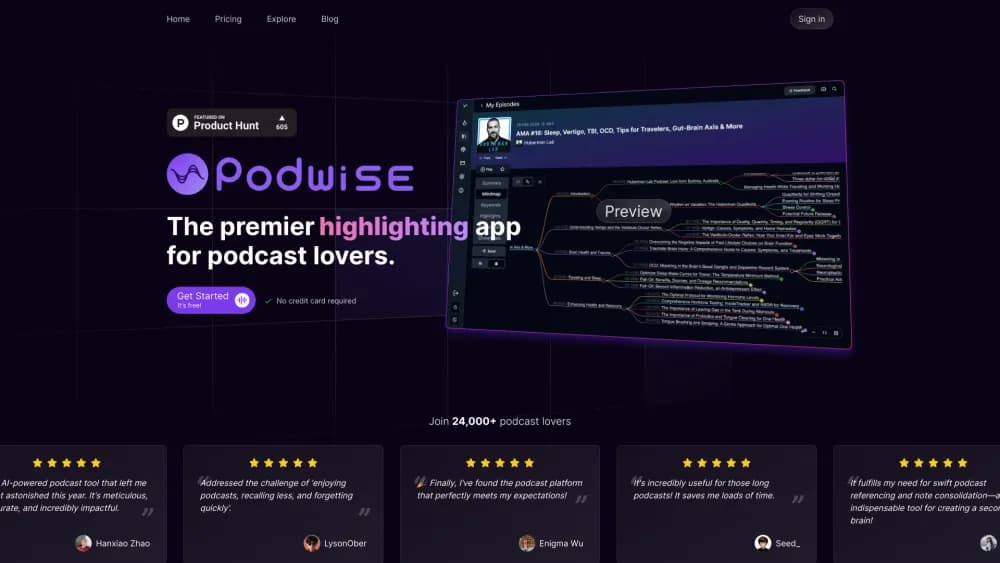
Podwise is an AI podcast app for listeners. It turns episodes from Apple Podcasts, Spotify, YouTube, and RSS feeds into summaries, mind maps, transcripts, and answers you can search later.
About Podwise
What Is Podwise
Podwise is a reading-first companion for people who listen to learn. Instead of pressing play and hoping the key points stick, you hand the app an episode and get back a structured set of notes: a short summary, a visual mind map, a full transcript, and a set of deeper insights. The company behind it is HardHacker Labs, a small team that built the product around one complaint listeners keep repeating, which is that they enjoy podcasts but remember very little of what they hear.
The tool is aimed at founders, students, researchers, and professionals who treat podcasts as a source of ideas rather than background noise. Because everything lands in one searchable library, an episode from six months ago is still available when a meeting or an essay calls for it.
The limits matter too. Podwise does not create podcasts, and it does not replace a listening app for playback. AI processing runs on a monthly credit count, so heavy listeners on the lower plan will hit the cap, and the free account is sized for trying rather than sustained use.
Getting Started
- Create an account at podwise.ai, or install the iOS or Android app and sign in with the same account.
- Pick a source: connect Apple Podcasts, Spotify, YouTube, or an RSS feed, or upload your own audio file.
- Choose an episode and start processing, which produces the summary, mind map, transcript, and insights within minutes.
- Read the summary first, then open the transcript to jump to any quoted moment.
- Save what matters to Notion, Readwise, Obsidian, Logseq, or as a Markdown file, and keep the episode in your library for later.
Product Information
A quick look at Podwise's pricing, supported platforms, and performance.
Best for
The users, tasks, and scenarios where this tool fits best.
Users
- Founders and operators
- Students and self learners
- Researchers and analysts
- Creators and writers
Tasks
- Summarizing a long interview
- Finding a specific quote
- Asking questions about an episode
- Exporting notes into a knowledge base
Scenarios
- Catching up on a backlog of saved episodes
- Preparing for a meeting after a relevant episode
- Listening across languages
Key features
AI Episode Summaries
Every processed episode opens with a short AI summary and a list of top takeaways, and the shape of the output depends on whether the conversation is an interview, a solo monologue, or a panel. The point is to give you the argument before you decide whether to listen, and the summary is usually enough to know whether the episode is worth the full hour.
Mind Maps of the Discussion
A generated mind map lays out how the main themes branch into sub topics, so the structure of a long conversation becomes visible at a glance. This helps most when an episode covers several ideas at once and a linear summary would bury the relationships between them.
Transcript Search Across the Library
Podwise keeps transcripts for everything you process and lets you search across all of them rather than one episode at a time. A search returns the matching lines with timestamps, which means finding that half remembered quote takes a search instead of a re-listen.
Ask Anything About an Episode
Ask Anything is a chat layer on top of an episode. You ask a question in plain language, and the answer is drawn from that episode's content. It is useful for checking whether a guest made a specific claim, or for pulling out details that a summary passes over.
Clips and Content Export
You can cut short clips from a transcript and send them, along with summaries, to Notion, Readwise, Obsidian, or Logseq, or download them as Markdown, SRT, or a mind map file. The export path matters because podcast notes are only useful if they land where your other notes already live.
Agents, CLI, and MCP Access
The CLI, the MCP server, and the agent skills let Podwise work inside tools like Claude, ChatGPT, and Cursor, turning each podcast mind map and podcast transcript into something an assistant can read directly. An agent can search episodes, pull a transcript, or ask a question without a browser open, which turns the episode library into a retrievable source for research workflows.
Processing in Twelve Languages
Episodes are processed and read in twelve languages, including English, Chinese, Japanese, and Spanish. A listener can follow a foreign language show through its summary and transcript, or keep everything in one language in their library.
Pros and cons
Pros
- The summary, mind map, transcript, and Q and A sit in one place, so a full episode becomes usable notes without switching between several tools.
- Search covers the entire processed library, which makes older episodes findable instead of forgotten.
- Export to Notion, Readwise, Obsidian, and Logseq means podcast notes join an existing knowledge base rather than forming a separate silo.
- The CLI, MCP server, and skills let AI assistants query podcast content directly, which is rare among podcast apps.
- Coverage spans Apple Podcasts, Spotify, YouTube, RSS, private feeds, and direct audio uploads, so most existing listening habits carry over.
Cons
- AI processing runs on a monthly credit count, and the Standard plan allows twenty episodes per month, which a daily listener will use up in under two weeks.
- Free accounts are limited enough that they work better as a trial than as a daily setup.
- The API, CLI, and MCP tooling is gated to the Pro plan and above, so the automation features cost serious money for occasional users.
- It handles understanding, not playback, so you still need your usual podcast player for the actual listening.
Frequently asked questions
Podwise turns podcast episodes into summaries, mind maps, transcripts, clips, and answers to questions about the episode. Listeners use it to capture what an episode said and find it again later, instead of relying on memory.
Related content
Explore related tools, skills, and articles for Podwise.
Podwise Alternatives

Prosp
Prosp · Writing · Voice & Language · MarketingProsp is an AI LinkedIn outreach tool built for agencies and sales teams, and it writes the message and the voice note in your own voice for each prospect so they actually reply. You connect your accounts, find leads, and let the AI draft and send personalized messages at scale, all from one inbox. It's built for people running outbound at volume. That's the whole pitch. Every touchpoint still has to feel human.

Wordly AI Translation
Wordly · Voice & Language · ProductivityWordly AI Translation is a real-time AI translation and captioning platform built for meetings, conferences, and events. It delivers live translation, captions, transcripts, and summaries in more than 60 languages, and attendees join by scanning a QR code or opening a link instead of using dedicated headsets. The platform works with Zoom, Microsoft Teams, Google Meet, and Webex, and it's designed for organizations that want multilingual access without hiring human interpreters for every session. Simple as that.
Musicful
Musicful AI · Voice & Language · VideoMusicful is an AI music generator and AI music video maker that turns text to music in minutes. Give it a text prompt, a set of lyrics, or a hummed melody and it returns a finished track with vocals and instruments. It also doubles as an AI song generator, produces music videos from the songs you create, and offers an AI cover tool plus a developer API. The platform runs in a web browser and through an Android app, so you can start a song on desktop and pick it up on your phone.