

Polyglotta
Polyglotta · Writing
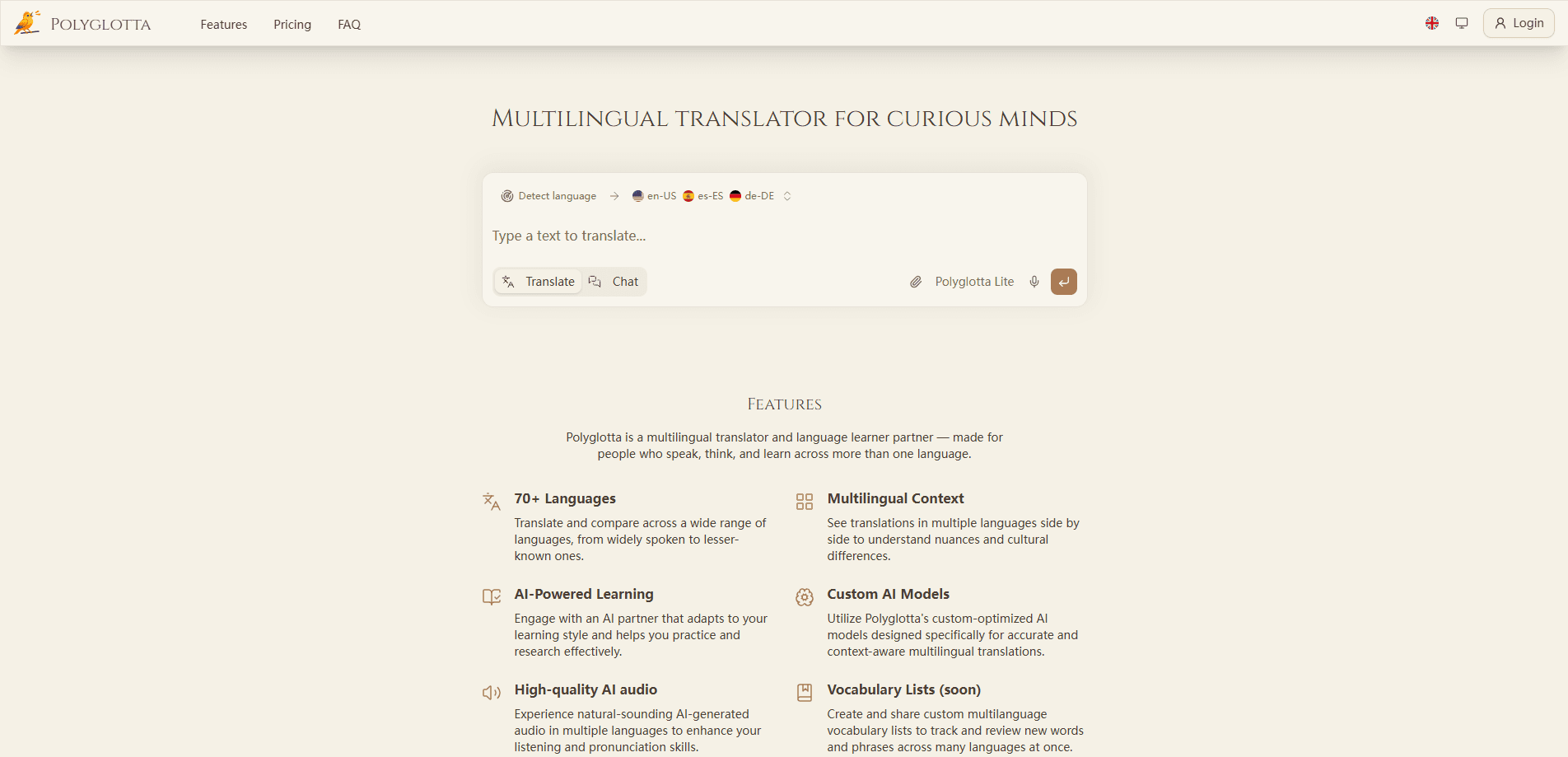
Polyglotta is a multilingual translator and AI language learning platform that lets you translate multiple languages side by side. Type your text once, and it comes back translated across 70+ languages at the same time. Instead of giving you one translation and calling it done, it puts several languages next to each other so you can see how meaning shifts between them. The app pairs that comparison view with an interactive AI partner, high-quality voice playback, and a light community layer built around translation threads and streaks.
About Polyglotta
What Is Polyglotta
Polyglotta is a web app for people who live and work across more than one language. Its core idea is simple: translation quality is easier to judge when you can see several languages next to each other. You type or paste text once, pick your target languages, and the app streams translations back in parallel. That layout helps language learners spot nuance and helps translators sanity-check their own work.
The platform runs on custom AI models tuned specifically for translation rather than repurposed chat models. According to the developers, three leading AI providers power those models, and the app offers two modes: a direct Translate mode and a conversational Ask mode where an AI partner responds to your questions in context. It also includes native-quality AI voice for hearing pronunciation, saved chat history, language auto-detection, and public profiles with activity tracking.
The main limitation right now is scope. The custom glossary feature, which lets you build and share your own word lists, is still marked as coming soon, so the vocabulary side isn't finished. Polyglotta also runs in the browser only, with no mobile app or Google Play download. Pricing details aren't published on the public site, so check the app directly before assuming a free tier.
Getting Started
- Open polyglotta.app in your browser and create an account, or sign in if you already have one.
- Pick your source and target languages, or let the app detect the source automatically.
- Choose Translate for a direct translation or Ask to chat with the AI language partner.
- Compare the side-by-side results, read the AI voice playback, and save the chat if you want to revisit it.
- Vote on translations or join discussion threads to refine a result with other users.
Product Information
A quick look at Polyglotta's pricing, supported platforms, and performance.
Best for
The users, tasks, and scenarios where this tool fits best.
Users
- Multilingual learners
- Working translators
- Curious travelers
Tasks
- Comparing one phrase across several languages
- Practicing listening and pronunciation
- Checking a translation before sending it
- Building vocabulary context
Scenarios
- Drafting a message for an international team and wanting to confirm the tone still reads right.
- Studying a language and hitting a phrase that doesn't map cleanly to your native tongue.
- Preparing travel notes and wanting a spoken version to learn before a trip.
Key features
Side-by-Side Translation Comparison
Most translators answer with one result. Polyglotta shows several languages at once, so you can watch how the same sentence is handled across a wide language range. That parallel view is the whole point of the app. Want to see it in action? Pick three languages and translate the same line. It's what makes the tool useful for learners and translators rather than casual one-off lookups.
Two Modes: Translate and Ask
Translate mode gives you a direct conversion. Fast, to the point. Ask mode turns the same box into a conversation, where an AI partner answers questions about the wording and the context. You can switch between them depending on whether you want an answer or an explanation. Same text, different outcome.
Custom AI Models Tuned for Translation
The app runs on models built specifically for translation. Not a general chat model doing double duty. According to the developers, three leading AI providers back these models, and responses stream in live as they generate. The translation focus shows up most in how the app handles context over literal word swaps.
High-Quality AI Voice
Every translation can be played back in a natural-sounding voice across languages. For learners this is the difference between reading a phrase and actually hearing it. The audio also makes it easier to catch pronunciation details that text alone hides. Try it on a language you don't speak.
Saved Chats and Language Auto-Detection
Polyglotta keeps your conversation history and manages it in one place. You won't lose a useful translation you found last week. Language auto-detection means you can paste text without naming the language first. That saves a step when you're bouncing between languages. Small thing. Real time saver.
Community Translation Threads
You can vote on translations and jump into discussion threads where users add feedback and context. Over time that feedback is meant to sharpen the underlying translations. It's a lighter layer than a full forum. Still, it gives the app a reason to feel shared rather than solitary.
Pros and cons
Pros
- Compares translations across 70+ languages in one view, which is genuinely rare among translators.
- Two modes cover both quick conversion and deeper questions about wording.
- AI voice playback helps learners train listening and pronunciation, not just reading.
- Saved chats and auto-detection keep repeat work fast.
- Community voting and threads give translations a way to improve over time.
Cons
- The custom glossary is still coming soon, so the vocabulary feature isn't ready yet.
- No mobile app or Google Play download, meaning you're tied to a browser.
- Pricing isn't published on the public site, so budgeting takes extra digging.
Frequently asked questions
Polyglotta is a multilingual translator and language learning app. You use it to translate text across 70+ languages and see the results side by side, then dig into why a phrase was handled a certain way with the AI partner.
Related content
Explore related tools, skills, and articles for Polyglotta.
Polyglotta Alternatives

Google EmbeddingGemma 2
Google DeepMind · Writing · Image · CodingGoogle EmbeddingGemma 2 is a 740M-parameter open model that turns text, code, images, audio, and video frames into vectors in one 768-dimension space, running on phones and laptops.

MePersona
MePersona, Inc. · Writing · Productivity · MarketingMePersona is an AI unified inbox for creators. It learns your voice, drafts replies to fan messages from 12 platforms, and sends only what you approve.

Fluence
Yay Software (Yannick Huchard) · Writing · Voice & Language · ProductivityFluence is an Android app that reads PDFs, EPUBs, Word files and web articles aloud, follows each sentence as it speaks, and answers questions about the text on the phone itself.