

PostSmithAI — AI-Powered LinkedIn Posts
Extfy · Other
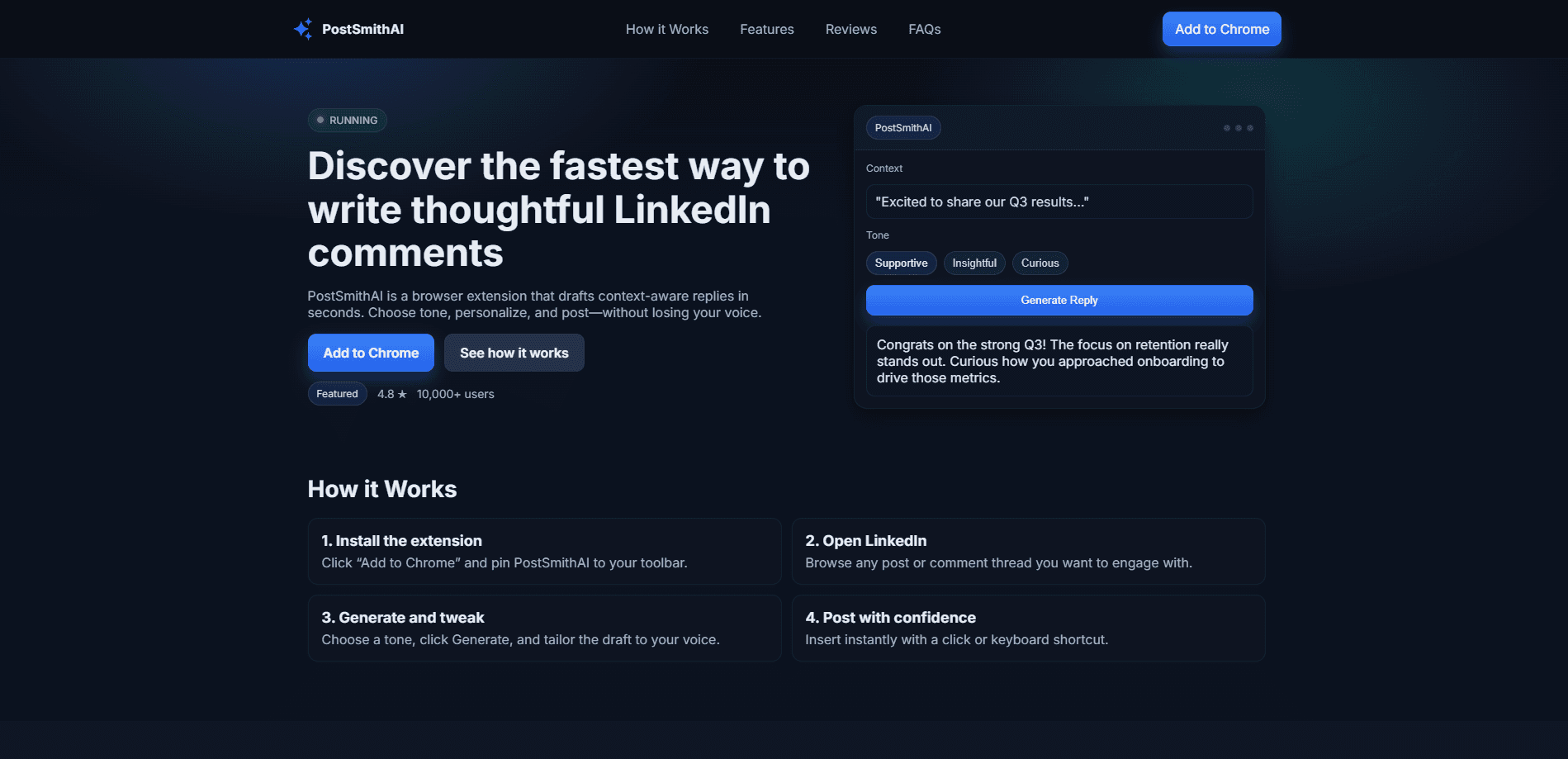
PostSmithAI is a browser extension that works as an AI LinkedIn post generator and a LinkedIn comment generator in one. It reads the post you're looking at, suggests a reply that fits the context, and lets you pick a tone before you insert it. The pitch is simple: engage with more people in the time it used to take to write one thoughtful comment, while still sounding like yourself.
About PostSmithAI — AI-Powered LinkedIn Posts
What Is PostSmithAI
PostSmithAI is a Chrome extension built for one narrow job: helping you write LinkedIn comments faster. Instead of staring at a post wondering what to say, you click a button, get a draft, adjust the tone, and post it. The extension reads the surrounding context so the suggestion relates to what was actually said, not a generic "Great post!" that everyone scrolls past.
It's aimed at people who treat LinkedIn as a growth channel. Founders, marketers, sales reps, recruiters, and anyone told to "engage more" but who finds posting comments a grind. The developer positions it as a compliance-focused tool, meaning it drafts comments rather than automating likes, connection requests, or mass engagement, so your activity stays under your own account and control.
The main limits are worth knowing up front. It's a Chrome extension for LinkedIn, so it runs on desktop browsers, not mobile. It writes comments and posts, not full-blown content strategy, and the quality of a suggestion still depends on how specific you've made your personalization settings. If you're weighing it against other LinkedIn engagement extensions, the thing to test is whether the drafts sound like you.
Getting Started
- Install the extension from the Chrome Web Store and pin PostSmithAI to your toolbar.
- Open LinkedIn and browse to any post or comment thread you want to reply to.
- Click the extension, choose a tone like supportive, insightful, or playful, then hit Generate.
- Edit the draft so it matches your voice, then insert it into the comment box with a click or a keyboard shortcut.
- Review recent drafts in your history if you want to reuse or refine an earlier reply.
Product Information
A quick look at PostSmithAI — AI-Powered LinkedIn Posts's pricing, supported platforms, and performance.
Best for
The users, tasks, and scenarios where this tool fits best.
Users
- Founders and solopreneurs
- Sales and business development reps
- Recruiters and marketers
Tasks
- Writing a quick comment on a trending post
- Drafting your own LinkedIn posts
- Replying across many languages
Scenarios
- Daily engagement blocks
- Networking before an event or launch
- Non-native English speakers
Key features
Context-aware replies
PostSmithAI reads the post you're responding to and drafts a comment that reflects its actual content. That matters because generic replies get ignored. The extension avoids the copy-paste feel by working from what's on screen rather than a fixed template.
Tone control
You can pick how a comment should land before generating it. Supportive, insightful, and playful are among the presets, which lets you match the emotional register of the original post instead of sounding flat. For anyone whose comments all read the same way, this is the feature that fixes it.
Templates
Save the prompts and formats you use most and reuse them. If you always congratulate people on promotions or ask a follow-up question on industry posts, templates keep those patterns consistent without retyping them every time. What if your best comments are the ones you already wrote? This feature assumes you'll find them and keep them.
Keyboard shortcuts
Generate, copy, and insert without touching your mouse. It's a small thing until you're working through a feed of posts, where the saved seconds add up to a real difference in how many people you reach.
Multi-language support
The extension writes replies in many languages, which widens who you can engage with. If a large share of your network posts in a second language, this removes the hesitation of drafting in something you're rusty at.
Draft history
Recent outputs stay accessible so you can go back, refine, or repurpose a comment that worked. It's a lightweight way to build a personal library of what resonates.
Personalization
You can add your role, product, and topics of interest so suggestions sound tied to what you actually do. Without this, drafts lean generic; with it, they start to resemble the way you'd phrase things yourself.
Privacy-first design
The extension is built to run locally with minimal data sent, and the developer states your content stays yours. For a tool that touches your professional network, that's a reasonable baseline to check before installing anything.
Pros and cons
Pros
- Cuts the blank-page hesitation of LinkedIn commenting, so you can engage with more posts in the same time.
- Context-aware drafts beat generic templates, which means less editing before you post.
- Tone presets and personalization keep comments from sounding like a bot wrote them.
- Keyboard shortcuts and draft history speed up daily engagement blocks noticeably.
- Runs as a lightweight Chrome extension with a free tier to test before paying.
Cons
- It's desktop-only. There's no mobile support, so iPhone and Android users can't use it on the app.
- It writes comments, not strategy. If you don't know what to engage with, the tool won't decide that for you.
- Drafts still need a human pass. Posting raw AI text at scale is exactly the behavior LinkedIn's user agreement discourages.
Frequently asked questions
It's a Chrome extension that drafts LinkedIn comments and posts for you. You open a post, pick a tone, and it generates a reply you can edit and insert.
Related content
Explore related tools, skills, and articles for PostSmithAI — AI-Powered LinkedIn Posts.
PostSmithAI — AI-Powered LinkedIn Posts Alternatives
BinkBink
BinkBink · OtherBinkBink is a free online game platform and AI game maker that lets anyone turn a short text description into a playable browser game. You can jump into hundreds of community-made games. Or describe your own idea and play it in seconds, then share it with friends. Want to create your own game? You don't need to code. No engine setup, no download, no hassle.

Audiogen
Audiogen Inc. · OtherAudiogen is an AI music generator built by Audiogen Inc., a small research team that spent about 2.5 years training its own generative music model and designing a web interface around it. Instead of a plain text box, this AI music tool turns the timeline into a beginner-friendly Generative Audio Workstation, or GAW, where inpainting, extending, remixing and stem editing work more like painting on a canvas. The product is still in beta, so access runs through a waitlist or an invite. Paid plans aren't published yet.

Aiml API
AIMLAPI OÜ · OtherAiml API is a unified AI model API that puts more than 1000 models from OpenAI, Google, Anthropic, and others behind one endpoint and one bill. You write code against a single OpenAI-compatible schema, then switch between chat, image, video, and audio models by changing a model string. It suits developers and small teams who want multi-model access without juggling a dozen separate provider accounts, and it removes the usual billing headache that comes with testing several vendors. One key covers it all.