
Prankify AI
Azaan Naqvi · Voice & Language
Prankify AI is a browser-based AI voice generator that turns your typed text into celebrity-style voice messages and lighthearted prank calls.
About Prankify AI
What Is Prankify AI
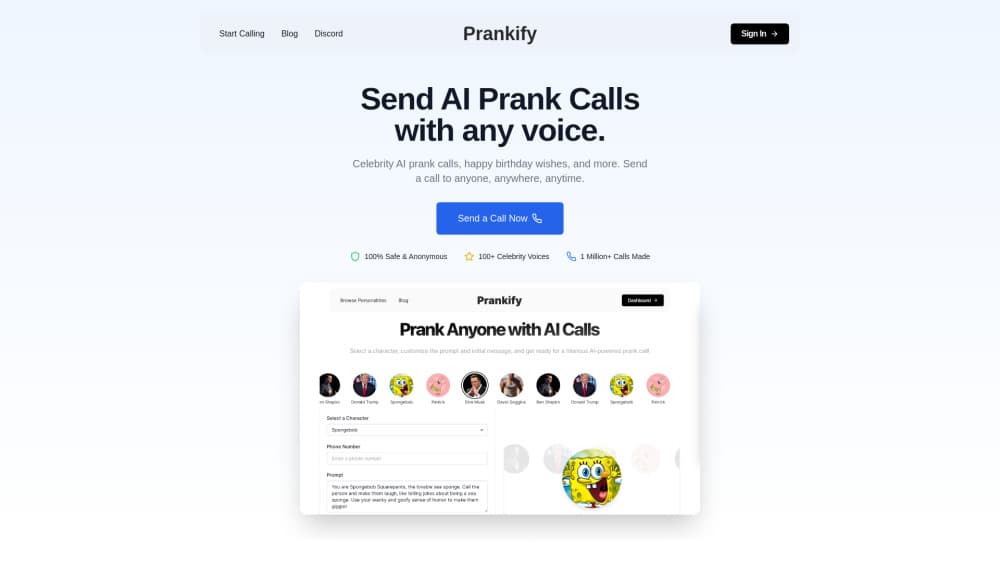
Prankify AI is a web app for making short audio clips that sound like famous people. You pick a voice from its roster of impersonations, type what you want that voice to say, and the platform renders a shareable message in seconds. The catalog leans on recognizable personalities: actors, athletes, rappers, crypto figures, and cartoon characters.
The appeal is that it skips the usual production chain. No microphone, no editing, no voice actor. If you want a quick bit for a group chat or a short video, you can have one before your coffee goes cold. For anyone who's ever priced out a voice actor for a throwaway joke, the gap between the idea and the finished clip here is a small subscription and about sixty seconds of typing.
It's built for entertainment only, and the terms say so plainly. You're expected to keep clips family-friendly and you can't use them to harass or impersonate anyone for real. There's no phone dialer behind the marketing phrase "prank call" here. Prankify generates a voice message you then share yourself, which is a meaningful limit if you came expecting automated outbound calls. So what do you actually get when the copy promises a prank call?
Getting Started
- Go to prankify.lol and open the voice maker. No download is needed since it runs in the browser.
- Pick a voice from the list. Each entry comes with a short description so you know the persona you're getting.
- Type your message into the text box. Keep it within your plan's clip limit.
- Generate the clip and listen back, then adjust the wording if a line lands flat.
- Download or share the audio, or copy it into a social post.
Product Information
A quick look at Prankify AI's pricing, supported platforms, and performance.
Best for
The users, tasks, and scenarios where this tool fits best.
Users
- Social media creators who want a hook for short videos without hiring voice talent, as long as the clip stays within the plan's length cap.
- Prank-minded friend groups sending a funny audio message for a laugh, with the understanding that the clip is shared manually rather than dialed out.
- Meme and crypto-community regulars who recognize the roster of founders, traders, and cartoon characters on offer.
Tasks
- Generating a celebrity voice message in seconds from a short script, which suits one-off gags better than long-form narration.
- Building a themed audio bit for a birthday or inside joke where a familiar voice does the heavy lifting.
- Testing a hook before committing to a full voiceover project.
Scenarios
- A weekend project where you want something funny to post by Sunday.
- Group-chat banter where a single shareable clip is the whole point.
- Drafting sample audio to pitch a bigger content idea to a client or collaborator.
Key features
Celebrity-Style Voice Catalog
The core draw is a growing list of impersonated voices, from Morgan Freeman-style narration to SpongeBob's laugh and Queen Elizabeth II's dry delivery. You don't record anything yourself, and there's no voice changer to configure. You choose a persona, and the system speaks in that style. Think of it as text to speech celebrity voices, minus the setup most tools of that kind demand.
Text-to-Voice in Seconds
Type a line, hit generate, and you get audio back fast. The workflow is short by design: pick a voice, write the message, render, share. This AI voice maker skips the timeline, the mixing desk, and the export settings most people never wanted to learn in the first place.
Plan-Based Clip Lengths
Each tier caps how long a single clip can run, from 30 seconds on the entry plan up to 3 minutes on the top one. If your script is longer than your cap, you'll need to trim it or step up a tier.
Credit System
Usage runs on voice credits. The $5 plan includes 50 per month, the $9 plan 200, and the $16 plan 400. Credits are the real limit to watch, not clip count alone. If you treat it as an AI voice changer you'll hit that ceiling faster than someone who renders one clip every few days, so budget accordingly.
Quality Tiers
Audio quality scales with price. The cheapest plan gives standard output, the middle tier steps up to HD, and the top tier advertises Ultra HD. For casual sharing the difference is minor. For anything you'll publish, it isn't. A standard-quality clip that sounds fine on a phone speaker can fall apart the moment it plays through a real set of headphones or a video edit.
Pro Voice Editor
The Studio plan adds an editor for tweaking your output before you export. That's the tier aimed at people producing clips regularly rather than cracking a joke once. If you're posting weekly and want control over pacing or tone before a clip goes public, the editor is the reason to skip the cheaper tiers entirely.
Voice Requests
Studio subscribers can ask for new voices to be added. It's a small perk, but it says the catalog is meant to keep growing rather than stay fixed.
Pros and cons
Pros
- Fast turnaround. You can go from idea to finished celebrity voice message in under a minute.
- A recognizable roster that spans actors, athletes, rappers, and cartoon characters, so there's likely a voice that fits your bit.
- Cheap entry point at $5/month if you only want the occasional clip.
- No install. It runs in the browser, which lowers the barrier for casual users.
Cons
- The "prank call" framing oversells what you get. Clips are shared manually, so there's no automated calling.
- No free tier at all, which means you can't test output quality before paying.
- Credits run out faster than beginners expect, and the 30-second cap on the cheapest plan is tight.
- It's entertainment only, so anyone wanting a voice for a genuine project should look elsewhere.
Frequently asked questions
It's an entertainment tool for making short audio clips in celebrity-style voices. You type a message, choose a voice, and get a shareable clip. It's not a business voiceover service or a real calling platform.
Related content
Explore related tools, skills, and articles for Prankify AI.
Prankify AI Alternatives

Prosp
Prosp · Writing · Voice & Language · MarketingProsp is an AI LinkedIn outreach tool built for agencies and sales teams, and it writes the message and the voice note in your own voice for each prospect so they actually reply. You connect your accounts, find leads, and let the AI draft and send personalized messages at scale, all from one inbox. It's built for people running outbound at volume. That's the whole pitch. Every touchpoint still has to feel human.

Wordly AI Translation
Wordly · Voice & Language · ProductivityWordly AI Translation is a real-time AI translation and captioning platform built for meetings, conferences, and events. It delivers live translation, captions, transcripts, and summaries in more than 60 languages, and attendees join by scanning a QR code or opening a link instead of using dedicated headsets. The platform works with Zoom, Microsoft Teams, Google Meet, and Webex, and it's designed for organizations that want multilingual access without hiring human interpreters for every session. Simple as that.
Musicful
Musicful AI · Voice & Language · VideoMusicful is an AI music generator and AI music video maker that turns text to music in minutes. Give it a text prompt, a set of lyrics, or a hummed melody and it returns a finished track with vocals and instruments. It also doubles as an AI song generator, produces music videos from the songs you create, and offers an AI cover tool plus a developer API. The platform runs in a web browser and through an Android app, so you can start a song on desktop and pick it up on your phone.