

Privacy AI App
AcmeUp Inc. · Other
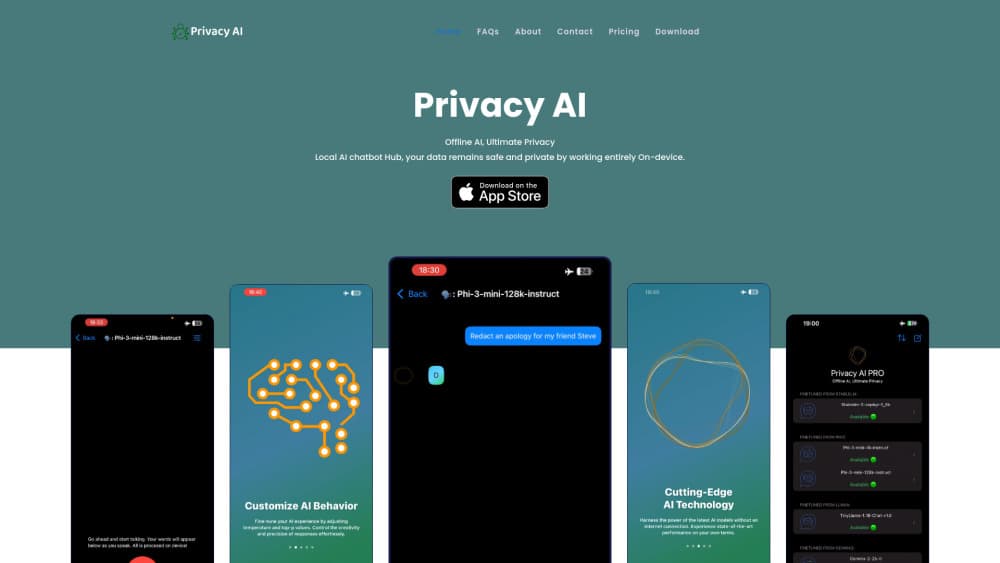
Privacy AI App is a local AI chatbot hub for iPhone, iPad and Mac that runs open-source language models on-device, so your chats work offline and stay private.
About Privacy AI App
What Is Privacy AI App
Privacy AI App is a private AI assistant for Apple devices. You download it, pick a language model, and chat. The model runs on your phone, tablet or Mac, so a question about your medical report or a draft of a resignation letter never touches a server. The tagline on the site sums it up: offline AI, ultimate privacy.
The problem it goes after is the trade most AI chatbots ask for. Free and cheap assistants usually pay for themselves by collecting your prompts, and many of them stop working the moment you lose signal. Privacy AI App steps out of that bargain. It collects no chat data and needs no connection once a model is downloaded, which matters on a plane, in a basement office or anywhere you would rather not route a private thought through someone else's data center.
The build is Apple-only and indie. One developer, Pablo Butron, maintains it, and the app leans on quantized models tuned to run inside the memory ceiling of a phone or a Mac. That focus is the point, and it is also the main limit. There is no Android version, no web app and no shared team history, so it fits a person who wants a private assistant on Apple hardware rather than a team that needs a collaboration hub.
Getting Started
- Download Privacy AI App from the App Store on a compatible iPhone, iPad or Mac running iOS 18 or later.
- Open the app and start chatting with the model that ships preloaded, or browse the list to see which larger models your device can handle.
- Unlock the full model list with a subscription or the one-time Founders purchase if the default model is not enough.
- Tune the response style with sampling temperature, Top-p value and a custom system prompt.
- Download your chosen models once, then keep using them with no internet connection.
Product Information
A quick look at Privacy AI App's pricing, supported platforms, and performance.
Best for
The users, tasks, and scenarios where this tool fits best.
Users
- Privacy-conscious iPhone and Mac owners who want an AI assistant that does not send prompts to a server, and who are willing to trade some cloud power for that guarantee.
- People who work without reliable internet, such as travelers, field workers or anyone in a spotty-signal area, since downloaded models keep running with no connection.
- Indie developers and tinkerers who like open-source models like Llama, Mistral and Gemma 2 and want to run them on a phone or laptop without a cloud account.
- Writers and students handling sensitive drafts, notes or research who would rather keep the raw text on their own device than in someone else's logs.
Tasks
- Asking private questions. A medical, legal or financial question stays on the device, so nothing is stored on an external server.
- Drafting and editing text. You can rewrite emails, essays or messages with a model that never sees an internet connection.
- Running quick local lookups. Searchable chat history keeps past conversations on hand for reference without a cloud sync.
- Choosing and comparing models. The app shows only the models that fit your device, so you can test a smaller model against a larger one and keep the fit.
- Working through a flight or a commute. Models already downloaded keep answering when there is no Wi-Fi or mobile data.
Scenarios
- A freelance writer on a long flight who wants to keep drafting without paying for in-flight Wi-Fi. Downloaded models cover the whole trip.
- A clinician or lawyer who needs a fast second pass on text that cannot leave a regulated device. On-device processing keeps it in bounds.
- A student on an older iPhone. The app hides models the hardware cannot run, so it stays usable instead of crashing on an oversized download.
- A Mac user who wants one assistant across desktop and phone. The same subscription and model list carry over to compatible Apple devices.
- Someone cutting ties with cloud chatbots over data worries. Local processing removes the collection step entirely.
Key features
Fully offline, on-device chat
Privacy AI App runs its language models directly on your Apple hardware, so a conversation works with no internet connection at all. Once a model is downloaded, every question and answer stays on the device. That is the feature the whole product is built around, and it is what separates it from cloud chatbots that quietly log your prompts.
A library of open-source models
The app packs open-source LLM options such as Gemma 2, Llama, Mistral, Phi-3 and StableLM, and the list updates over time. It shows only the models your specific device can run, which takes the guesswork out of choosing. You start with one model for free and unlock the rest with a subscription or a one-time purchase.
Quantized models for real hardware
Phones and laptops have far less memory than a data center, so Privacy AI App uses quantized versions of larger models that fit that ceiling. Quantization shrinks a model so it runs smoothly on a limited-RAM device, and the developer says it also cuts down on hallucinations. The trade is a small dip in raw capability for a speed and size that actually runs.
Custom sampling controls
You can adjust sampling temperature, Top-p value and the system prompt to change how the assistant answers. A low temperature keeps replies focused and factual, while a higher one makes the model more varied. This level of control is unusual in a mainstream chatbot and it lets you shape the tone without touching code.
Searchable chat history
Conversations are stored and searchable, so you can pull up an old exchange without scrolling through months of chat. The history lives on the device along with everything else, which keeps the reference value of past chats without a cloud backup that would defeat the privacy promise.
Family Sharing and one-time option
A subscription supports Family Sharing, so family members can use the models on their own compatible devices under one purchase. If you would rather not pay monthly, the one-time Founders purchase unlocks the same models without a recurring charge. Both paths reflect that the app is a solo-developer project funded by users.
Pros and cons
Pros
- Chats run fully on-device, so prompts and replies never reach an external server.
- Works offline once models are downloaded, which keeps it usable on planes and in weak-signal areas.
- Access to open-source models like Gemma 2, Llama and Mistral, with the app filtering by what your device can run.
- Custom sampling temperature, Top-p and system prompts give control that most consumer chatbots do not offer.
- Family Sharing and a one-time Founders purchase give two ways to pay, alongside a free tier.
- Searchable history stays local, so past conversations stay useful without a cloud sync.
Cons
- Apple only. There is no Android or Windows version, so anyone who does not own an iPhone, iPad or Mac is out.
- Small models trail the largest cloud systems. A quantized on-device model can miss nuance that a server-scale model handles, which shows up on hard reasoning tasks.
- The free tier includes just one preloaded model, so testing the wider library means paying for a subscription or the Founders option.
- As an indie project, the app depends on one developer for updates and support, which is a risk if it slows down.
Frequently asked questions
Privacy AI App is a local LLM app and private AI assistant for Apple devices, so people use it for the same everyday tasks they would bring to any chatbot. The difference is that the model runs on your iPhone, iPad or Mac instead of a server, so questions, drafts and notes stay on the device. It works with no internet connection once a model is downloaded.
Related content
Explore related tools, skills, and articles for Privacy AI App.
Privacy AI App Alternatives

Odyssey 3
Odyssey · OtherOdyssey-3 is Odyssey's foundation world model. It simulates physics in real time, turns a prompt into an interactive environment, and adapts to robots, cars and games.

JarvisCore
Prescott Data · Coding · Productivity · OtherJarvisCore is an open source Python runtime where AI agents work as equal peers on an agent mesh, claim tasks from a shared ledger, and reach external services through a zero-trust broker.
Clef
Cloudflare · Business · OtherClef is Cloudflare's open-source decision model for Workers AI. It returns calibrated probabilities for typed questions, not generated text, so agents can classify, route, and act fast.