

Project Ambience
Project Ambience · Voice & Language
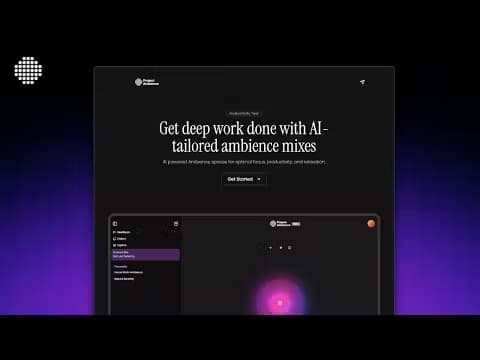
Project Ambience is an AI tool that builds ambience spaces for focus, study, rest, and sleep. You describe what you need, it generates a sound mix, and a Pomodoro timer keeps you on track.
About Project Ambience
What Is Project Ambience
Project Ambience is a web app that generates an AI soundscape to order. Instead of digging through playlists, you pick a goal like focus, study, relax, or sleep, and the generator blends sounds into a space that fits that mood. The tool sits between a white noise player and a full music app, aimed at people who find lyrics distracting but still want something playing in the background.
It leans on neuroscience claims in its marketing. The site says its mixes can improve focus retention by up to 40% for deep-concentration tasks, and points to the idea of lowering cortisol. Those numbers come from the maker, not an independent study, so treat them as a pitch rather than a proven result. What you actually get is a curated library, an AI generator, and a built-in Pomodoro timer.
The limit is scale and polish. It's a small product with a few hundred users, no mobile app, and a narrow scope, so if you need a full music catalog or offline playback, this isn't built for that.
Getting Started
- Open projectambience.com in your browser. There's no account to create for the free tier.
- Choose a category, like Focus, Study, Relax, or Sleep, or type a description into the AI generator.
- Let the generator build a mix, then tweak volume and playback until it sits right in the background.
- Start the built-in Pomodoro timer to split work into focused blocks with short breaks.
- Use your five free AI generations, then buy the one-time add-on if you want more.
Product Information
A quick look at Project Ambience's pricing, supported platforms, and performance.
Best for
The users, tasks, and scenarios where this tool fits best.
Users
- Students
- Remote workers
- Light sleepers
Tasks
- Deep work audio
- Study and revision
- Winding down in the evening
Scenarios
- A noisy shared space where you can't control the room
- A work-from-home afternoon that keeps drifting
- Replacing a lyric-heavy playlist you keep skipping
Key features
AI Ambience Generator
You describe the sound you want and the generator builds a mix from that prompt. It saves the manual hunt through long playlists and lets you shape a space around a specific task, like "rainy cafe for coding". The free tier includes five generations.
Curated Ambience Spaces
The app ships with set categories for Focus, Study, Relax, and Sleep, each with its own sound profiles. These work as ready-made starting points when you don't want to write a prompt at all.
Built-in Pomodoro Timer
A Pomodoro timer runs inside the app, splitting work into focused intervals with short breaks. Because it lives right next to the sound controls on the same page, you can run a focus block and its audio together instead of juggling two separate tools and losing your place each time.
Neuroscience-Based Sound Design
Project Ambience says its mixes are built around research on focus and stress. The claim of up to 40% better focus retention comes from the maker, so take it as a design goal rather than a verified benchmark.
Browser-Based, No Install
Everything runs in the browser, so there's nothing to download on desktop. The trade-off is there's no native mobile app yet, and you stay online to use it.
Simple One-Time Upgrade
The add-on is a single $5 payment that raises your AI generations to 50. There's no subscription, which keeps the cost predictable if you only want more generations.
Pros and cons
Pros
- Free tier is genuinely usable, with the library, generator, and Pomodoro timer all unlocked.
- One-time $5 add-on avoids a recurring subscription for a small helper tool.
- The lyric-free focus leans on ambient mixes, which suits people who find music distracting.
- Bundles a Pomodoro timer with the audio, so focus blocks and sound live in one place.
Cons
- No mobile app, so phone users must open it in a browser and stay online.
- The focus and cortisol figures come from the maker, not independent studies.
- Free tier caps you at five AI generations, which runs out fast if you like tweaking mixes.
- The library and feature set are small next to full soundscape or music apps.
Frequently asked questions
Yes. The core library, AI generator, and Pomodoro timer are free, with up to five AI generations. A one-time $5 add-on raises that to fifty generations.
Related content
Explore related tools, skills, and articles for Project Ambience.
Project Ambience Alternatives

Foley
Hanamori Labs, LLC · Voice & Language · Productivity · AI AssistantFoley is a voice to-do list that turns a spoken sentence into a filed task, complete with project, date and time, then helps you plan the day around what is already there.

HireKey
HireKey · Voice & Language · Productivity · LeaningHireKey is an AI job search copilot built by a former tech recruiter. It checks role fit, tailors resumes, runs interview practice and tracks every application.

Fluence
Yay Software (Yannick Huchard) · Writing · Voice & Language · ProductivityFluence is an Android app that reads PDFs, EPUBs, Word files and web articles aloud, follows each sentence as it speaks, and answers questions about the text on the phone itself.