

ProMindGPT - AI Powered Content Generation
ProMind AI · Coding
ProMindGPT, now ProMind AI, is an AI content generator: GPT-powered agents draft tweets, blog posts, LinkedIn copy, and YouTube scripts, fix code, and keep session context.
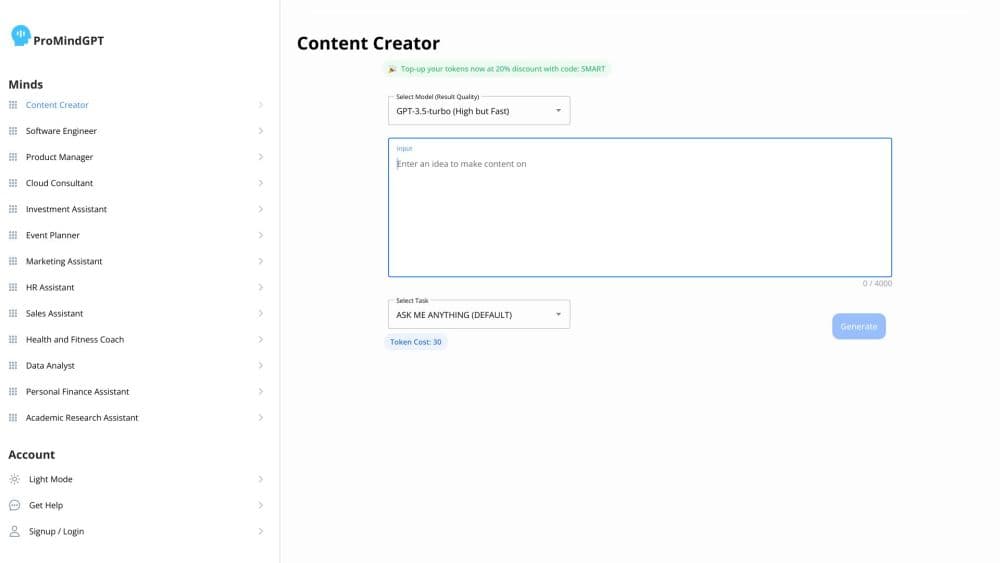
About ProMindGPT - AI Powered Content Generation
What Is ProMind AI
ProMind AI is a web workspace that doubles as an AI writing assistant and a code helper, with narrow agents bundled under a single login. Each agent tackles one job: a tweet, a blog post, a LinkedIn update, a YouTube script, or a piece of broken code. You pick the tool, describe what you need, and the agent writes the first draft with an OpenAI model behind it. The personal assistant mode goes further by remembering earlier conversations, so follow-up requests don't start from zero.
The product started life as ProMindGPT and still uses that name in places. The pitch is speed for people who write for work. A marketer can turn one idea into posts for three platforms. A developer can paste an error message and get a fix with an explanation attached. Nobody has to learn prompt engineering to get a usable result, because each agent arrives with its own instructions.
The limits are worth knowing up front. Output quality depends on the underlying GPT model, so long articles still need a human pass for facts and tone. Credits are metered, which means heavy use costs more. And the service runs entirely in the browser, so there's no offline mode or native app.
Getting Started
- Open promind.ai and create an account with an email address or a Google login.
- Land on the dashboard and pick an agent from the list, such as a blog writer, a tweet generator, or a code fixer.
- Describe the task in plain language. Add a tone, an audience, or a target length if the agent asks for one.
- Review the draft and ask for changes in the same chat, or copy it out into your own editor.
- For repeat work, open the personal assistant and keep building on the conversation it remembers.
Product Information
A quick look at ProMindGPT - AI Powered Content Generation's pricing, supported platforms, and performance.
Best for
The users, tasks, and scenarios where this tool fits best.
Users
- Solo creators
- Social media managers
- Developers who write docs
Tasks
- Drafting short social copy
- Writing blog outlines and first drafts
- Turning an article into a video script
- Debugging a code snippet
Scenarios
- Running a small content calendar
- Learning a new topic
- Editing before a deadline
Key features
Agent Library for Writing Tasks
The core of ProMind AI is a menu of separate agents rather than one open chat box. Each one is tuned for a format: a tweet, a blog post, a LinkedIn update, a YouTube script, or a piece of copy. That structure keeps output closer to the shape you need, and you spend less time explaining format in the prompt.
Personal Assistant With Memory
The assistant mode remembers what you discussed earlier in the session. Ask for a plan, then ask it to break the plan into steps, and it builds on the first answer instead of starting over. For research or planning work, that continuity saves repeating context with every message.
AI Code Fixer
Paste code and an error message, and the agent returns a corrected version with an explanation. It handles common syntax and logic mistakes and explains the change in plain language. It won't run your code, so you still need to test the fix in your own environment.
Platform-Specific Post Generators
The LinkedIn post generator and the tweet agent understand the shape of each platform. Tweets come out short and punchy, LinkedIn posts come out in longer paragraphs with a hook. You can ask for several variants at once and choose the one that fits your voice.
Blog and YouTube Script Builders
For longer formats, the blog post generator drafts sections you can fill in, and the YouTube agent turns material into spoken script lines. Both tools work best when you supply facts, links, or a point of view first, since the model fills gaps with generic text otherwise.
Chat-Style Workspace
Every agent runs in a chat window, so revisions happen by asking. You can say "make it shorter" or "add an example" and get an updated draft in place. It's a low-friction way to work for anyone who's used a chatbot before.
Pros and cons
Pros
- Separate agents for separate formats cut down the prompt writing, and the output arrives shaped for where it's going.
- The memory in assistant mode keeps long sessions coherent, which matters for planning and research work.
- Code fixes come with an explanation, so you learn what broke instead of just getting a patch.
- The free plan lets you test the writing agents before you commit to a subscription.
Cons
- The free tier is limited by credits, so trying a GPT-4 content tool across several agents can drain them fast.
- Long-form blog output often reads generic and needs a rewrite for facts, examples, and brand voice.
- There's no API, so you can't plug the agents into your own tools or build automation on top.
- Everything runs in a browser, and the interface leans on chat, which some people find slower than a document editor.
Frequently asked questions
It's a content tool for working professionals. You use it to draft social posts, blog articles, YouTube scripts, and to fix code errors, all from one account. It also has an assistant mode for planning and research questions.
Related content
Explore related tools, skills, and articles for ProMindGPT - AI Powered Content Generation.
ProMindGPT - AI Powered Content Generation Alternatives

Base Code
Base44 (Wix) · Coding · ProductivityBase Code is a shared cloud development environment from Base44. Teammates describe changes to an existing GitHub codebase in chat, preview them live and send them back as pull requests.

Google EmbeddingGemma 2
Google DeepMind · Writing · Image · CodingGoogle EmbeddingGemma 2 is a 740M-parameter open model that turns text, code, images, audio, and video frames into vectors in one 768-dimension space, running on phones and laptops.

GitGlow
GitGlow · Coding · ProductivityGitGlow is a local-first desktop Git client that lets independent developers review their own code and their AI agents' changes in one place before shipping.