

Prompt Generator
Prompt Generator · Other · Prompts
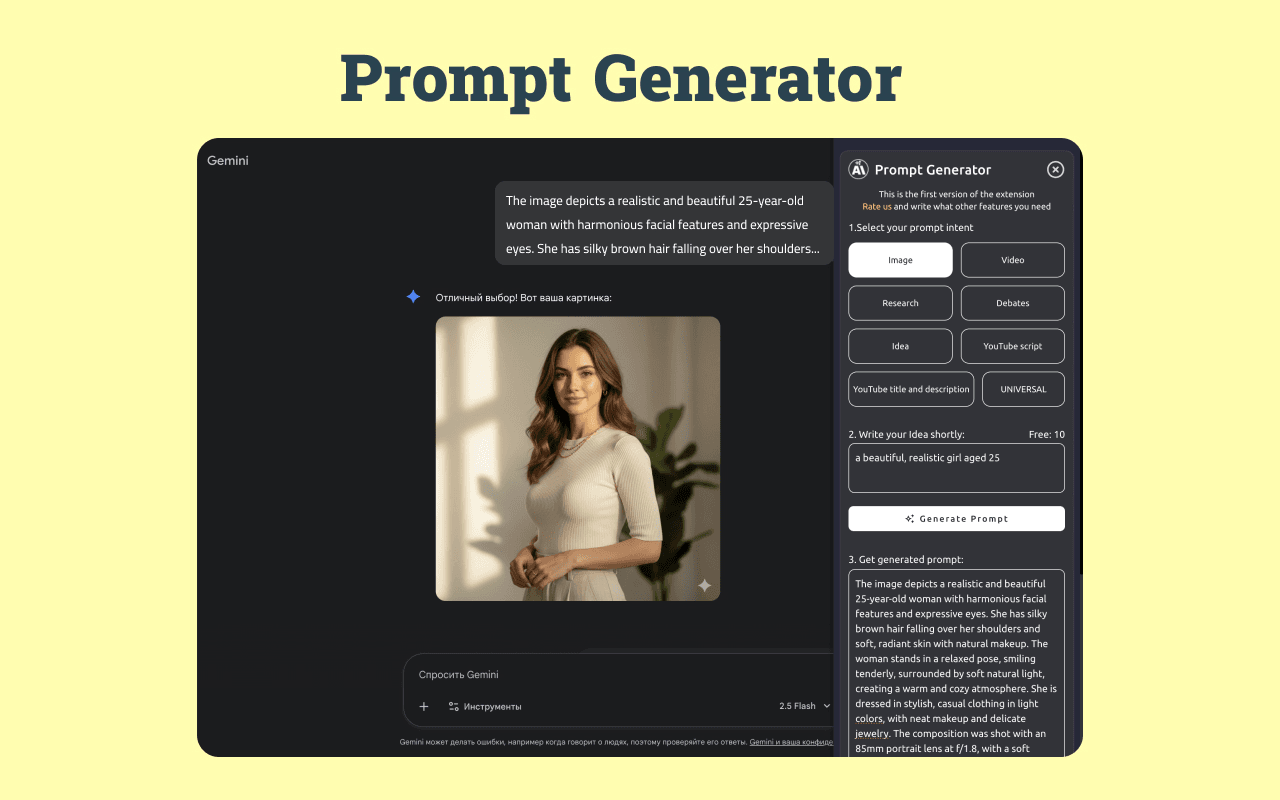
Prompt Generator is a Chrome extension and web app that turns a rough request into a structured, ready-to-use AI prompt. Type a one-line idea or paste a paragraph, pick a mode for text, image or video, and the tool builds out the context, constraints and output direction most people forget to include. It sits in the browser. Generate a prompt from the popup, from a selected-text menu, or with a double Ctrl+C shortcut. No tab switching required.
About Prompt Generator
What Is Prompt Generator
Prompt Generator is a browser-based writing aid for anyone who talks to AI tools but keeps getting vague answers. The problem it targets is simple. ChatGPT, Claude, Midjourney and most other models reply well only when the instruction is specific, and most people write instructions that skip the audience, the format and the limits. Prompt Generator fills those gaps for you.
The tool ships in three modes, one for each kind of output. Text mode builds prompts for assistants that answer, summarize, rewrite or draft. Image mode structures subject, composition, lighting and mood. Video mode handles scene, motion, camera behavior and pacing. Each mode applies a different template, because a request for a logo and a request for a three-second clip need different details.
Two limits are worth knowing before you rely on it. The free plan caps you at three prompts per day, so heavy users will need a paid tier. And the extension structures your rough request. It doesn't write the final answer or talk to the AI model for you. You still copy the result into your own tool.
Getting Started
- Install the Prompt Generator extension from the Chrome Web Store, or open the web demo at promptgeneratorextension.com to try it without installing.
- Open the popup and type your rough request, or highlight text on a page and use the context menu or the double Ctrl+C shortcut.
- Choose text, image or video mode depending on what you're creating.
- Hit Generate to get a structured prompt that adds context, audience, constraints and output format.
- Copy the finished prompt into ChatGPT, Midjourney, Claude or whichever AI tool you use.
Product Information
A quick look at Prompt Generator's pricing, supported platforms, and performance.
Best for
The users, tasks, and scenarios where this tool fits best.
Users
- Casual ChatGPT users
- Marketers and copywriters
- Designers and video creators
Tasks
- Turning a rough brief into a shareable prompt
- Writing image prompts for Midjourney or DALL·E
- Summarizing long documents for a specific reader
- Drafting outreach and marketing copy
Scenarios
- Ad-hoc work inside the browser
- Learning prompt structure by example
- Light daily use
Key features
Three Separate Prompt Modes
Text, image and video requests use different templates rather than one generic form. Text mode adds objective, audience, context, constraints, output format and tone. Image mode structures subject, composition, lighting, environment, mood and visual limits. Video mode defines scene, motion, camera behavior, pacing and production details. That split matters, because a text summary and a cinematic shot need opposite kinds of information.
Rough Text to Structured Prompt
Start from a one-line idea, a pasted paragraph or a rough task, and the tool rewrites it into a clearer instruction. The generated prompt keeps your intent but adds the scaffolding a model needs to answer well. A rough request like "summarize this research note for a non-technical team" comes back with an explicit audience, a length cap and a note on when to use bullet points.
Browser-Native Workflows
Prompt Generator lives where you already work. Generate from the extension popup, from a selected-text right-click menu, or through a double Ctrl+C shortcut that grabs highlighted text. You can build a prompt from the paragraph you're reading without copying it into another window first.
Shared License Across Web and Extension
One license entitles you to the same access on the website and in the Chrome extension, as long as you use the same browser. You aren't buying the tool twice or juggling separate accounts for the demo page and the installed extension. For teams standardizing on one prompt workflow, that keeps the setup simple.
Lightweight Privacy Default
The extension doesn't store your raw prompt history by default. For people who paste client notes, drafts or internal text into prompts, that default reduces the risk of sensitive material sitting in a tool you forgot about. You can still keep the generated output yourself, but the source text isn't retained automatically.
Before-and-After Examples
The site ships with sample pairs that show a rough request next to the finished prompt. These act as a teaching aid rather than decoration. Seeing how "summarize this technical article for a non-expert audience" becomes a prompt with method, findings and a 200-word cap shows you the pattern you can reuse in your own work.
Pros and cons
Pros
- Splits prompt building into text, image and video modes, so each output gets the right fields instead of a generic template.
- Works from the browser popup, a text-selection menu or a double Ctrl+C shortcut, keeping the workflow on the page.
- One license covers both the website and the Chrome extension on the same browser.
- Raw prompt history isn't stored by default, which suits people handling drafts or client material.
- Free tier with three prompts a day lets you test it before paying.
Cons
- The free plan is capped at three prompts per day, so regular users hit the limit fast and need a paid tier.
- It structures prompts but won't send them to an AI model, so you still copy the result into ChatGPT or another tool yourself.
- It's Chrome-first, so Firefox and Safari users lose out. The web demo still works in any browser.
Frequently asked questions
It turns a rough request into a structured AI prompt. You enter an idea, pick text, image or video mode, and it adds context, audience, constraints and output format so your chosen AI tool gets a clearer instruction. Think of it as an AI prompt writer that handles the setup for you.
Related content
Explore related tools, skills, and articles for Prompt Generator.
Prompt Generator Alternatives
BinkBink
BinkBink · OtherBinkBink is a free online game platform and AI game maker that lets anyone turn a short text description into a playable browser game. You can jump into hundreds of community-made games. Or describe your own idea and play it in seconds, then share it with friends. Want to create your own game? You don't need to code. No engine setup, no download, no hassle.

Audiogen
Audiogen Inc. · OtherAudiogen is an AI music generator built by Audiogen Inc., a small research team that spent about 2.5 years training its own generative music model and designing a web interface around it. Instead of a plain text box, this AI music tool turns the timeline into a beginner-friendly Generative Audio Workstation, or GAW, where inpainting, extending, remixing and stem editing work more like painting on a canvas. The product is still in beta, so access runs through a waitlist or an invite. Paid plans aren't published yet.

Aiml API
AIMLAPI OÜ · OtherAiml API is a unified AI model API that puts more than 1000 models from OpenAI, Google, Anthropic, and others behind one endpoint and one bill. You write code against a single OpenAI-compatible schema, then switch between chat, image, video, and audio models by changing a model string. It suits developers and small teams who want multi-model access without juggling a dozen separate provider accounts, and it removes the usual billing headache that comes with testing several vendors. One key covers it all.