

Prompt Template Generator
Hinchilla · Other · Prompts
Prompt Template Generator is a free browser tool from Hinchilla that lets you build reusable AI prompt templates with dynamic fields, then share them as a link.
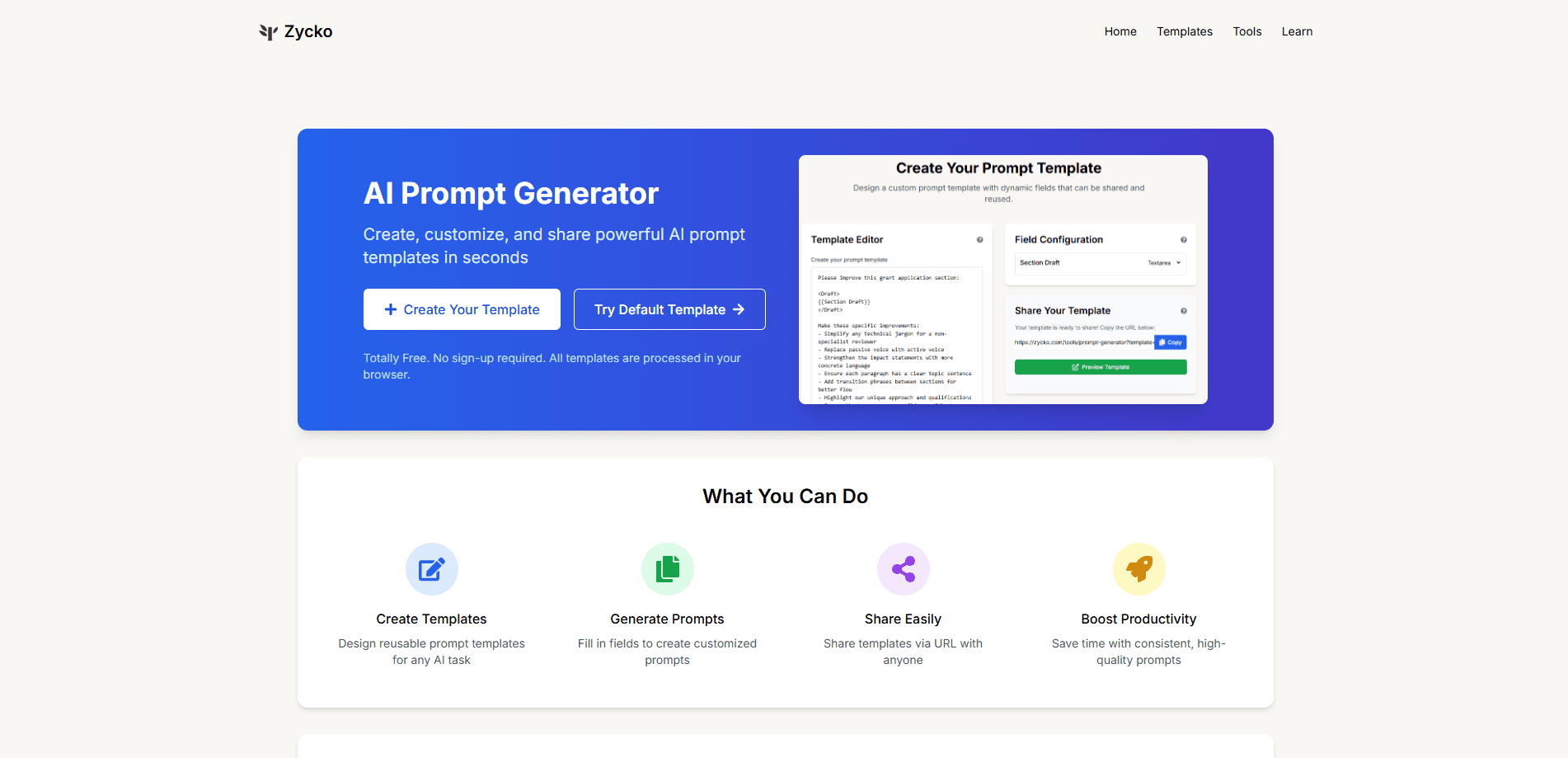
About Prompt Template Generator
What Is Prompt Template Generator
Prompt Template Generator is a free web tool built by Hinchilla, the team behind an AI grant-writing assistant. It works as a prompt builder that turns the messy work of writing prompts from scratch into a reusable template you build once and fill in many times. You define the fixed parts of a prompt, mark the parts that change as fields, and the tool produces a clean prompt you can paste into ChatGPT, Claude, Gemini, or any other model.
The tool solves a common annoyance. If you write the same kind of prompt every week, you end up repeating the same instructions and getting slightly different results each time. A template locks the structure down so the output stays consistent, and the only things that shift are the inputs you actually want to change. That matters most when several people on a team need to ask a model for the same kind of thing.
Everything runs in your browser. There is no account, no database, and nothing is sent to a server, so your template stays on your machine unless you choose to share it. The main limitation is scope: it formats and organizes prompts, it doesn't test them against a model or tell you whether a prompt works well.
Getting Started
- Open the Prompt Generator page at hinchilla.com and pick "Create Your Template" to start from a blank canvas, or load the default template to see one in action.
- Write your prompt text and mark the parts that change with the
{{fieldName}}syntax, so each one becomes an editable input. - Set a field type for each placeholder, choosing text, textarea, number, date, or a dropdown with fixed options when you want to limit the choices.
- Fill in the fields to generate the finished prompt, then copy it with one click and paste it into the AI tool you use.
- Share the template by copying its URL, which carries the whole template inside the link, so anyone can open and use it without an account.
Product Information
A quick look at Prompt Template Generator's pricing, supported platforms, and performance.
Best for
The users, tasks, and scenarios where this tool fits best.
Users
- Content marketers
- Developers and reviewers
- Students and researchers
Tasks
- Writing repeatable prompts
- Standardizing team prompts
- Structuring prompts for models
Scenarios
- Handling the same kind of request every week, where a fixed template saves rewriting the same instructions each time.
- Onboarding a teammate on prompt use, since the template URL shows them exactly how to phrase a request.
- Preparing prompts on a shared or work computer, given that everything is processed in the browser and nothing leaves the device.
Key features
Dynamic field templates
Mark any part of a prompt with the {{fieldName}} syntax and it becomes a fillable input. You write the fixed instructions once, and each use only changes the fields you defined, which keeps a task's wording steady across runs.
Field type controls
Each field can be set to text, textarea, number, date, or a dropdown. Dropdowns with predefined options are useful when you want everyone to pick from the same set of choices, such as a tone or a length, instead of typing free text.
One-click prompt generation
Once the fields are filled, the tool assembles the complete prompt and lets you copy it in a single click. You paste the result straight into ChatGPT, Claude, or another model, so there is no manual stitching of text.
URL-based sharing
A template is encoded into its own link, so sharing is just sending a URL. No account, database, or file transfer is involved, and the person receiving it can open and use the template right away.
Browser-only processing
The tool runs entirely in your browser, and Hinchilla states that no template data is sent to its servers. That makes it usable for work prompts on a machine you don't fully control, as long as the prompt itself carries no secrets.
XML and structured prompt support
Templates can include XML tags, which helps when you need clearly separated sections for a model. Role instructions, context, and the material to work on can each sit in their own labeled block.
Pros and cons
Pros
- Free to use with no account or sign-up, so there is nothing to register before building a template.
- Runs in the browser and keeps template data local, which limits what leaves your machine.
- URL sharing keeps a team on the same prompt wording without extra tools.
- Field types and dropdowns reduce typos and keep inputs consistent.
Cons
- It only formats prompts, so it cannot tell you whether a prompt actually produces good results with a given model.
- No API is offered, which rules it out for teams that want to generate prompts inside their own software.
- Sharing exposes the entire template in the URL, so it's a poor fit for prompts that contain sensitive details.
Frequently asked questions
It is used to build reusable AI prompt templates and turn them into ready prompts. You define a structure once with dynamic fields, then fill in the parts that change each time and copy the result into a model like ChatGPT or Claude.
Related content
Explore related tools, skills, and articles for Prompt Template Generator.
Prompt Template Generator Alternatives

Odyssey 3
Odyssey · OtherOdyssey-3 is Odyssey's foundation world model. It simulates physics in real time, turns a prompt into an interactive environment, and adapts to robots, cars and games.

JarvisCore
Prescott Data · Coding · Productivity · OtherJarvisCore is an open source Python runtime where AI agents work as equal peers on an agent mesh, claim tasks from a shared ledger, and reach external services through a zero-trust broker.
Clef
Cloudflare · Business · OtherClef is Cloudflare's open-source decision model for Workers AI. It returns calibrated probabilities for typed questions, not generated text, so agents can classify, route, and act fast.