

PromptForge
insaaniManav · Coding · Prompts
PromptForge is an open-source prompt engineering workbench that generates, critiques, and tests AI prompts, then logs how each one performs across models.
About PromptForge
What Is PromptForge
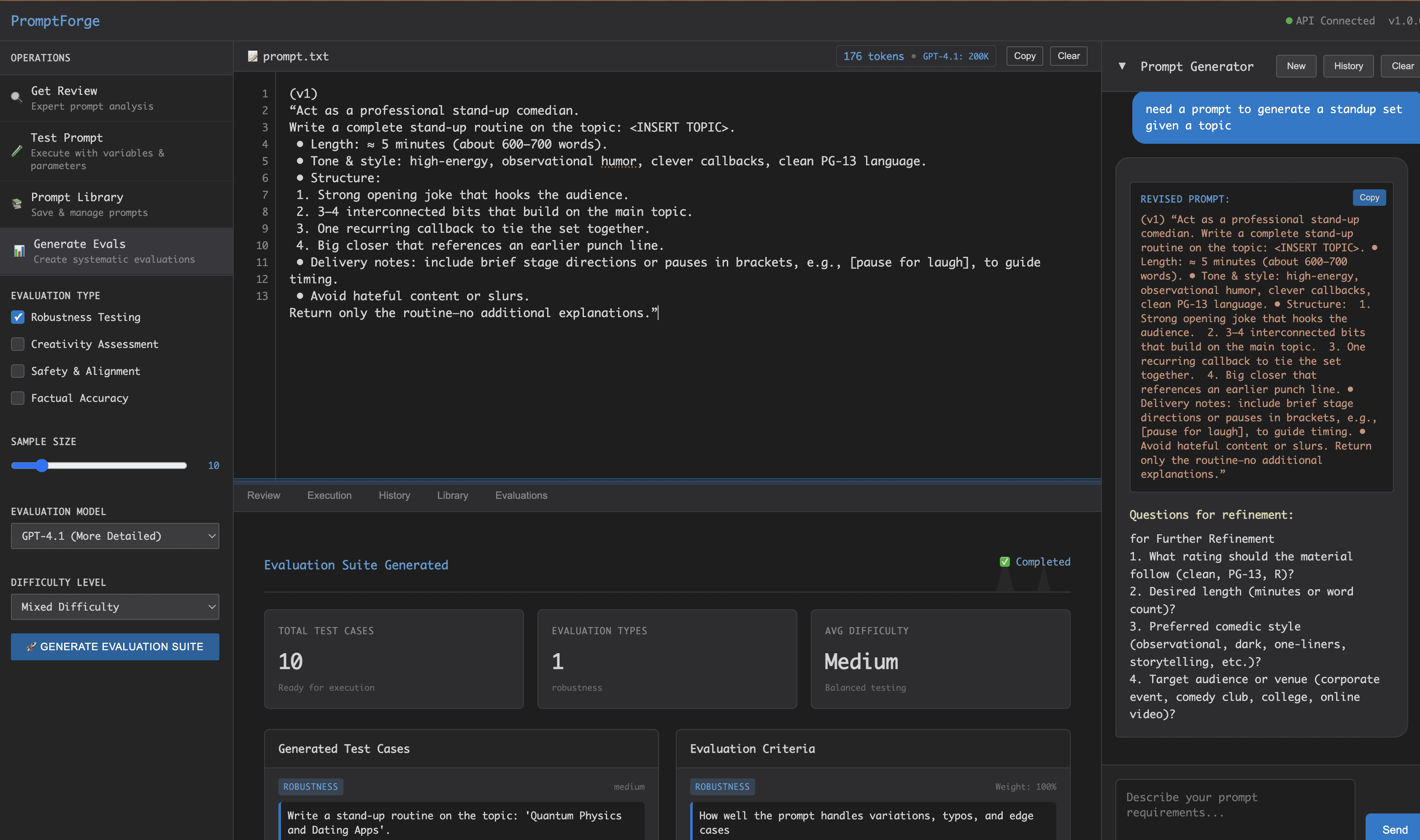
PromptForge is a self-hosted workbench for people who write a lot of prompts and want to stop treating it as guesswork. You describe what you need, let the AI draft candidates, review the suggestions, then run the prompt through structured tests before you ship it. It's built in Go and runs from a single Docker command.
The project's angle is discipline. Where most prompt tools are little more than a text box with a save button, this prompt engineering tool adds the parts engineers expect: a critique pass for prompt evaluation, an auto-generated test suite, and a library that keeps a version history. As an AI prompt generator, it drafts candidates rather than leaving you alone with a blank field, and as a self-hosted prompt tool, it keeps the whole loop on your own machine. The result is a repeatable process instead of one-off tweaking.
The catch is that it's infrastructure, not a managed product. You host it, you supply your own model API keys, and setup assumes you're comfortable running Docker.
Getting Started
- Pull the Docker image and start the container, passing an API key for at least one provider such as Anthropic, OpenAI, Azure OpenAI, or a local Ollama server.
- Open the app in your browser, then create a prompt and let the AI suggest an initial draft.
- Run the critique to get scoring and optimization feedback, and revise based on what it flags.
- Generate a test suite, execute the prompt with your variables, and compare results across two or more models.
- Save the working version to the library so you keep a record you can return to.
Product Information
A quick look at PromptForge's pricing, supported platforms, and performance.
Best for
The users, tasks, and scenarios where this tool fits best.
Users
- Prompt engineers and AI developers
- Product teams shipping LLM features
- Privacy-conscious developers
Tasks
- Hardening a prompt before launch
- Comparing models on one prompt
- Prompt optimization
- Tracking prompt versions
Scenarios
- Moving a prompt from prototype into production
- Team prompt review
- Local and offline work
Key features
Smart prompt generation
Describe the task and PromptForge drafts prompt candidates with context-aware suggestions instead of leaving you at a blank box. It also flags improvements as you edit, so the first version you test is usually further along than what you'd type by hand.
Deep prompt critique
Before you run anything, the critique pass scores a prompt and checks it against prompt engineering best practices. It returns optimization suggestions, which means you can spot a weak structure or a missing constraint before you burn API calls testing it.
Automatic test suite generation
PromptForge builds test cases for you: robustness checks with typos and input variations, safety checks for bias and harmful content, accuracy checks for factual claims, and creativity checks. That coverage is the part most teams skip by hand, and it's where a prompt usually breaks.
Multi-model comparison
You can run one prompt against Claude, GPT-4.1, O3, Azure OpenAI, and local Ollama models in the same workspace. Results sit side by side, so the choice of model is based on output you can see rather than a guess.
Dynamic variables and parameters
The tool detects variables inside a prompt and substitutes values at run time, and you keep full control over execution parameters. That turns a static prompt into a reusable template you can fire at different inputs without rewriting it.
Prompt library with version control
Prompts live in a searchable, tagged library with a complete execution history and import/export. You keep what worked, filter past runs, and recover an earlier version instead of starting over.
REST API and self-hosting
The core actions run over HTTP endpoints for critique, execution, test-suite generation, and library management, so you can wire PromptForge into your own tooling. Because it ships as a Docker image under GPLv3, you run and inspect it entirely on your own terms.
Pros and cons
Pros
- Free and open source under GPLv3, so there's no license fee to evaluate or adopt it.
- Self-hosting keeps prompts and data on your own infrastructure, and local Ollama models work as a provider.
- The critique, test generation, and version history combine into a repeatable loop most prompt editors don't offer.
- One workspace compares Claude, GPT, O3, Azure OpenAI, and Ollama outputs side by side.
Cons
- There's no hosted version, so you need Docker and the willingness to run your own server before you can try it.
- It doesn't include model access; you pay each provider separately for the API calls your tests generate.
- As a young open-source project, the interface and features still shift between versions, so pin a release if stability matters.
Frequently asked questions
It's an open-source, self-hosted workbench for prompt engineering. It generates prompt drafts, critiques them against best practices, builds test suites, and keeps a versioned library, all from a browser UI you run yourself.
Related content
Explore related tools, skills, and articles for PromptForge.
PromptForge Alternatives

Base Code
Base44 (Wix) · Coding · ProductivityBase Code is a shared cloud development environment from Base44. Teammates describe changes to an existing GitHub codebase in chat, preview them live and send them back as pull requests.

Google EmbeddingGemma 2
Google DeepMind · Writing · Image · CodingGoogle EmbeddingGemma 2 is a 740M-parameter open model that turns text, code, images, audio, and video frames into vectors in one 768-dimension space, running on phones and laptops.

GitGlow
GitGlow · Coding · ProductivityGitGlow is a local-first desktop Git client that lets independent developers review their own code and their AI agents' changes in one place before shipping.