

PromptWave AI
PromptWave AI · Other · Prompts
PromptWave AI is a web library that saves, sorts and shares AI prompts. You browse prompts tagged by model, bookmark what works, and copy it straight into ChatGPT, Claude or Midjourney.
About PromptWave AI
What Is PromptWave AI
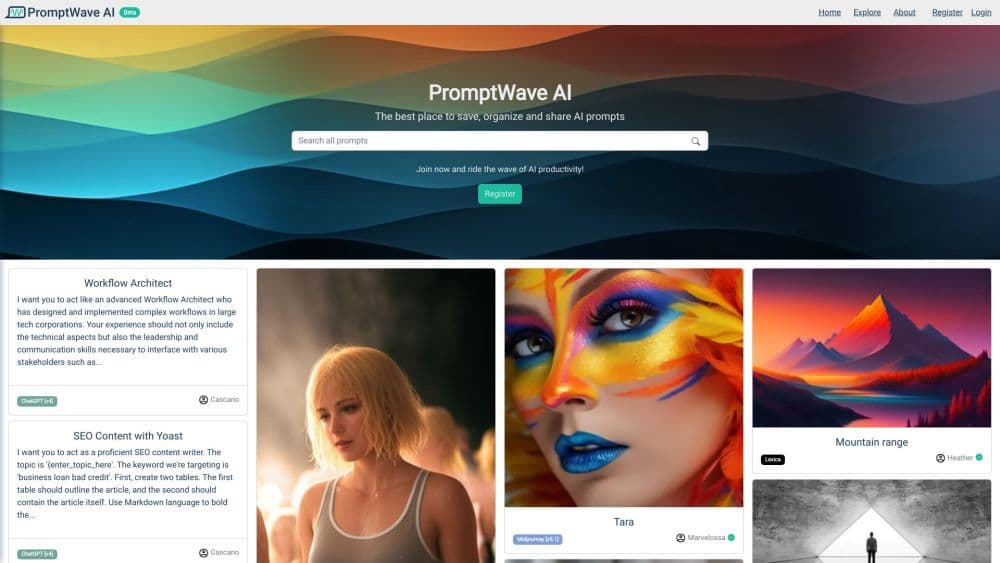
PromptWave AI is a browser based prompt library built for people who use several AI models and keep losing the instructions that worked. Prompts are stored as cards with a model tag, a view count and a like count. Anyone can search the public pool, open a card, and copy the text out to ChatGPT, Claude, Gemini, Midjourney, DALL-E, Stable Diffusion or Bing Image Creator.
The problem it targets is messy: a good prompt usually lives in a notes app, a chat history, a screenshot or a group chat, and it's hard to find again three weeks later. PromptWave AI puts those instructions in one searchable place with a filter for the model they were written for. A prompt collection built this way survives a model upgrade better than a pile of bookmarks, because you can see which version the prompt was written against. It also gives you a clean way to share AI prompts with a teammate: one link instead of a pasted wall of text.
The site is still labeled Beta and runs on a free account. There's no public pricing page, no documented developer API, and no in-app chat window. You copy prompts out to the model of your choice instead of running them on the site. Prompt quality is community driven, so a high view count means people looked, not that the output is good.
Getting Started
- Open promptwave.ai and scroll the home feed, which lists recent and popular prompt cards by model.
- Use Explore to search a keyword, filter by model, and sort by trending, likes, title or date.
- Register with a username, email and password, or sign in with a Google account, to like, bookmark and publish your own prompts.
- Open any card, hit Copy, and paste the text into your model's chat box.
- Bookmark the prompts you plan to reuse, then group them in a collection on your profile.
Product Information
A quick look at PromptWave AI's pricing, supported platforms, and performance.
Best for
The users, tasks, and scenarios where this tool fits best.
Users
- Prompt engineers testing many models
- Content marketers and copywriters
- Students and self-learners
Tasks
- Organizing prompts that are scattered across notes and chats
- Finding a proven prompt for a specific model
- Sharing a prompt set with other people
- Checking what other people use for a task
Scenarios
- Starting a new project with an unfamiliar model
- Building a reusable writing stack
- Running a small team of freelancers
Key features
Model Tagged Prompt Cards
Every prompt sits on a card with the model and version it was written for, such as ChatGPT v4o, Claude v2, Midjourney v6 or Gemini Pro. That tag is the feature that makes the library usable at scale, because a prompt tuned for GPT-3.5 often behaves differently on a newer model. Image prompts and text prompts share the same card format, so a Midjourney prompt and a ChatGPT prompt don't look like two different products.
Search, Filter and Sort on Explore
The Explore view combines a keyword search with a model filter and eight sort orders: trending, least trending, most liked, least liked, title A to Z or Z to A, and oldest or newest first. A prompt organizer without sorting turns into a junk drawer fast. Sorting by likes surfaces the crowd favorites, while newest first is the better view when you want prompts written for a model release from the past month.
Copy, Like, Share and Bookmark
Each prompt page carries four actions. Copy takes the exact prompt text to the clipboard, which is the main workflow since nothing runs inside PromptWave AI. Like and Bookmark are two different signals: a like is public feedback, a bookmark is your own shortlist. Share hands out a direct link to the card, handy when a colleague asks how you got a particular output.
Collections and Public Profiles
Profiles list a user's prompts and collections, with the same search, model filter and sorting controls as the main library. A collection is the closest thing to a working folder, which is what makes prompt management practical for someone juggling client work. Profiles are public by default, so anything you publish is visible to anyone with the link.
A Community Pool With Real Usage Signals
The library is built on shared prompts rather than vendor templates. Each card shows a view count and a like count, and the home feed mixes recent uploads with popular ones. Some entries have thousands of views, which tells you the phrasing has been copied and reused by other people. Treat those numbers as a popularity signal, not a quality score.
Free Beta Account With Google Sign In
Registration takes a username, email and password, or one click through Google. The account unlocks liking, bookmarking and publishing, and there's no payment step in the flow today. The Beta label shows up across the site, so expect interface changes and occasional rough edges while the product is still being shaped.
Pros and cons
Pros
- Model tags cut the guesswork: you can tell at a glance whether a prompt was written for GPT-4, Claude v2 or Midjourney v6.
- Free to use during beta: registration needs no card and the whole library is open.
- Fast copy workflow: one button puts the exact prompt text on your clipboard, ready for any chat window.
- Sorting by likes and date: both a crowd favorite view and a fresh uploads view, which suits different jobs.
- Public profiles make sharing simple: send one link instead of pasting prompt text into Slack.
Cons
- Profile pages expose the account email: the profile header shows the address used to register, so anyone browsing your page can read it.
- No prompt version history: editing a card replaces the text, so a prompt that worked last month can't be rolled back.
- Nothing runs on the site: there's no playground or model connection, so every test means copying text into another tab.
- Quality varies wildly: the pool is community submitted, and a 20,000 view card can still be a throwaway jailbreak trick.
Frequently asked questions
It stores, sorts and shares AI prompts. You keep the instructions that work, tag them by model, and copy them out to ChatGPT, Claude, Gemini or Midjourney when you need them.
Related content
Explore related tools, skills, and articles for PromptWave AI.
PromptWave AI Alternatives

Odyssey 3
Odyssey · OtherOdyssey-3 is Odyssey's foundation world model. It simulates physics in real time, turns a prompt into an interactive environment, and adapts to robots, cars and games.

JarvisCore
Prescott Data · Coding · Productivity · OtherJarvisCore is an open source Python runtime where AI agents work as equal peers on an agent mesh, claim tasks from a shared ledger, and reach external services through a zero-trust broker.
Clef
Cloudflare · Business · OtherClef is Cloudflare's open-source decision model for Workers AI. It returns calibrated probabilities for typed questions, not generated text, so agents can classify, route, and act fast.