

PulseSync: Free Health Tracker
Yashraj Jain · AI Assistant
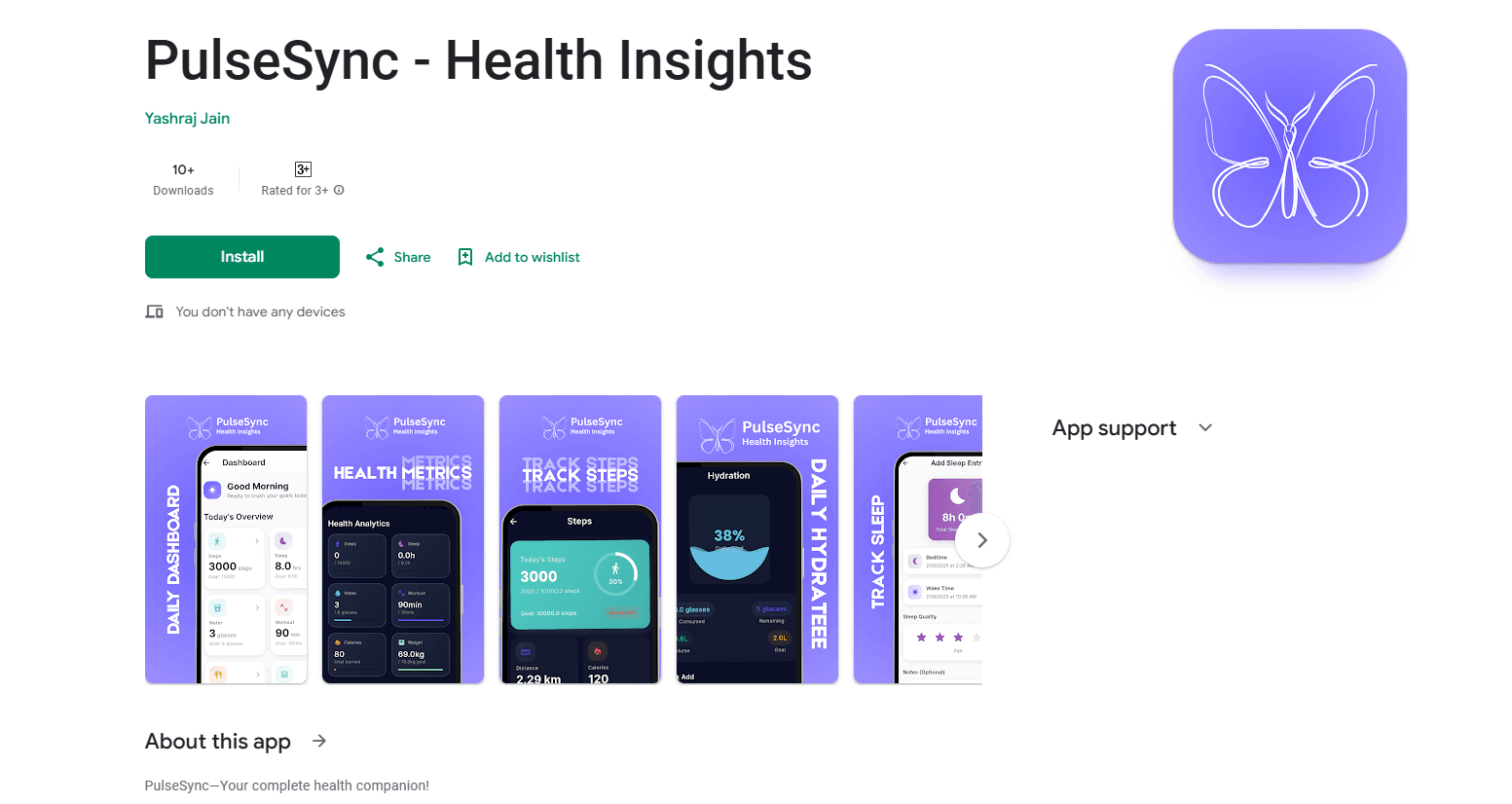
PulseSync is a free health tracker for Android that logs water, sleep, weight, steps, nutrition, and workouts in one app, with no ads or paywalls, and points out patterns across your data.
About PulseSync: Free Health Tracker
What Is PulseSync
PulseSync is a free health tracker app that keeps water intake, sleep, weight, steps, nutrition, and workouts in a single place. Instead of opening four separate apps, you log each metric in one lightweight dashboard and let the app tie them together. The hook is comparison: PulseSync points out links you'd otherwise miss, such as whether you sleep better on the days you train.
The app targets the everyday annoyance of scattered tracking. If your hydration lives in one app and your step count in another, you never see how they relate. PulseSync pulls those numbers into one view and works offline, syncing your entries automatically once you're back online.
The catch is scope. PulseSync tracks and organizes what you log, but it doesn't measure anything on its own, so weights and water amounts come from you or a connected device. It's also Android only, and it's a wellness tool, not a medical one.
Getting Started
- Install PulseSync from Google Play and open the app.
- Set up the metrics you care about, such as water, sleep, weight, steps, nutrition, or workouts.
- Log your first entry for each one, or let the app pull step data from your phone.
- Review your history and let PulseSync highlight patterns across the metrics you track.
Product Information
A quick look at PulseSync: Free Health Tracker's pricing, supported platforms, and performance.
Best for
The users, tasks, and scenarios where this tool fits best.
Users
- People who want one tracker instead of four
- Users tired of ads and paywalls
- Casual self-trackers who log by hand
Tasks
- Logging daily water intake
- Tracking sleep and spotting trends
- Following weight and BMI over time
- Recording workouts and nutrition
Scenarios
- Checking how last night's sleep compares with the days you exercised, in one screen.
- Logging a workout right after the gym, even with spotty signal, since the app works offline.
- Picking up your history on a new phone after cloud sync restores your entries.
Key features
Multi-Metric Tracking in One App
PulseSync works as a water intake tracker, a sleep tracker, a step tracker, and a workout tracker in a single dashboard, along with weight and BMI, nutrition, and calories. The value is consolidation, since one app means one place to check instead of hopping between separate trackers that never talk to each other.
Cross-Metric Pattern Insights
The app compares your metrics and surfaces connections that raw logs hide, like whether you sleep better on the days you train. That's the difference between a record and an insight, and it's what makes the tracker more useful than a plain spreadsheet of numbers.
No Ads and No Paywalls
PulseSync is completely free, with no ads, no premium tier, and no paywalled features. Every tracking tool is available from the first launch, which removes the usual pattern of hitting a paywall the moment you try to see your full history.
Offline Support with Automatic Sync
This offline health app works without a connection, so you can log an entry anywhere and it syncs automatically once you're back online. That matters for gyms and basements where signal drops, and it means a missed connection never blocks a check-in.
Cloud Backup Across Devices
Entries back up to the cloud and sync across devices, so your history follows you to a new phone instead of resetting. You can edit or delete any entry at any time, which keeps the data under your control rather than locked in place.
Clean, Distraction-Free Interface
PulseSync keeps the layout simple, with light and dark mode and a straightforward logging flow. The design stays out of the way, so the daily habit of tracking takes seconds rather than turning into a chore you skip.
Pros and cons
Pros
- Free with no ads, no premium tier, and no paywalled features.
- Tracks water, sleep, weight, steps, nutrition, and workouts in one app.
- Points out patterns across metrics, like sleep versus training days.
- Works offline and syncs automatically when you're back online.
- Cloud backup and cross-device sync keep your history intact on a new phone.
Cons
- Android only, so iPhone users can't use it.
- It logs what you enter but doesn't measure metrics on its own, so accuracy depends on your input.
- It's a wellness tracker, not a medical device, so it can't diagnose or treat anything.
- As a newer app with a small user base, it lacks the deep integrations and coaching features bigger health platforms offer.
Frequently asked questions
PulseSync tracks daily health metrics in one place. You log water intake, sleep, weight, steps, nutrition, and workouts, and the app shows how those numbers connect over time.
Related content
Explore related tools, skills, and articles for PulseSync: Free Health Tracker.
PulseSync: Free Health Tracker Alternatives

Iplan AI
Iplan AI · Productivity · AI AssistantIplan AI is an AI travel planner that turns a few trip details into a full day-by-day itinerary in seconds. You answer questions about your destination, interests, budget, and travel companions, and the tool builds a plan you can edit, share, and carry with you on any device. It targets travelers who want a solid draft without spending hours in spreadsheets and browser tabs. Think of it as an itinerary generator that does the tedious part for you.

Screenhelp
Screenhelp · Productivity · AI AssistantScreenhelp is an AI screen assistant that turns a single keyboard shortcut into real-time help. You press Ctrl+Shift+Space, it captures what's on your screen, and it streams an answer into a private panel in about two seconds. Think of it as an AI screenshot helper you trigger on demand. It runs on Mac, Windows, and the web, starts free with 30 answers a month, and stays invisible during screen sharing on Zoom, Teams, and Google Meet.
Rainbow
Rainbow · AI AssistantRainbow is an AI weather forecast app built around short-term precipitation nowcasting. Its engine pushes min-by-min rain and snow predictions up to four hours ahead, blending live satellite and radar feeds into hyperlocal forecasts. The app adds live rain radar, a seven-day outlook, precipitation alerts, home-screen widgets, and a hurricane tracker, and it runs on both Android and iOS with a free tier plus paid upgrades.