

Quadratic
Quadratic · Coding · Productivity
Quadratic is the AI spreadsheet that connects live data sources, writes Python and SQL cells, and handles up to 100 million rows. It is one of the few spreadsheets with AI that keeps a familiar grid.
About Quadratic
What Is Quadratic
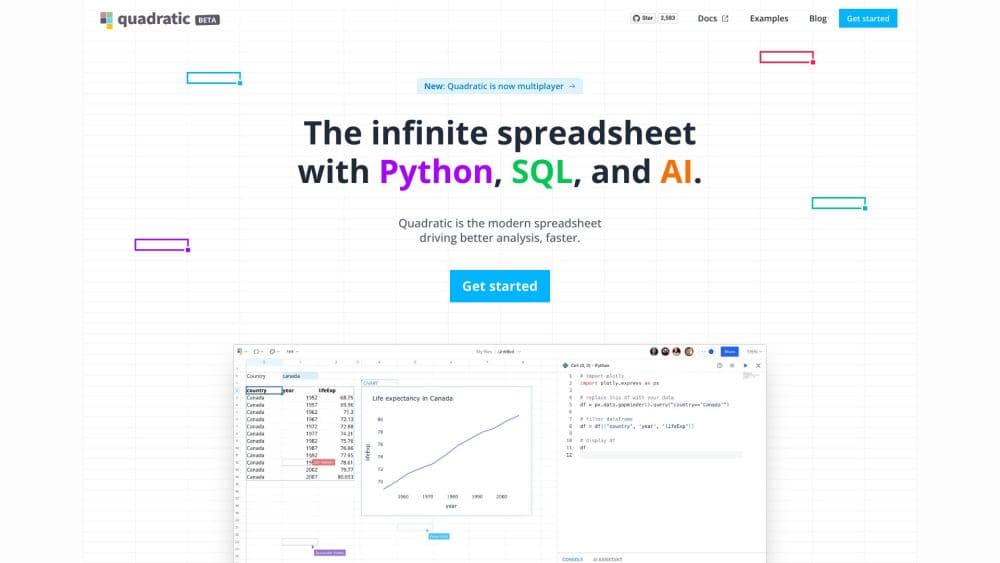
Quadratic is a spreadsheet with AI built for people who have outgrown Excel and Google Sheets, but do not want to move into a coding environment. It looks and behaves like a familiar grid, so anyone who knows how to use a spreadsheet can pick it up, yet it runs Python and SQL directly inside cells and lets an AI assistant build formulas, code, and charts from a plain English request.
The product targets the gap between manual spreadsheets and data-science tooling. Its main promise is that datasets which overwhelm Excel, up to 100 million rows, stay responsive for sorting, filtering, and analysis. Quadratic can also connect to live databases rather than copying data in, so a sheet always reflects the current numbers instead of a manual export.
The most important limits are the ones tied to cost and access. AI usage is metered through monthly credits on the paid plans, and some collaboration and connection features are restricted on the free tier. Quadratic runs in the browser, and advanced deployment options such as self-hosting appear only on the Enterprise plan.
Getting Started
- Create a free account at app.quadratichq.com using an email address, Google, or another sign-in option.
- Start a new file, or import an existing .xlsx, CSV, or Parquet file to keep your current structure.
- Add data by typing values, pasting a range, or connecting a database such as PostgreSQL, Snowflake, or QuickBooks.
- Ask the AI assistant a question in plain language, or write a formula, Python, or SQL cell to shape the data yourself.
- Share the file with teammates to collaborate on the same, verifiable analysis.
Product Information
A quick look at Quadratic's pricing, supported platforms, and performance.
Best for
The users, tasks, and scenarios where this tool fits best.
Users
- Financial analysts
- Data scientists and analysts
- Startup and finance teams
Tasks
- Analyzing large datasets
- Building recurring reports
- Spreadsheet automation
Scenarios
- Replacing a fragile lookup chain
- Building a net-worth or budget dashboard
- Monitoring live business data
Key features
Python, SQL, and formula cells in one grid
Quadratic lets you mix plain formulas with Python and SQL cells in the same sheet. A Python cell can join and reshape tables using libraries like pandas, while a SQL cell queries a connected database directly. This means a non-technical teammate can read a familiar grid next to code-based analysis that would normally live in a separate notebook.
AI that writes the analysis for you
An AI assistant turns a natural language question into formulas, code, and charts. Instead of guessing how a result was produced, you can open any cell the AI filled in and read the method behind it. That open approach makes the output easier to verify and adjust than a black-box answer.
Connections to live databases and files
Quadratic connects natively to PostgreSQL, MySQL, SQL Server, Snowflake, and BigQuery, and also pulls from Plaid, QuickBooks, and files such as CSV, Excel, PDF, and Parquet. Because the sheet reads the source rather than copying it, the whole team works from the same numbers, and scheduled refreshes keep reports up to date.
Built for large datasets
Quadratic opens files that would crash older spreadsheets. It supports multi-gigabyte CSV and Parquet imports and datasets up to 100 million rows in a single sheet, roughly 100 times the Excel row limit, while keeping sorting, filtering, and AI analysis fast.
Model Context Protocol support
Quadratic works with the Model Context Protocol, the open standard for linking AI tools to software. Teams that already use MCP-compatible assistants can bring them into the spreadsheet, which keeps the workflow in one place instead of moving data between separate tools.
Team collaboration and access controls
Files can be shared with teammates for collaborative analysis, and administrators decide who can view, edit, download, or share a file. Different plan tiers set how much sharing, file storage, and AI usage a team gets, with higher limits as a team grows.
Pros and cons
Pros
- Keeps a familiar spreadsheet layout while adding Python and SQL cells, so the learning curve stays low for anyone who already uses a grid.
- Handles datasets up to 100 million rows and multi-gigabyte files that slow down or break Excel and Google Sheets.
- Connects directly to live databases and services such as Snowflake, BigQuery, and QuickBooks, so reports stay current without manual exports.
- Shows how the AI reached an answer, since every generated formula or code cell can be opened and edited.
- SOC 2 and HIPAA certified, which matters for teams handling financial or health data.
Cons
- AI usage runs on monthly credits, so heavy users may need to buy additional credits on some plans.
- The free Personal plan limits AI usage, sharing, files, and connections, which can hold back individual work before upgrading.
- Self-hosting and single sign-on are limited to the Enterprise plan, so smaller teams cannot get those controls on standard tiers.
- There is no public price for API or programmatic access, leaving some integration questions unanswered.
Frequently asked questions
Quadratic is used to analyze data in a spreadsheet that also supports Python and SQL cells and an AI assistant. It suits teams that have outgrown Excel but want to stay in a familiar grid instead of moving to a notebook or a BI tool.
Related content
Explore related tools, skills, and articles for Quadratic.
Quadratic Alternatives

Base Code
Base44 (Wix) · Coding · ProductivityBase Code is a shared cloud development environment from Base44. Teammates describe changes to an existing GitHub codebase in chat, preview them live and send them back as pull requests.

Google EmbeddingGemma 2
Google DeepMind · Writing · Image · CodingGoogle EmbeddingGemma 2 is a 740M-parameter open model that turns text, code, images, audio, and video frames into vectors in one 768-dimension space, running on phones and laptops.

GitGlow
GitGlow · Coding · ProductivityGitGlow is a local-first desktop Git client that lets independent developers review their own code and their AI agents' changes in one place before shipping.