

QuickMock 2.0 – AI for Hot Interviews
MirWork · Business
Quick Mock is a Chrome extension from MirWork that turns any LinkedIn job posting into an AI mock interview, and version 2.0 adds hot roles and a real question bank from top companies.
About QuickMock 2.0 – AI for Hot Interviews
What Is Quick Mock
Quick Mock is an AI interview coach that lives inside your browser. Instead of pasting a job description into a separate tool, you install the Chrome extension, open a LinkedIn job listing, and click one button to start a practice interview built around that exact role. MirWork, the company behind it, built the tool for job seekers who want targeted practice without hiring a human coach.
The product solves a simple problem: most interview prep is generic. You rehearse the same handful of behavioral questions no matter what you're applying for. Quick Mock reads the posting you're already looking at and generates questions tied to that company, title, and requirements. Its AI coach, Mir, then reviews your answers and points at what to fix.
The main limits are practical. Quick Mock is tied to LinkedIn postings for its signature one-click flow, so it's less useful if you find roles elsewhere. Practice happens by voice or text in the browser, and the depth of company-specific questions depends on what MirWork's question bank covers for that employer.
Getting Started
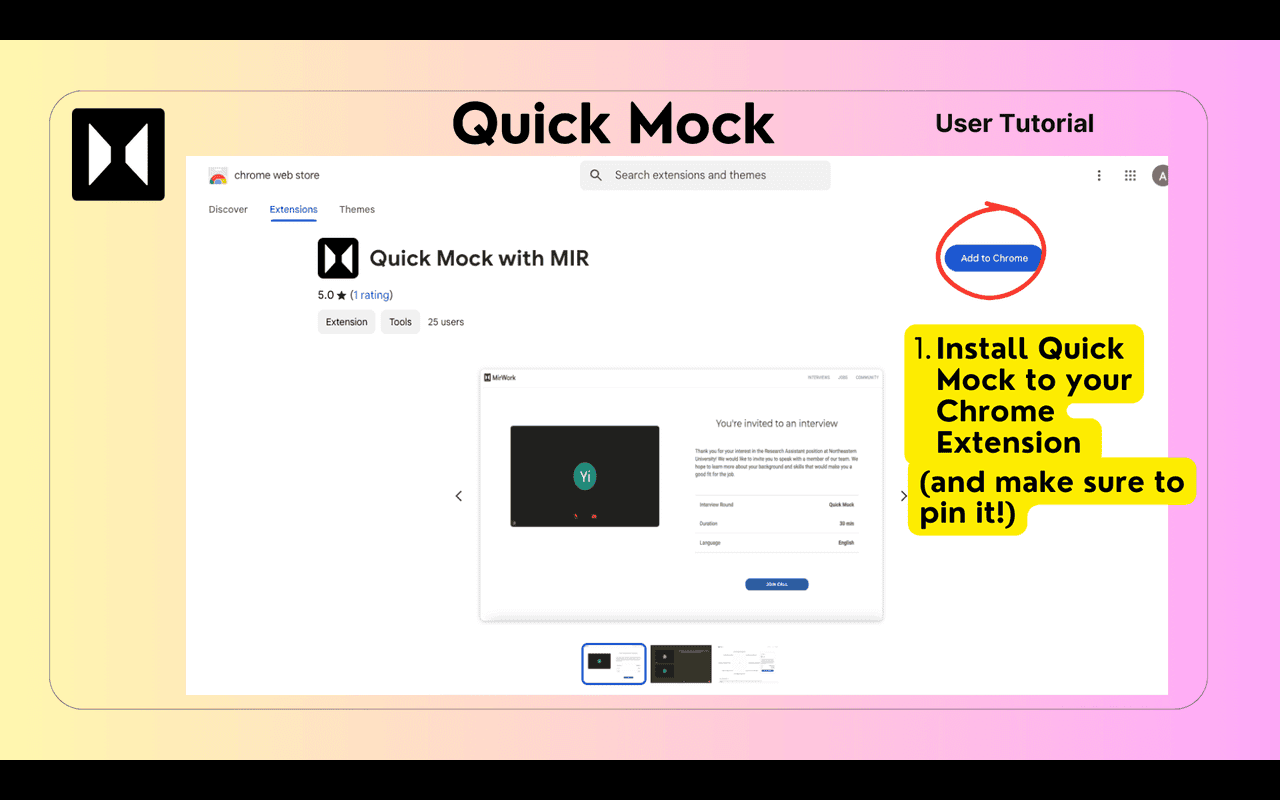
- Install the Quick Mock Chrome extension from the Chrome Web Store and pin it to your toolbar.
- Sign in to MirWork to create your candidate profile and save your progress.
- Open any job listing on LinkedIn and click the Quick Mock button beside the Save option.
- Answer the AI-generated questions by voice or text, then review Mir's feedback and repeat on other roles.
Product Information
A quick look at QuickMock 2.0 – AI for Hot Interviews's pricing, supported platforms, and performance.
Best for
The users, tasks, and scenarios where this tool fits best.
Users
- Active job seekers
- Career changers
- New graduates
Tasks
- Rehearsing behavioral answers
- Preparing for a specific interview
- Practicing trending roles
Scenarios
- Applying on LinkedIn late at night
- Tight prep windows
- Repeated practice across applications
Key features
One-Click Mock Interviews From LinkedIn
The extension adds a Quick Mock button next to the Save option on every LinkedIn job listing. One click starts a practice session built from that posting, so the questions match the role you're actually chasing. There's no copy-paste step and no separate dashboard to open first.
AI Coach Built Around Your Answers
MirWork's coach, Mir, adapts to how you respond and flags where your answers fall short. Feedback covers what you said and how you said it, including delivery and communication habits. The aim is specific corrections rather than generic encouragement.
Job-Specific Question Generation
Questions come from the posting's company, title, and requirements rather than a fixed script. Practice on a data role asks different things than practice on a design role. That specificity is the reason to use Quick Mock over a static question list.
Real Question Bank From Top Companies
Version 2.0 adds a library of questions reported from interviews at major employers. You can rehearse prompts that candidates actually faced, which narrows the gap between textbook answers and what a real panel asks.
Hot Interviews for Trending Roles
The 2.0 release introduces hot interviews tied to roles in high demand, along with hot interview questions pulled from those searches. If you're weighing a move into a crowded field, you can sample the questions that come up most before committing to a path.
Voice Practice With Delivery Feedback
You can answer out loud and get notes on how you sound, not just what you wrote. Practicing spoken delivery matters because interviews reward composure and pace as much as content.
Progress Tracking Across Sessions
Saved sessions let you return to earlier interviews and compare attempts. Seeing a weak answer get sharper over a few runs is the clearest sign the practice is working.
Pros and cons
Pros
- Installs as a Chrome extension and starts from a LinkedIn posting in a single click, so there's almost no setup.
- Questions are generated from the actual job description, keeping practice relevant to the role.
- The 2.0 question bank pulls from real interviews at major companies, adding credibility beyond generic prompts.
- Voice practice with delivery feedback trains how you come across, not just the words.
- Free to install and free to start, which lowers the barrier for casual practice.
Cons
- The signature one-click flow depends on LinkedIn postings, so roles found on other sites need more work.
- Company-specific question depth varies by employer, meaning coverage isn't uniform across every target.
- Pricing for higher tiers isn't clearly published on the main site, so you may need to check inside the app before committing.
Frequently asked questions
Quick Mock is an AI mock interview tool that turns a LinkedIn job posting into a practice session. You answer role-specific questions and get feedback on your answers, so you can prepare for a real interview without a human coach.
Related content
Explore related tools, skills, and articles for QuickMock 2.0 – AI for Hot Interviews.
QuickMock 2.0 – AI for Hot Interviews Alternatives

Knocket
Knocket (Tencent RTC team) · Productivity · Business · ChatbotKnocket is a free live chat and contact page tool that lets visitors message you from your website, app, or a shareable link, with every reply handled from Telegram or one inbox.

shippedit.me
Krawlup · Marketing · Businessshippedit.me now redirects to Krawlup, a web platform that audits SEO, AEO and page speed every week, then hands the fixes to AI coding agents over MCP.

Ayven
Alknoma · Productivity · BusinessAyven is an AI control centre by Alknoma that turns a plain-language goal into a dated plan, hands the work to your people and AI agents, and asks for your approval only when the call is yours.