

Qwen Studio
Alibaba Cloud (Tongyi Lab) · Other · China AI
Qwen is Alibaba's free AI assistant from the Tongyi lab, covering chat, image and video generation, deep research, and web development in one place.
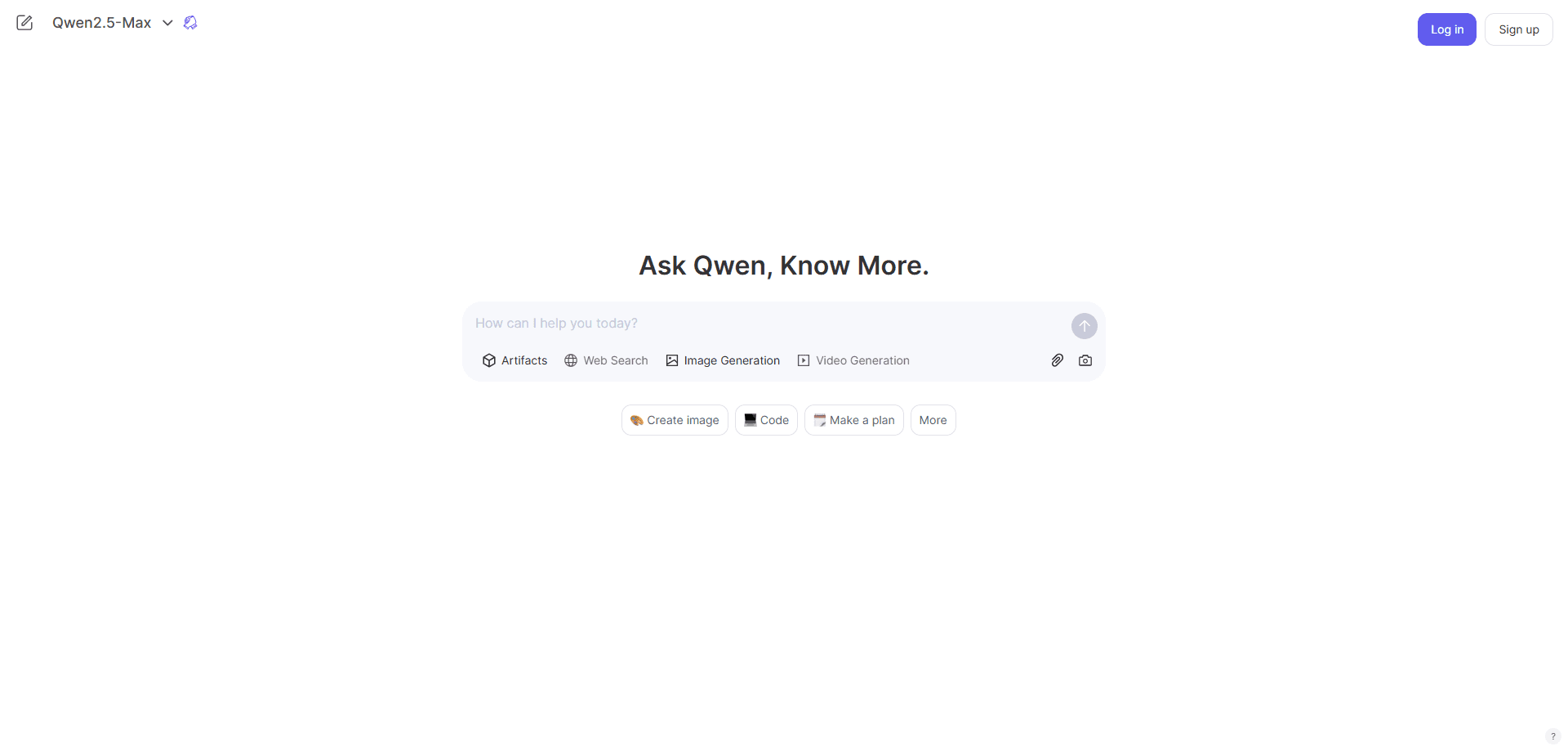
About Qwen Studio
What Is Qwen
Qwen is Alibaba's consumer AI assistant, built by the Tongyi lab and offered free to anyone with an account. You run it at chat.qwen.ai, or through apps for iOS, Android, macOS, and Windows. The idea is simple: instead of paying for several tools, you handle chat, image generation, video, search, and coding help from one window.
The assistant sits on top of a family of models rather than a single one. You can pick a fast model for quick questions or a stronger one for multi-step work, and the chat keeps its context across a long conversation. That flexibility is the main reason people treat it as a general-purpose workspace instead of a plain chatbot.
The catch is that the models change often. Features appear, get renamed, and get folded into bigger releases, so anything you read here can shift within weeks. Treat the current model list on the site as the source of truth.
Getting Started
- Go to chat.qwen.ai and register with an email address, or download the desktop or mobile app
- Choose a model from the selector, or leave it on auto to let the app match the model to your prompt
- Type your request, or upload a file, image, or link to work from
- Switch on a tool such as Deep Research, Search, or image generation when the task needs it
Product Information
A quick look at Qwen Studio's pricing, supported platforms, and performance.
Best for
The users, tasks, and scenarios where this tool fits best.
Users
- General users who want a capable AI assistant without a subscription
- Students and researchers juggling reading and notes
- Small teams and solo developers
Tasks
- Generating and editing images
- Producing short video clips
- Fact-checking and summarizing a topic
- Building a simple web page
Scenarios
- Late-night study sessions
- Drafting a work update or an email
- Planning a trip or a project
Key features
Multi-model selection in one app
Qwen gives you a drop-down of models rather than a single fixed one. You can pair a lightweight model with a heavier one for the same task and compare how each answers. That matters when a quick reply is fine for one question and a slow, careful answer is worth the wait for the next.
Deep Research
Deep Research is an agent that runs multi-step searches across the internet, then writes a structured report from what it finds. Point it at a broad question and it handles the digging, so a job that used to take an afternoon comes back in minutes. It suits market scans, background reading, and any task where you need a summary you can actually read.
Image and video generation
The image tool turns text into visuals and edits existing ones, including changing a style or building a scene from several elements. Video generation extends the same idea to short clips. Both live beside the chat, so you can generate an image and keep asking questions about it without switching tabs.
Web Dev
Web Dev converts a plain-language description into a finished web page. You get clean HTML, modern layout, and a live preview, which is enough for a landing page, a small prototype, or a quick mock-up when you don't have design skills.
Built-in search
Search reads the live web and filters results against your question before answering. You get current information with context, which is the difference between a useful answer and a confident guess on anything that changed recently.
A model family you can deploy
Beyond the chat app, Alibaba Cloud's Model Studio offers the same Qwen models through an OpenAI-compatible API, and many of them are open source. Developers can start with the hosted API and later move a model onto their own servers, which keeps migration costs low.
Pros and cons
Pros
- Free to use for personal work, with no subscription gate on the core chat and tools
- Several capabilities in one place, from image generation to deep research, so you skip the app-switching
- Runs in the browser and on iOS, Android, macOS, and Windows
- Open-source model weights and an OpenAI-compatible API give you a path off the hosted service
- Multilingual support fits users outside the Chinese market
Cons
- The model lineup and feature names change quickly, so older guides go stale fast
- Free access comes with rate limits and occasional queues during peak times, which can slow down a long research task, so factor Qwen pricing and usage caps into heavy workflows
- Advanced features like video generation are heavier on resources and may be capped or queued
- Some interface text and documentation skew toward Chinese users, while the international site stays in English
Frequently asked questions
Yes. The Qwen assistant is free for personal use, and the core tools such as chat, search, and image generation don't sit behind a paywall. Developer access through Alibaba Cloud's API is billed separately by usage.
Related content
Explore related tools, skills, and articles for Qwen Studio.
Qwen Studio Alternatives

Odyssey 3
Odyssey · OtherOdyssey-3 is Odyssey's foundation world model. It simulates physics in real time, turns a prompt into an interactive environment, and adapts to robots, cars and games.

JarvisCore
Prescott Data · Coding · Productivity · OtherJarvisCore is an open source Python runtime where AI agents work as equal peers on an agent mesh, claim tasks from a shared ledger, and reach external services through a zero-trust broker.
Clef
Cloudflare · Business · OtherClef is Cloudflare's open-source decision model for Workers AI. It returns calibrated probabilities for typed questions, not generated text, so agents can classify, route, and act fast.