

RADAAR
RADAAR LLC · Marketing
RADAAR is a social media management platform for agencies and multi-brand teams, with scheduling, a shared inbox, monitoring, and client reports from $4.99/mo.
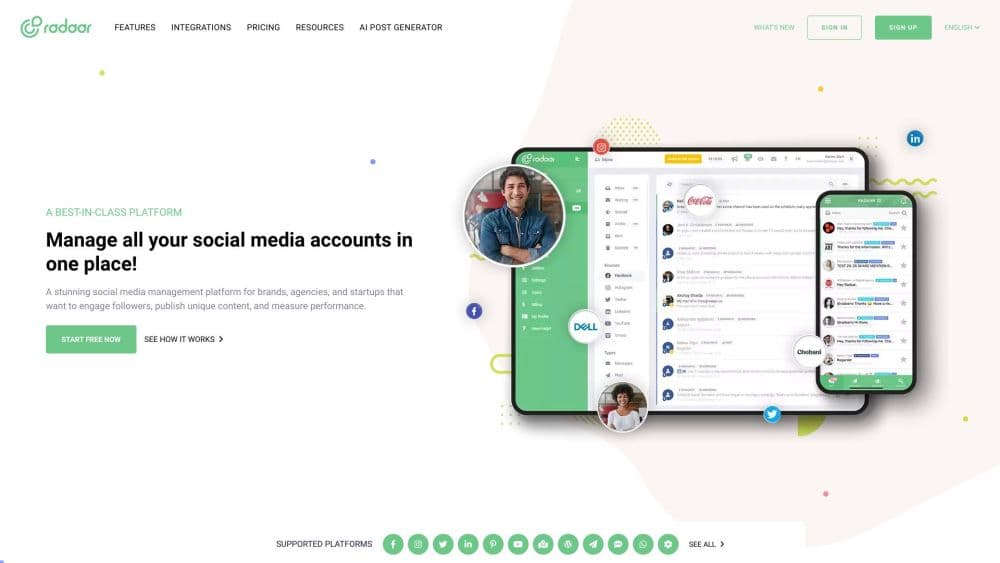
About RADAAR
What Is RADAAR
RADAAR is a social media management tool that runs in the browser and pulls publishing, replies, monitoring, and reporting into one dashboard. It's organized around subscriptions for separate brands, so an agency can keep each client's profiles, teammates, and reports apart without opening a second account.
The appeal is breadth at a low entry price. The Basic plan costs $4.99 a month and covers scheduling, an editor, and a media library. Professional, at $29.99, adds the social inbox, three monitoring queries, and analytics, which is the point where the product starts to feel like a full workspace.
Depth varies by network. X analytics is still listed as "soon," TikTok gets scheduling only, and the Basic plan leaves out both the inbox and reporting. Teams that need heavy listening across many markets will find the query caps tight.
Getting Started
- Sign up at dash.radaar.io. Every plan opens with a 14-day trial, and the signup doesn't ask for a card.
- Connect your profiles from the integrations page. Facebook Pages, Instagram Business accounts, LinkedIn organizations, YouTube channels, TikTok, Threads, Bluesky, and Pinterest are all on the list.
- Write a post in the content editor, assign it to a board and a stream, then schedule it or park it in the content pool.
- Invite teammates and set permissions per brand subscription, so a client can see reports without touching the publishing queue.
- Check Analytics after a week of posts and turn the numbers into a shareable report.
Product Information
A quick look at RADAAR's pricing, supported platforms, and performance.
Best for
The users, tasks, and scenarios where this tool fits best.
Users
- Small agencies
- In-house marketers running several brands
- Solo founders and community managers
Tasks
- Planning a month of content
- Answering comments and messages
- Tracking brand mentions
- Reporting to clients
Scenarios
- An agency with five retainer clients
- A product launch week
- A lean nonprofit team
Key features
Social Media Scheduler With a Visual Calendar
Posts go into boards and streams that behave like a Kanban calendar. You can drag a draft to a new day, set recurring posts, or leave evergreen items in the content pool for the scheduler to pick up. Best Times suggests slots based on past engagement, and the content score flags a caption that's too long for the network.
Social Inbox for Comments and Messages
The inbox collects conversations from connected networks into one list, with contact history beside each thread. Quick replies cut the typing on repeated questions, and a conversation can be handed to a teammate. Not every network feeds it: TikTok and Pinterest stay out, and X depends on the API tier your account has.
Social Listening and Monitoring
Monitoring queries track keywords, competitor handles, and hashtags. Professional includes three queries and Advanced includes nine, each one feeding a stream you can filter by network or assign to a person. Google Search and Bluesky are supported sources, which helps when you want to catch a mention before it reaches the brand account.
Social Media Analytics and Client Reports
Analytics covers engagement, reach, and audience growth per profile, with predefined reports and custom report boards. Report links can be shared with clients who don't have a login, and Advanced adds automated reporting and a presentation generator. X analytics is marked "soon," so cross-network reports currently lean on the other channels.
Task Manager and Team Workflows
A Kanban task board tracks who is doing what, with due dates and labels. Workflow triggers move a post through review stages, advanced permissions decide who can publish, and team discussion keeps comments next to the asset. Small agencies tend to notice this part, since it replaces a separate project tool.
Built-In Utilities and Integrations
Every plan includes a password manager, URL shortener, landing page builder, stock photo and audio libraries, and an AI assistant for captions. Design files come in from Canva, VistaCreate, Adobe Express, PostNitro, Contentdrips, and Layerhub, while Google Drive, Dropbox, OneDrive, and Box handle uploads. Zapier, Albato, Pabbly Connect, Slack, and Discord link the rest of the stack.
Pros and cons
Pros
- Low entry price: $4.99/mo covers scheduling for three profiles, and the 14-day trial doesn't ask for a card.
- Multi-brand structure: subscriptions, brands, labels, and permissions are built for agencies rather than bolted on later.
- Wide network list: more than 20 channels, including Threads, Bluesky, Mastodon, Pinterest, Google Business Profile, Telegram, and WordPress.
- Reports clients can open: shareable report links and the presentation generator save the monthly slide-building ritual.
- Extras at no extra cost: URL shortener, landing pages, password vault, stock libraries, and an AI caption assistant come with every plan.
Cons
- No free plan: the trial ends after 14 days and the cheapest option is $4.99/mo, so testing beyond two weeks costs money.
- Basic cuts the useful parts: no social inbox, no analytics, no monitoring, and a 90-post monthly cap.
- Network gaps: X analytics is marked "soon," TikTok gets scheduling only, and Pinterest reporting is still pending.
- Monitoring caps: three queries on Professional and nine on Advanced run out fast for an agency watching several clients.
Frequently asked questions
RADAAR is a social media management platform that handles scheduling, a shared inbox, monitoring, analytics, and client reporting for multiple brands from one account.
Related content
Explore related tools, skills, and articles for RADAAR.
RADAAR Alternatives

Emailwritr
Emailwritr · Writing · MarketingEmailwritr is an AI email copywriting tool built for affiliates, course creators, and online businesses that want more revenue from the list they already own. Instead of blank pages or generic chatbot prompts, this AI email writer generates welcome sequences, launch campaigns, cart recovery emails, and promo series from frameworks modeled on well-known direct-response copywriters. You connect your autoresponder, answer a few questions about your offer, and it writes the copy for you.

Prosp
Prosp · Writing · Voice & Language · MarketingProsp is an AI LinkedIn outreach tool built for agencies and sales teams, and it writes the message and the voice note in your own voice for each prospect so they actually reply. You connect your accounts, find leads, and let the AI draft and send personalized messages at scale, all from one inbox. It's built for people running outbound at volume. That's the whole pitch. Every touchpoint still has to feel human.

On Model
On Model · Image · MarketingOn Model is an AI fashion model tool that places your clothing on virtual models so online stores can get on-model product photos without booking a photoshoot. It runs as a Shopify app, letting you swap the model in an existing image, change backgrounds, and generate faces for cropped or headless shots. The goal is simple: match your product photos to your customers and stand out from competitors using the same supplier images.