

Ray
cdinnison (Ray) · Other
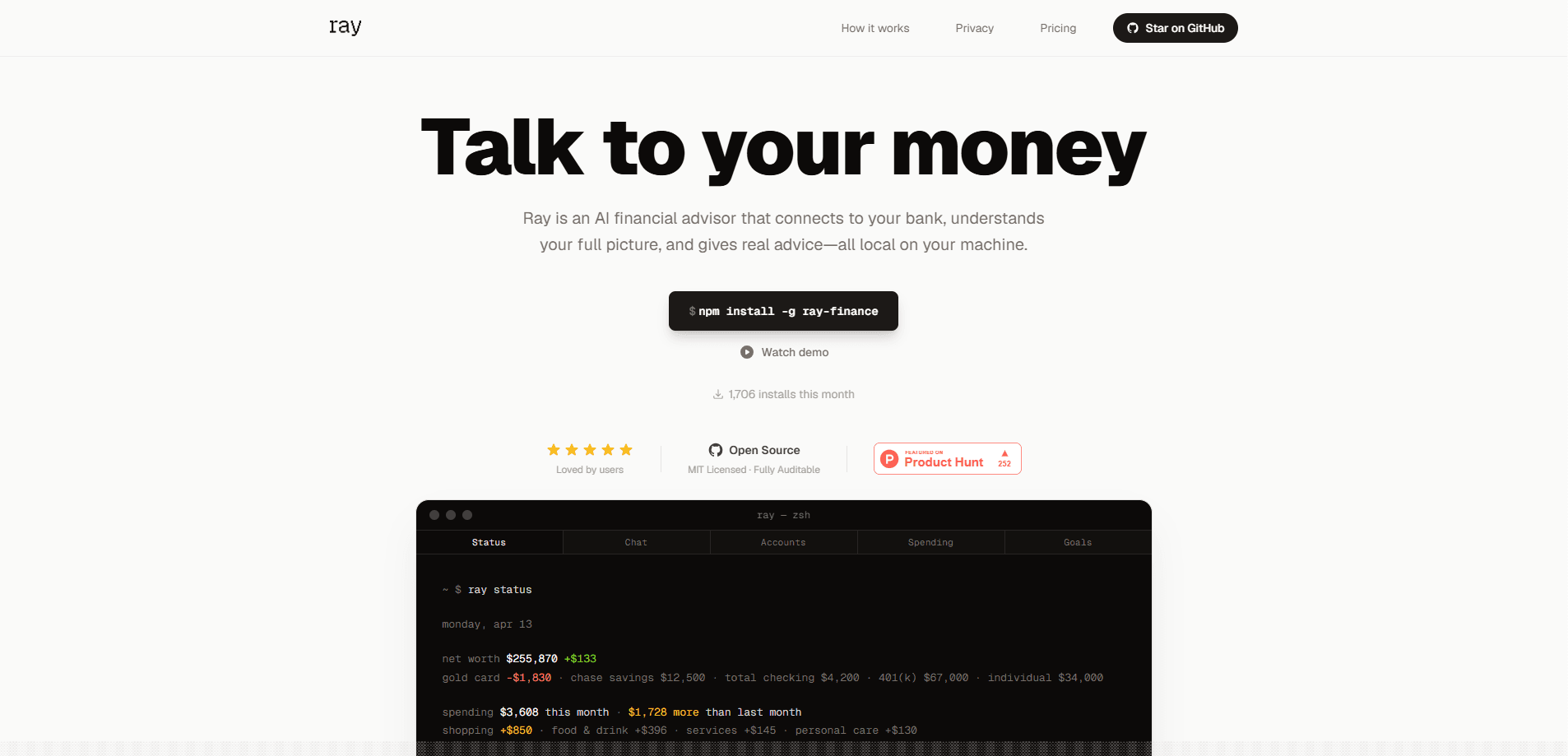
Ray is an open-source AI financial advisor that connects to your real bank accounts and tells you what to do with your money instead of just showing you charts. This local-first finance tool runs on your machine, keeps your data in an encrypted database, and remembers your goals, family situation, and past decisions across every conversation. You install it from the command line, link accounts through Plaid or Bridge, then ask plain questions and get concrete next steps.
About Ray
What Is Ray
Ray is a personal finance app built around a single idea: you already know what you spent, so what you need is someone to tell you what to do about it. Most budgeting apps stop at pie charts and notifications. Ray takes your actual bank data, factors in your goals and situation, and hands you a decision. Ask "can I afford this trip?" and you get a yes, a no, or a "not yet, and here's what would change that."
It's made by an independent developer (cdinnison on GitHub) and released as open-source software under the MIT license. That matters for two reasons. First, anyone can read the code that touches their money. Second, because it's local-first, this privacy-first finance app keeps your transactions on your machine in an AES-256 encrypted SQLite database instead of living on someone else's server.
The catch is that Ray is a command-line tool aimed at people comfortable with a terminal. There's no polished mobile app, and you connect your own AI provider key so you pay for the model usage yourself.
Getting Started
- Install Ray globally with npm:
npm install -g ray-finance. No account or app store needed. - Link your bank accounts by running
ray link, which connects through Plaid (US and Canada) or Bridge (Europe via PSD2). - Add your Anthropic API key so Ray can talk to the AI model that powers its advice.
- Answer a few profiling questions about your family, income, and goals so Ray builds your situation profile and starts remembering the details that shape every future recommendation.
- Start asking questions like "am I on track to save $10k?" and act on the next move Ray gives you.
Product Information
A quick look at Ray's pricing, supported platforms, and performance.
Best for
The users, tasks, and scenarios where this tool fits best.
Users
- DIY budgeters who live in the terminal
- Privacy-conscious users
- People juggling debt and goals
Tasks
- Deciding on a large purchase
- Building a debt payoff plan
- Tracking everyday behavior
Scenarios
- Monthly money check-ins
- Life changes
- Subscription cleanups
Key features
Advice Grounded In Real Bank Data
Ray uses 30+ tools to query your actual linked accounts, run the math, and hand you a next move. Think of it as an AI budgeting advisor rather than a dashboard. Ask about a purchase and it projects your balance forward from real income and spending patterns, so you see the impact before you commit. This is the core difference from apps that only describe the past.
Persistent Memory Across Conversations
Ray keeps a running profile of your life: family, income, goals, strategy, and key decisions. That's why the advice you get on day 30 looks nothing like day one. It also updates itself when your situation changes, so a raise or a new baby flows into future answers without you re-explaining everything. Tell it once. It remembers.
Local-First Encrypted Storage
Your data lives on your machine in an AES-256 encrypted SQLite database rather than on a remote server. Names, account numbers, and identifying details get masked before anything reaches the AI, so the model analyzes your finances without seeing your identity. For anyone uneasy about handing transaction history to a startup, this is the whole point. No cloud, no leak.
Bank Sync Through Plaid and Bridge
As a bank sync app, Ray connects checking, savings, credit cards, investments, and loans. Plaid covers the US and Canada, while Bridge handles Europe through PSD2, including France and the broader EU. Link once. Ray pulls fresh data as you ask questions.
CFO-Style Recommendations
Ray doesn't hand you a menu of options. It tells you what it would do and why, references your goals, and flags problems you haven't noticed yet. That voice is deliberate. It's framed as a chief financial officer rather than a chat assistant, so the output reads like a decision, not a brainstorm. Big difference.
Daily Score And Achievements
A 0-100 behavior score tracks how you're doing day to day, with streaks and 14 earnable achievements. Skip restaurants for a week and you earn Kitchen Hero. Hit five zero-spend days and you earn Monk Mode. It's a light layer of gamification over the boring part of money management.
Budgets, Goals, And Alerts
You can set spending limits by category and track progress toward specific goals. Smart alerts fire on large transactions, low balances, and budget overruns, so you hear about problems while there's still time to react. Simple, but it works.
Pros and cons
Pros
- Open-source under the MIT license, so the code handling your money is auditable.
- Local-first design keeps transaction data in an encrypted database on your own machine.
- Persistent memory means advice improves over time instead of starting from scratch each session.
- Free to use, with no subscription and no account to create.
Cons
- It's a command-line tool, so you need terminal comfort, and there's no mobile or web app.
- You must supply your own AI provider key, which adds a separate usage cost on top of setup.
- As a young open-source project, it lacks the polished support and onboarding of paid budgeting apps.
Frequently asked questions
Ray is a local-first AI financial advisor that reads your real bank data and tells you what to do about your money. Instead of showing charts, it answers questions like "can I afford this?" with a decision and the reasoning behind it.
Related content
Explore related tools, skills, and articles for Ray.
Ray Alternatives
BinkBink
BinkBink · OtherBinkBink is a free online game platform and AI game maker that lets anyone turn a short text description into a playable browser game. You can jump into hundreds of community-made games. Or describe your own idea and play it in seconds, then share it with friends. Want to create your own game? You don't need to code. No engine setup, no download, no hassle.

Audiogen
Audiogen Inc. · OtherAudiogen is an AI music generator built by Audiogen Inc., a small research team that spent about 2.5 years training its own generative music model and designing a web interface around it. Instead of a plain text box, this AI music tool turns the timeline into a beginner-friendly Generative Audio Workstation, or GAW, where inpainting, extending, remixing and stem editing work more like painting on a canvas. The product is still in beta, so access runs through a waitlist or an invite. Paid plans aren't published yet.

Aiml API
AIMLAPI OÜ · OtherAiml API is a unified AI model API that puts more than 1000 models from OpenAI, Google, Anthropic, and others behind one endpoint and one bill. You write code against a single OpenAI-compatible schema, then switch between chat, image, video, and audio models by changing a model string. It suits developers and small teams who want multi-model access without juggling a dozen separate provider accounts, and it removes the usual billing headache that comes with testing several vendors. One key covers it all.