

Reachat
Reaviz · Marketing · Chatbot
Reachat is an open-source React library that ships ready-made chat UI components for LLM apps, so a working AI chat interface takes hours instead of weeks.
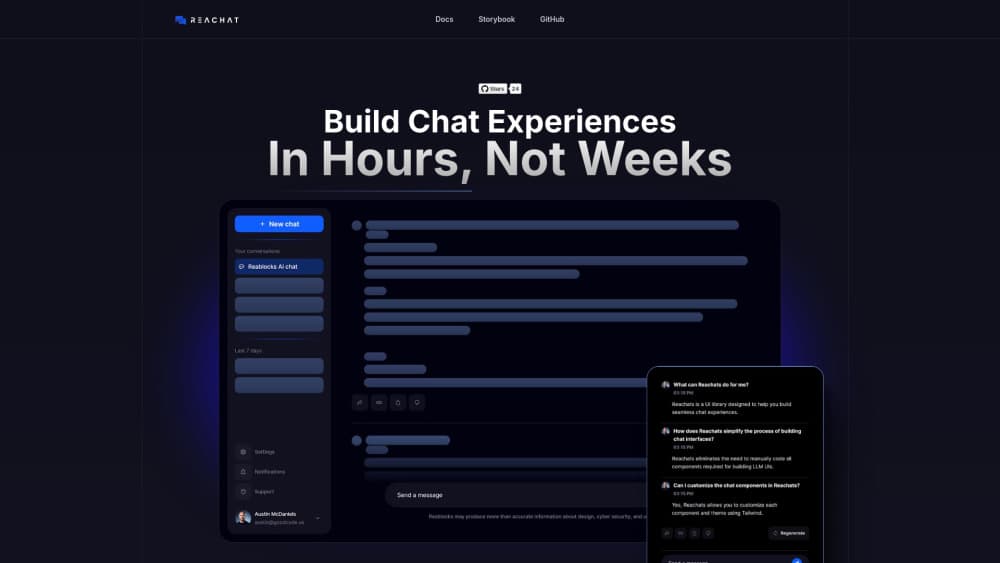
About Reachat
What Is Reachat
Reachat is a React chat UI library for developers who already build with React and Tailwind. It covers the parts every LLM chat UI needs: the message list, the composer, the session sidebar, markdown output, file uploads, and a theme layer you control. You install it from npm and drop the components into an app you're writing anyway.
The library stays out of your backend. It doesn't call OpenAI, Anthropic, or any other model provider on its own, and it doesn't store conversations. Your code passes messages in, handles the request, and passes the reply back. That makes the open-source chat components usable with a self-hosted model, a proxy, or a service you already pay for.
The tradeoff is scope. Reachat is a UI layer, not a finished product. There's no hosted widget, no dashboard, and no analytics out of the box. If you want a chat box on a marketing site without touching code, this isn't the tool. If you're assembling a Tailwind chat UI in your own codebase, it removes most of the grunt work.
Getting Started
- Run
npm i reachatin your project, then confirm Tailwind is configured, since the components depend on it for styling. - Import the chat component and mount it inside your page or route.
- Pass in your message array and a send handler that calls your own API endpoint.
- Style the result with Tailwind classes or slot overrides, and check the Storybook demos for props worth using.
Product Information
A quick look at Reachat's pricing, supported platforms, and performance.
Best for
The users, tasks, and scenarios where this tool fits best.
Users
- Frontend developers building an AI chat interface
- Small product teams without a dedicated designer
- Developers prototyping an LLM feature inside an existing app
Tasks
- Assembling a chat screen for a custom model endpoint
- Displaying agent output with tool calls
- Theming a chat view to match a brand
Scenarios
- Shipping an internal copilot for a support or sales team
- Adding document Q&A to a SaaS dashboard
- Replacing a hand-rolled chat view that fell apart on long threads
Key features
Two Layout Modes
Reachat ships a console layout with a session sidebar and a companion layout that sits closer to a side panel. Teams pick the one that matches how their users work. Both share the same message components, so switching layouts doesn't mean rebuilding the thread.
Markdown Rendering for Real Model Output
Answers from a model rarely arrive as plain sentences. Reachat renders markdown, GFM tables, highlighted code, JSON blocks, lists, math, and YouTube embeds out of the box, with remark and rehype plugin support if you need more. This is the part most teams underestimate when they start building a chat UI.
Agentic Message Roles
Messages carry user, assistant, system, and tool roles. Tool calls and their results sit in the same thread as the conversation, which matters for agentic chat interfaces that search, query, or call functions before answering. You keep control of the data, the library handles the display.
File Attachments and Image Preview
Users can upload files and preview images inside the message composer. Attachments stay in your message payload, so you decide where they're stored and how they're sent to the model. No separate upload widget to wire up.
Mentions and Commands
The composer supports mentions and slash commands through Tiptap. Users can reference a document, a contact, or a saved prompt without leaving the message box. What each command does is your call, which keeps the feature tied to your product instead of a fixed menu.
Tailwind Theming and Slots
Every component takes Tailwind classes, and slots expose the inner pieces, so you can restyle one button without forking the source. There's no CSS-in-JS runtime and no theme config file to maintain. If your design system already speaks Tailwind, the chat view inherits it.
Long Thread Handling
Message pagination, smart session grouping, and keyboard shortcuts are included. Conversations that run to hundreds of messages stay usable, and the grouping logic keeps related sessions together in the sidebar. Keyboard navigation covers the composer and the message list.
Pros and cons
Pros
- Apache 2.0 license, so you can ship it inside a commercial product without a licensing review.
- No backend coupling, which means any provider or a locally hosted model works.
- Covers the tedious parts of chat UI, including markdown edge cases, code blocks, and scroll behavior on new messages.
- Tailwind and slot overrides keep restyling cheap, even for a single component.
Cons
- React and Tailwind are assumed. A Vue, Svelte, or plain HTML project gets nothing from it.
- No hosted version exists, so deployment, authentication, and message persistence are yours to build.
- Documentation leans on Storybook demos, and edge cases often need a look at the source.
- Version 4.0 changed APIs from earlier releases, so older tutorials and blog posts may not match current code.
Frequently asked questions
It supplies chat UI components for React apps that talk to an LLM. You bring the backend and the model call, Reachat brings the interface.
Related content
Explore related tools, skills, and articles for Reachat.
Reachat Alternatives

ngram 2.0
ngram · Video · Marketingngram 2.0 is an AI video generator for teams. It turns a prompt, a screen recording, or a product URL into a narrated explainer, product demo, or AI avatar video, and every scene stays editable.

shippedit.me
Krawlup · Marketing · Businessshippedit.me now redirects to Krawlup, a web platform that audits SEO, AEO and page speed every week, then hands the fixes to AI coding agents over MCP.

MePersona
MePersona, Inc. · Writing · Productivity · MarketingMePersona is an AI unified inbox for creators. It learns your voice, drafts replies to fan messages from 12 platforms, and sends only what you approve.