

Readable
NextLab Inc. · Writing · Productivity
Readable is an AI PDF translation service from NextLab Inc. that converts English documents into Japanese while keeping the original layout, tables, and figures intact.
About Readable
What Is Readable
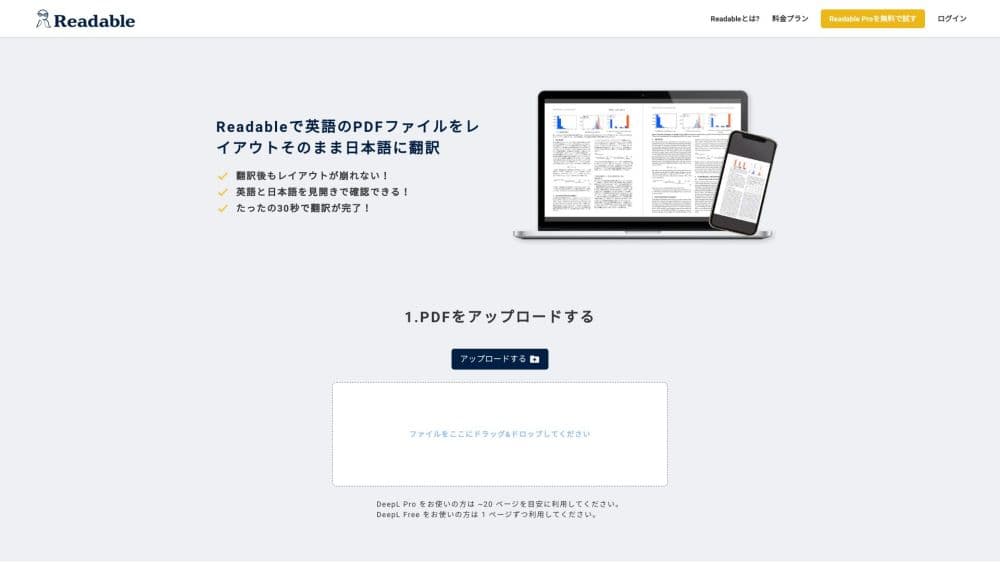
Readable is a Japanese AI translation tool built for PDFs. Developed by NextLab Inc. in Tokyo, it takes English documents and turns them into Japanese without breaking the page apart. Tables, charts, images, and multi-column text stay where they were, so a report or research paper still reads like a document rather than a wall of rewritten text.
The product targets two groups: researchers reading English papers, and companies working through English manuals, contracts, and reports. Both need to understand a document quickly, and both often lose layout information when they paste text into a generic translator. Readable removes that step by translating the file itself.
Its main limits are worth noting early. It translates into Japanese, not the other way around, so it does not translate PDF to Japanese as one direction among many; the languages you can translate from depend on your plan. Heavy users also need to watch file caps: the cheaper plan stops at 100 pages and 50MB per file. Uploaded files sit in storage longer on the free tier than on paid plans.
Getting Started
- Sign up on the Readable site with an email address and verify the account.
- Pick a plan. A 7-day free trial is available, and it moves to a paid plan automatically if you do not cancel in time.
- Upload a PDF or use the Chrome extension to send an online document for translation.
- Wait roughly 10 seconds for the translated file, then open it in side-by-side view to check sections against the original.
- Register recurring terms in the dictionary so product names and technical words stay consistent across documents.
Product Information
A quick look at Readable's pricing, supported platforms, and performance.
Best for
The users, tasks, and scenarios where this tool fits best.
Users
- Researchers and students reading English papers
- Corporate teams handling English documents
- Readers who want to check the original
Tasks
- Translating long research papers
- Translating layout-heavy reports
- Standardizing technical vocabulary
- Quick online file translation
Scenarios
- A research lab reviewing prior work
- A business processing English vendor documents
- A student working through a textbook chapter
Key features
Layout-Preserving Translation
Readable's core strength is holding a PDF's visual structure together. Tables, diagrams, images, and boxed sections are translated in place, so the arrangement of the original survives into the Japanese version. This matters most for research papers and reports, where a table separated from its heading or a figure detached from its caption becomes hard to follow. Keeping the layout also saves the step of rebuilding a document after translation.
Dictionary for Technical and Company Terms
Generic translators often render the same technical term two or three different ways across one document. Readable lets you register fixed term pairs, defining what a specific word, product name, or abbreviation should become. Once entered, the term stays consistent in every later translation, which reduces proofreading effort and keeps shared documents stable when several people rely on the same vocabulary.
Large-File and Long-Document Support
The Pro Premium plan translates PDFs up to 1000 pages and 200MB in a single upload, and the lower plan covers 100 pages and 50MB. For long papers or thick manuals, this avoids the usual routine of splitting a file, translating each part, and stitching the results back together. A single pass keeps numbered sections and cross-references aligned.
Unlimited Translations on a Flat Monthly Fee
Paid plans allow unlimited translation runs and unlimited downloads of translated PDFs, billed at a flat monthly or annual rate rather than per file. Heavy months do not raise the cost, which helps readers who work through many documents and teams that cannot predict monthly volume. The annual option runs about 20 percent cheaper than paying monthly.
Chrome Extension for Online Files
A Chrome extension lets you translate files you open in the browser without downloading them first. The same engine handles both uploaded PDFs and extension-based translation, so document handling stays consistent. According to NextLab, translations are typically ready in about 10 seconds.
Choice of Translation Engine
Readable runs on its own translation engine and does not require a separate DeepL subscription. On the Pro Premium and Business plans, users can also switch to a ChatGPT-based engine for some jobs. Having two engines means a reader can compare output when a technical passage comes out flat in one and clearer in the other.
Pros and cons
Pros
- Keeps tables, figures, and multi-column layouts intact, so translated PDFs stay readable without manual rebuilding.
- Unlimited translations and downloads on a flat fee, which suits people who process many documents each month.
- Term dictionary fixes wording across documents, cutting repeated correction work on technical or branded text.
- Side-by-side view lets a reader verify the Japanese against the original without leaving the page.
- Handles very large files, up to 1000 pages and 200MB on Pro Premium, in one upload.
Cons
- Translation runs only into Japanese, so users who need other target languages are out of scope.
- File limits are tight on the cheaper Pro Standard plan, at 100 pages and 50MB, which pushes heavy users toward the higher tier.
- The free tier stores uploaded PDFs and may let staff view them for accuracy work, so confidential documents should go through a paid plan.
- The exact per-plan language coverage is not clearly spelled out beyond "200 countries," making it hard to confirm support for a specific source language before paying.
- No public API, so teams cannot wire translation into their own tools or automated workflows.
Frequently asked questions
Readable translates PDF documents into Japanese with AI while keeping the original layout, including tables, images, and multi-column sections. It is built for reading English papers, reports, and manuals in Japanese without losing the document's structure.
Related content
Explore related tools, skills, and articles for Readable.
Readable Alternatives

Google EmbeddingGemma 2
Google DeepMind · Writing · Image · CodingGoogle EmbeddingGemma 2 is a 740M-parameter open model that turns text, code, images, audio, and video frames into vectors in one 768-dimension space, running on phones and laptops.

MePersona
MePersona, Inc. · Writing · Productivity · MarketingMePersona is an AI unified inbox for creators. It learns your voice, drafts replies to fan messages from 12 platforms, and sends only what you approve.

Fluence
Yay Software (Yannick Huchard) · Writing · Voice & Language · ProductivityFluence is an Android app that reads PDFs, EPUBs, Word files and web articles aloud, follows each sentence as it speaks, and answers questions about the text on the phone itself.