
Receipts
Independent developer (getreceipts.app) · Other
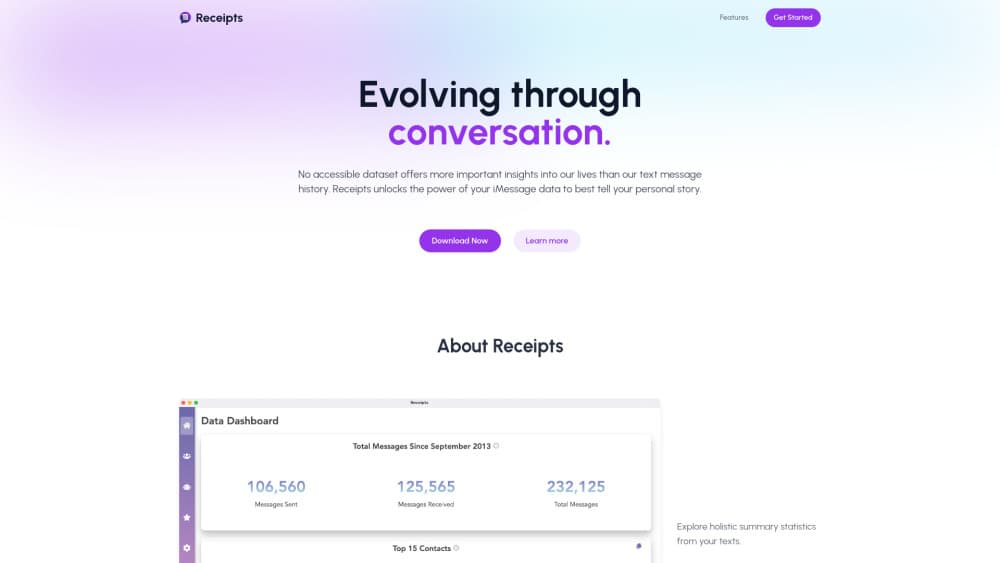
Receipts is a Mac app that turns your iMessage history into message statistics, per-contact conversation insights, and AI text analysis you can question in plain English.
About Receipts
What Is Receipts
Receipts is an iMessage analytics app for macOS that reads the Messages database already sitting on your Mac and turns years of iMessage threads into charts, rankings, and written summaries. Its site uses the line "Evolving through conversation," and the product keeps that introspective tone. It works less like a chat exporter and more like a mirror for how you talk to the people in your life.
The app runs on two layers. The first is numbers: total messages, busiest contacts, long silences, word frequency, and the shape of a thread over time. The second is language. Receipts sends a chosen conversation through ChatGPT on the backend and asks for patterns, tone shifts, or a simulated reply written in the other person's style.
There are real limits. It runs on macOS only, with separate builds for Apple Silicon and Intel chips, and it reads iMessage data rather than SMS or third-party chat apps. Your iPhone history also has to be synced to the Mac before the app can see it. The AI features send message text to OpenAI's API, so the private, on-device experience stops at that door.
Getting Started
- Download the Apple Silicon or Intel build from getreceipts.app and move the app into Applications.
- Open Receipts and allow access when macOS asks for permission to read the Messages database.
- Pick a contact or a group from the list to load its statistics and timeline.
- If threads are missing, open Messages on the Mac, go to Settings, then iMessage, and press Sync Now.
- Switch on the AI tools and choose a conversation to analyze or use for a simulated exchange.
Product Information
A quick look at Receipts's pricing, supported platforms, and performance.
Best for
The users, tasks, and scenarios where this tool fits best.
Users
- Mac owners with years of iMessage history
- Writers and journal keepers
- Curious friend groups
- People who like a visual answer
Tasks
- Reviewing how a friendship changed over time
- Finding your most active contacts
- Testing an AI read on a chat
- Drafting a reply in someone else's voice
Scenarios
- A late night scroll through old threads
- Preparing for a difficult conversation
- Cleaning up your digital life
Key features
Lifetime message statistics
Receipts reads the full local history and reports totals for messages sent and received, plus activity by hour, day, and month. The result is a simple read on when you're most talkative and which years were busiest. It's the fastest part of the app, and it works without any AI feature turned on.
Contact and group breakdowns
Every thread gets its own page with message counts, average length, response gaps, and a running timeline. Group chats get a separate view that shows who dominates the conversation. This is where the app earns its name, since you can pull up the receipts for any relationship in a couple of clicks.
AI conversation analysis
With the AI layer on, you can ask Receipts to describe a thread in plain language: the tone, the recurring topics, the moments where things shifted. Answers arrive as short written summaries rather than charts. Chat history analysis is only as good as the text it reads, so short or one-sided threads produce thinner results.
Interaction simulation
The simulation tool generates replies that mimic how a contact writes, based on their past messages. It's useful for rehearsal before a hard conversation, or just to see how a person's phrasing comes across. Treat the output as a writing aid, not a prediction of what anyone will actually say.
Local-first storage
Non-AI data stays on your Mac. The developers state that message data isn't stored on their servers, and nothing leaves the machine unless you turn on the ChatGPT features. For anyone worried that iMessage data insights will end up on a server, that design choice matters more than any feature list.
iPhone sync guidance
The app includes instructions for pulling iPhone threads onto the Mac through the Messages app, which is the step most people miss. If your history looks short, that's usually the cause. The fix takes a minute and doesn't require any third-party tool.
Pros and cons
Pros
- Reads the Messages database already on your Mac, so there's no account to create and no upload step.
- AI answers come back in plain language, which suits people who don't want to read raw charts.
- One-to-one and group threads both get their own breakdowns.
- Free to download, with clear guidance on syncing a partial iPhone history.
Cons
- Mac only. There's no Windows, web, or iPhone version, so the app is useless on any other device.
- iMessage only. Green-bubble SMS and chats from WhatsApp or Telegram don't appear at all.
- AI features send message text to OpenAI, which is a deal breaker for anyone who wants every byte to stay local.
- Pricing isn't listed anywhere on the site, so you only learn the cost, if there is one, after installing.
Frequently asked questions
It reads your local iMessage history and turns it into statistics and AI written summaries. Nothing is posted publicly, and the app doesn't send messages on your behalf.
Related content
Explore related tools, skills, and articles for Receipts.
Receipts Alternatives

JarvisCore
Prescott Data · Coding · Productivity · OtherJarvisCore is an open source Python runtime where AI agents work as equal peers on an agent mesh, claim tasks from a shared ledger, and reach external services through a zero-trust broker.
Clef
Cloudflare · Business · OtherClef is Cloudflare's open-source decision model for Workers AI. It returns calibrated probabilities for typed questions, not generated text, so agents can classify, route, and act fast.

iFixAi
iFixAi · Business · OtheriFixAi is an open-source auditor for AI agents. It runs your agent through a simulation of your business, grades every reply, and returns an A to F scorecard backed by evidence.