

Rewrite Text - AI Rewriter
Reescribirtextos.net · Writing
Rewrite Text is a free web-based AI rewriter that paraphrases paragraphs, essays, and articles in seconds while keeping the original meaning intact.
About Rewrite Text - AI Rewriter
What Is Rewrite Text
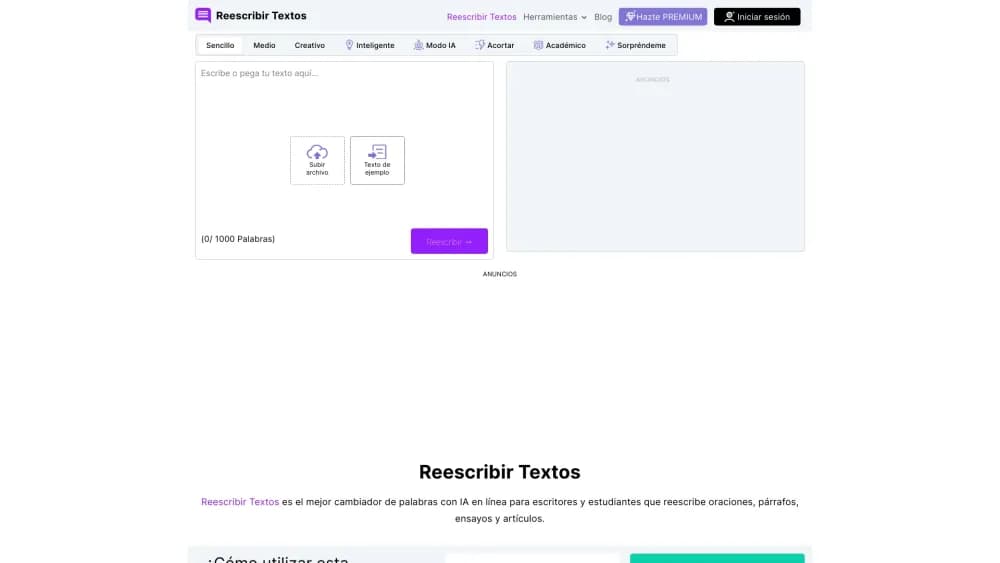
Rewrite Text is an online AI rewriter hosted at reescribirtextos.net, a tool that takes a block of text and produces a rewritten version by swapping words for synonyms and reshaping sentences. You paste in a paragraph, an essay, or a full article, pick a rewriting mode, and get a fresh draft that reads differently but says the same thing. The site also runs English, Portuguese, and French versions under the same brand, so the same engine serves writers working across languages.
The problem it targets is dull, repetitive, or borrowed wording. Students polishing an assignment, bloggers trying to make a post feel less like the source they read, and content teams facing a plagiarism flag all reach for a rewriter. Because the tool changes surface wording while holding the meaning, it fits editing far better than translation or fact-checking.
There are real limits. Output quality depends on how much of the sentence gets rebuilt, so long technical passages can come out awkward, and no rewriter fixes weak ideas or missing facts. The service says it doesn't store the text you paste, but you should treat any web tool as unsuitable for confidential material. The tool also caps a single run at 5,000 words, so very long documents need to be split.
Getting Started
- Open reescribirtextos.net in a browser, or the English, Portuguese, or French version of the site.
- Type, paste, or upload your text, since TXT, DOC, DOCX, and PDF files are accepted.
- Pick a rewriting mode that matches the tone you want, such as Standard, Formal, or Creative.
- Click Rewrite and wait a few seconds for the new version to appear.
- Review the highlighted changes, then copy the result or download it as a DOC file.
Product Information
A quick look at Rewrite Text - AI Rewriter's pricing, supported platforms, and performance.
Best for
The users, tasks, and scenarios where this tool fits best.
Users
- Students
- Content writers
- Bloggers and webmasters
- SEO specialists
Tasks
- Rewriting a paragraph
- Paraphrasing an essay
- Removing accidental plagiarism
- Tightening or expanding text
Scenarios
- Polishing a draft before submission
- Refreshing an old blog post
- Preparing copy in another language
Key features
Eight Rewriting Modes
This paragraph rewriter offers eight modes, Standard, Simple, Formal, Creative, Academic, Shorten, Expand, and AI Mode, so you can match the output to the job. Standard suits everyday rewriting, Academic leans toward study and reports, and Creative pushes further from the source when you want a noticeably different phrasing. Choosing the right mode matters more than anything else, since it changes how aggressively the engine rebuilds your sentences.
Word-Level Synonym Suggestions
Beyond a full rewrite, the tool works as an AI word changer that flags specific words it can swap and suggests alternatives, letting you pick the synonym that fits best. This gives you finer control than an all-or-nothing rewrite, which is useful when one term is almost right but not quite. You end up editing rather than accepting a wholesale replacement.
Highlighted Changes
Every rewrite highlights the words and phrases that were changed, so you can compare the new version against your original at a glance. That visual diff is what makes the tool usable for editing work, because you can spot an awkward swap and fix it instead of rereading the whole draft. It also helps you judge how far the tool went from your source.
File Upload and Download
Instead of pasting text, you can upload a file and pull the rewritten version back out. The tool accepts TXT, DOC, DOCX, and PDF on the way in, which saves retyping a long document, and lets you download the result as a DOC file. A single run handles up to 5,000 words, so most essays and blog posts fit in one pass.
Free, No-Account Access
You can rewrite text without registering or paying, and the site describes the tool as free for all purposes. That lowers the barrier for a quick job, since there is no sign-up wall before you see a result. The same free access applies across the English, Portuguese, and French versions of the site.
Pros and cons
Pros
- Works without an account, so you can rewrite text in seconds with no sign-up.
- Eight modes cover tones from formal to creative, letting one tool fit different writing jobs.
- Highlighted changes make it easy to see what was altered and keep the parts you like.
- File upload and DOC download save time on long documents that would be tedious to paste.
- The site ships in English, Portuguese, and French, useful for writers in those languages.
Cons
- Rewrites can drift in meaning on technical or niche text, so the output needs a careful read before you use it.
- A 5,000-word cap per run means long documents have to be split and rewritten in parts.
- There is no way to save work or revisit past rewrites, since the tool runs without accounts.
- Confidential or sensitive text is best kept out, as the material is processed online.
Frequently asked questions
An AI text rewriter is an online tool that uses artificial intelligence to rephrase text by swapping in synonyms and rebuilding sentence structures, aiming to keep the original meaning while changing how it reads. Rewrite Text applies this to paragraphs, essays, and articles you paste into its web page.
Related content
Explore related tools, skills, and articles for Rewrite Text - AI Rewriter.
Rewrite Text - AI Rewriter Alternatives

Google EmbeddingGemma 2
Google DeepMind · Writing · Image · CodingGoogle EmbeddingGemma 2 is a 740M-parameter open model that turns text, code, images, audio, and video frames into vectors in one 768-dimension space, running on phones and laptops.

MePersona
MePersona, Inc. · Writing · Productivity · MarketingMePersona is an AI unified inbox for creators. It learns your voice, drafts replies to fan messages from 12 platforms, and sends only what you approve.

Fluence
Yay Software (Yannick Huchard) · Writing · Voice & Language · ProductivityFluence is an Android app that reads PDFs, EPUBs, Word files and web articles aloud, follows each sentence as it speaks, and answers questions about the text on the phone itself.