
Reflect
No Translation Layer LLC · AI Assistant
Reflect is a private self-tracking app for iPhone and iPad that lets you log mood, sleep, habits, symptoms, and health markers, run self-experiments, and find correlations in your own data.
About Reflect
What Is Reflect
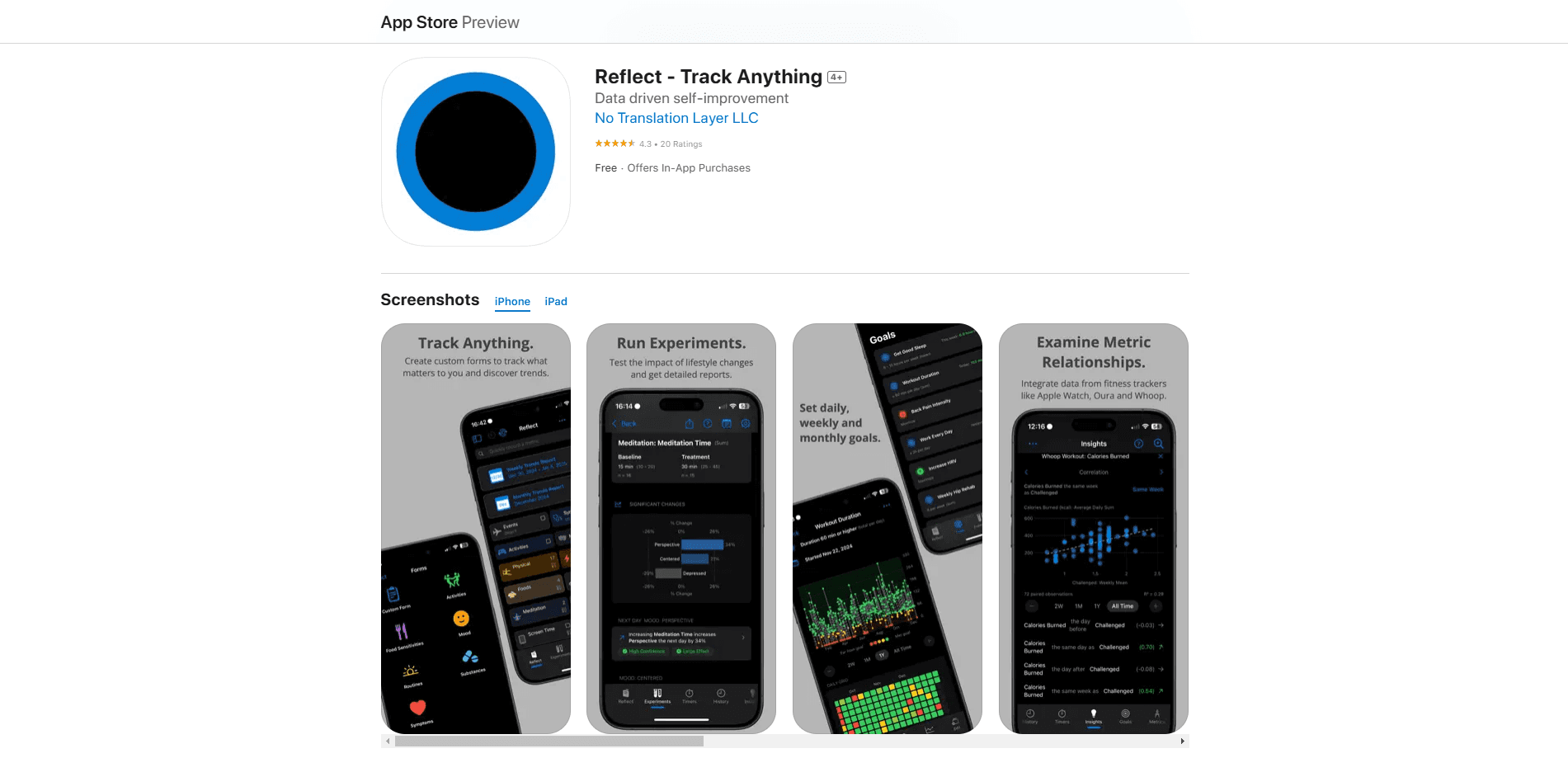
Reflect is a self-tracking and self-experimentation app built for people who want to understand their own patterns. You decide what to record, how often to record it, and what shape the data takes. Mood, sleep, focus, supplements, blood pressure, cycle symptoms: the app leaves the choice to you instead of forcing a fixed template.
The core idea is that personal data becomes useful once you can compare it. Reflect turns your logs into charts, calendars, and correlation reports, so a vague hunch like "I focus better on the days I sleep well" can turn into something you can actually look at. It also lets you run structured experiments and get a report comparing what you predicted with what happened.
The biggest limit is scope. Reflect is Apple-only: iPhone and iPad, iOS 18.0 or later, with no Android version and no web app. It leans on you to design your own metrics, which rewards curious tinkerers but can feel like work if you want a ready-made plan. Privacy is a selling point rather than a limitation: everything stays on your device.
Getting Started
- Install Reflect on an iPhone or iPad running iOS 18.0 or later. There's no account to create and no sign-up step.
- Build a form for whatever you want to track. Pick a metric type such as a number, a rating with custom bounds, a text field, a choice, or a timer, and set how often you want to log it.
- Start recording entries whenever it suits you. There's no once-a-day cap and no fixed question set.
- Review the Insights and Reports views to see trends and which metrics move together.
- Optionally set up an experiment, choose a schedule, and share the final report when it wraps up.
Product Information
A quick look at Reflect's pricing, supported platforms, and performance.
Best for
The users, tasks, and scenarios where this tool fits best.
Users
- Quantified-self enthusiasts
- People managing a chronic condition
- Habit builders
Tasks
- Finding correlations across metrics
- Running a self-experiment
- Exporting or importing data
Scenarios
- Reviewing a month of mood data
- Tracking a cycle alongside energy and mood
- Consolidating health device data
Key features
Track Anything With Custom Forms
Reflect starts from a blank form rather than a preset list. You choose the metric type, such as a number, a text field, a rating with your own scale, a choice, or a timer, and set how often you log it. There's no once-a-day limit and no small fixed menu of options, so unusual habits and one-off symptoms fit as easily as common ones.
Insights and Correlation Reports
The Insights view shows which of your metrics correspond most closely with the thing you care about. Instead of guessing, you can check claims like whether you are more productive on days you wake up earlier. Reports arrive weekly and monthly and summarize the changes that stand out.
Guided Self-Experiments
You can test a real-world change and let Reflect track it for you. Define the intervention, choose a schedule type that fits, and wait for the result. When the experiment ends, you get a report with statistics and plots that you can keep or share.
Flexible Visualization
Interactive charts, graphs, and calendars turn raw entries into something you can scan in seconds. Trends and relationships between metrics are easier to spot visually, which matters once you have months of data and no memory of what happened when.
Health and Device Integrations
Reflect syncs data from outside sources, including Apple Health, Oura Ring, WHOOP, and local weather. Integrations are free, so you are not paying extra to combine a wearable's sleep reading with your own mood notes in one view.
Private By Design
Entries are stored and analyzed locally on your device. The developers say they have no access to your data, and there's no cloud account needed to use the app. For a tool that holds your symptoms and mental health notes, that local-first approach is the main reason some people pick it.
Pros and cons
Pros
- Free unlimited custom tracking, with paid features limited to optional extras rather than your ability to log data
- No account or sign-up required, so you can start recording in minutes
- Correlation insights that compare metrics, such as linking sleep to focus
- Free CSV import and export that avoid locking your data inside the app
- Local storage and analysis that keep sensitive health notes on your device
Cons
- Apple only, with no Android or web version, which rules it out for mixed-device households
- The blank-canvas approach means you design every metric yourself, and that setup can be slow if you want something ready to go
- Being a self-tracking tool and not a medical device, it does not diagnose anything or replace a clinician's advice
- No published public API, so automating data entry or building custom integrations is not an option
Frequently asked questions
Reflect lets you record almost anything about your day, from mood and sleep to symptoms and supplements, then turns those entries into charts, correlations, and reports. It is built for people who want to spot patterns in their own data.
Related content
Explore related tools, skills, and articles for Reflect.
Reflect Alternatives

Iplan AI
Iplan AI · Productivity · AI AssistantIplan AI is an AI travel planner that turns a few trip details into a full day-by-day itinerary in seconds. You answer questions about your destination, interests, budget, and travel companions, and the tool builds a plan you can edit, share, and carry with you on any device. It targets travelers who want a solid draft without spending hours in spreadsheets and browser tabs. Think of it as an itinerary generator that does the tedious part for you.

Screenhelp
Screenhelp · Productivity · AI AssistantScreenhelp is an AI screen assistant that turns a single keyboard shortcut into real-time help. You press Ctrl+Shift+Space, it captures what's on your screen, and it streams an answer into a private panel in about two seconds. Think of it as an AI screenshot helper you trigger on demand. It runs on Mac, Windows, and the web, starts free with 30 answers a month, and stays invisible during screen sharing on Zoom, Teams, and Google Meet.
Rainbow
Rainbow · AI AssistantRainbow is an AI weather forecast app built around short-term precipitation nowcasting. Its engine pushes min-by-min rain and snow predictions up to four hours ahead, blending live satellite and radar feeds into hyperlocal forecasts. The app adds live rain radar, a seven-day outlook, precipitation alerts, home-screen widgets, and a hurricane tracker, and it runs on both Android and iOS with a free tier plus paid upgrades.