

Regex.ai
Liberty Labs · Coding
Regex.ai is a free web tool that reads text you highlight and writes the matching regular expression. Four AI agents propose rival patterns so you can compare results.
About Regex.ai
What Is Regex.ai
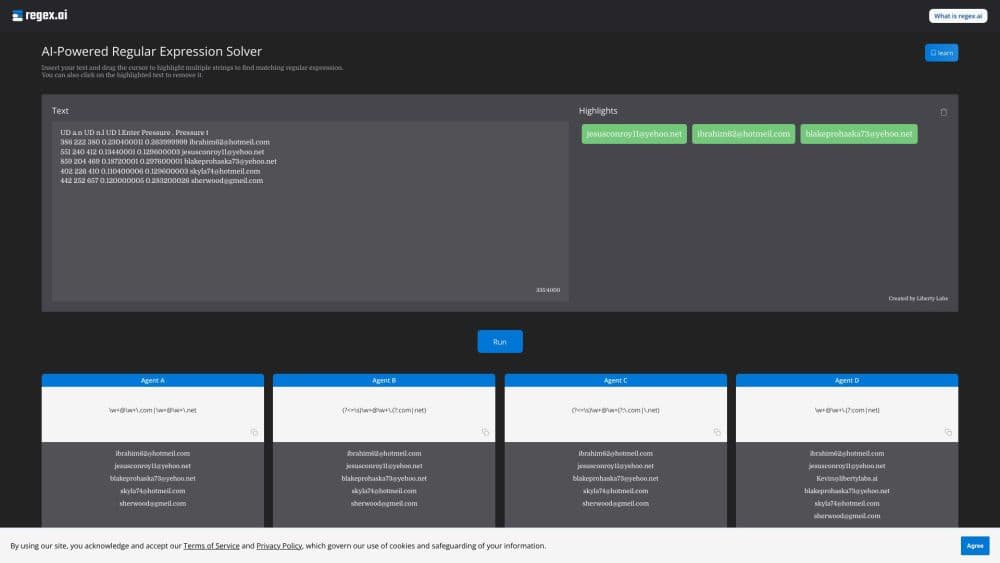
Regex.ai is a browser tool for people who need a regular expression but would rather not write one. It works as a regular expression generator driven by examples. You paste a block of text, drag your cursor over the strings you want to capture, and hit Run. The service compares your highlights against the surrounding text and hands back working patterns. The site describes itself as a regular expression solver, and the name fits: you bring the problem, it brings the pattern.
Regular expressions describe text patterns, and they power search, form validation, log parsing, and data cleanup. The syntax is dense and unforgiving. A missing backslash breaks a pattern silently, and debugging it later takes longer than writing it did. Regex.ai sidesteps that work by starting from examples instead of syntax. You show it what a match looks like, and it infers the rule.
The tool is built and run by Liberty Labs, a software company registered in Seoul, South Korea, and it has stayed a lightweight single-purpose site. There's no account, no install, and no paywall. That simplicity is the trade: there's no project library, no team workspace, and no supported API, so a pattern you like has to be copied out and stored somewhere else.
Getting Started
- Open regex.ai in any modern browser. No signup is required.
- Paste the text you need to process into the input box. The counter accepts up to 4,000 characters per run.
- Drag across the strings you want matched. Each highlight becomes an example. Click a highlight to remove it if you selected too much.
- Press Run and wait for the four agents to return patterns. Review how each one performs against your full text.
- Copy the version that covers every case you care about, then test it in your own code or in a regex tester before shipping it.
Product Information
A quick look at Regex.ai's pricing, supported platforms, and performance.
Best for
The users, tasks, and scenarios where this tool fits best.
Users
- Developers who forget regex syntax
- Data analysts cleaning messy exports
- Students and beginners learning regular expressions
- QA engineers writing input validation rules
Tasks
- Writing an email or URL validation rule
- Log parsing
- Building a find-and-replace rule in an editor
- Documenting a legacy regex
Scenarios
- A quick one-off extraction during a debugging session
- Teaching a colleague how patterns are built
- Checking a pattern someone else wrote
Key features
Four Competing Agents
A single run produces four patterns, each generated by an agent with a different strategy. Agent A generalizes the way a person would, reaching for a rule that covers the spirit of your highlights. Agent B looks for a pattern shared by the highlighted strings and the text around them. Agent C targets adjacent single characters. Agent D concentrates on the count and type of characters. Having four answers side by side is the point: you see how the pattern behaves on the parts of your text you never highlighted, and you pick the one that doesn't overreach.
Highlight to Pattern Workflow
The interface works like selecting text in a document. You drag over a value, it lights up, and the tool treats it as an example of what to capture. Select several and click Run. Mistakes cost nothing: a click on any highlight removes it, and you can keep adjusting until the examples cover every variant in the text. There's no prompt to write and no syntax to recall, which is what separates this from pasting into a general-purpose chatbot.
Full-Text Match Preview
Each agent's result is tested against your complete input, not just the strings you marked. You see which parts of the document the pattern captures and, more usefully, what it picks up by accident. That view is what breaks a tie between two plausible answers. A pattern that matches your three examples and nothing else looks different from one that sweeps up a dozen unrelated values, and the preview makes the difference obvious before you copy a single character.
Built-In Regex Reference
The documentation page doubles as a syntax guide. It covers the metacharacters that do the heavy lifting, including brackets, anchors, quantifiers, alternation, and grouping, plus the special sequences for digits, word boundaries, and whitespace. Each entry comes with a short example. For anyone learning the language, having the reference one click from the working tool saves a round trip to a separate cheat sheet. It's a basic reference, not a tutorial series.
No Account, No Cost, No Install
Everything runs in the browser and nothing is gated. There's no sign-up form, no paid tier, and no feature that unlocks after purchase. The service is licensed for personal, non-commercial use, so commercial teams should read the terms before relying on it in production work. For individual developers and students, the lack of friction is the main draw: open the tab, solve the problem, close the tab.
Custom Pattern Builder
The about page advertises a companion tool builder that's meant to sit alongside the generator, aimed at people who want to wrap an extraction task into a repeatable setup. The link currently returns a 404, so it's not usable today. Treat this as a roadmap item rather than a feature you can count on when planning work.
Pros and cons
Pros
- Four independent patterns per run give you real alternatives to compare rather than a single guess.
- The point-and-highlight input means you never have to describe a pattern in words or remember escape characters.
- Full-text previews flag overmatching before you copy a pattern into code.
- No account, no credit card, and no install, so the first useful result arrives in under a minute.
- The built-in reference table gives beginners enough syntax context to understand why a pattern works.
Cons
- The 4,000 character input limit rules out large documents and forces you to slice long files into batches.
- There's no API and no paid support tier, so automating the workflow or getting help on a broken pattern is on you.
- Results vary by how clean your text is. Messy data with inconsistent formatting can produce patterns that fit your examples and nothing else.
- The interface is minimal to a fault: no saved history, no shareable links to a specific run, and no team features.
Frequently asked questions
It generates regular expressions from examples. You paste text, highlight the strings a pattern should match, and the site returns four candidate patterns from four different AI agents. Each one is tested against your full text so you can see what it captures and what it misses.
Related content
Explore related tools, skills, and articles for Regex.ai.
Regex.ai Alternatives

Base Code
Base44 (Wix) · Coding · ProductivityBase Code is a shared cloud development environment from Base44. Teammates describe changes to an existing GitHub codebase in chat, preview them live and send them back as pull requests.

Google EmbeddingGemma 2
Google DeepMind · Writing · Image · CodingGoogle EmbeddingGemma 2 is a 740M-parameter open model that turns text, code, images, audio, and video frames into vectors in one 768-dimension space, running on phones and laptops.

GitGlow
GitGlow · Coding · ProductivityGitGlow is a local-first desktop Git client that lets independent developers review their own code and their AI agents' changes in one place before shipping.