

ReplyPilot
ReplyPilot Inc. · Marketing
ReplyPilot is a Chrome extension that drafts social media replies: type /rp in a comment box on LinkedIn, Instagram, X, or TikTok and it writes a first draft from your own notes.
About ReplyPilot
What Is ReplyPilot
ReplyPilot is a Chrome extension for writing social media replies and comments. It works on public comment boxes on LinkedIn, Instagram, X, and TikTok in a desktop browser. Each reply starts from a draft inside the comment box, guided by saved personalization, so you edit a real first attempt rather than face a blank field. You type a slash command into the field you're already using, tell the panel what you want to say, and it returns a first draft you can edit before posting.
The problem it addresses is the gap between reading a post and answering it well. Most people know the point they want to make but stall on the wording, or they repeat the same generic praise until it stops meaning anything. ReplyPilot turns that point into a sentence or two using your notes. You start from a draft instead of a blank box.
The limit to keep in mind is that ReplyPilot is a drafting aid, not an autopilot. It doesn't post for you, and the site is direct that you review every draft for facts, relevance, and voice before it goes live. It also runs only on the four public comment workflows it documents, not on direct messages, email, or mobile apps. That scope is narrow on purpose.
Getting Started
- Open the ReplyPilot Chrome Web Store listing in desktop Chrome, check the permissions, and add the extension. Pin it to the toolbar if you want quick access.
- Open the extension and sign in, then return to your social tab and refresh it so the panel can load. Sign-in matters here.
- Click a supported comment box, type /rp, and wait for the panel to open.
- Choose a response length and add a short instruction, such as asking how the author measured a result, then choose Generate.
- Read the draft, edit it in the comment field, and post it yourself once it matches what you mean.
Product Information
A quick look at ReplyPilot's pricing, supported platforms, and performance.
Best for
The users, tasks, and scenarios where this tool fits best.
Users
- Sales and business development teams
- Founders and personal brands
- Community and social managers
Tasks
- Answering a LinkedIn post with a real point
- Keeping replies to a set length
- Replying in another language
Scenarios
- A busy launch day
- B2B networking
- Working across platforms
Key features
Slash-command drafting with /rp
The core move is small: in a supported comment box, you type /rp and a panel opens over the page. From there you set the draft and ask for it. There is nothing to switch to. Because it lives inside the field you already use, there is no separate editor to paste into. The draft lands where the comment goes, ready for your edit.
Tone, sentiment, and length controls
The panel groups its writing controls as Reply length, Sentiment, and Tone of voice, plus emoji and hashtag switches. Length runs Short, Normal, or Long; sentiment runs Positive, Neutral, or Negative; and tone runs Formal, Casual, or Sarcastic. These are drafting preferences rather than hard guarantees, so you still check the result against what you meant.
Personalization profiles per platform
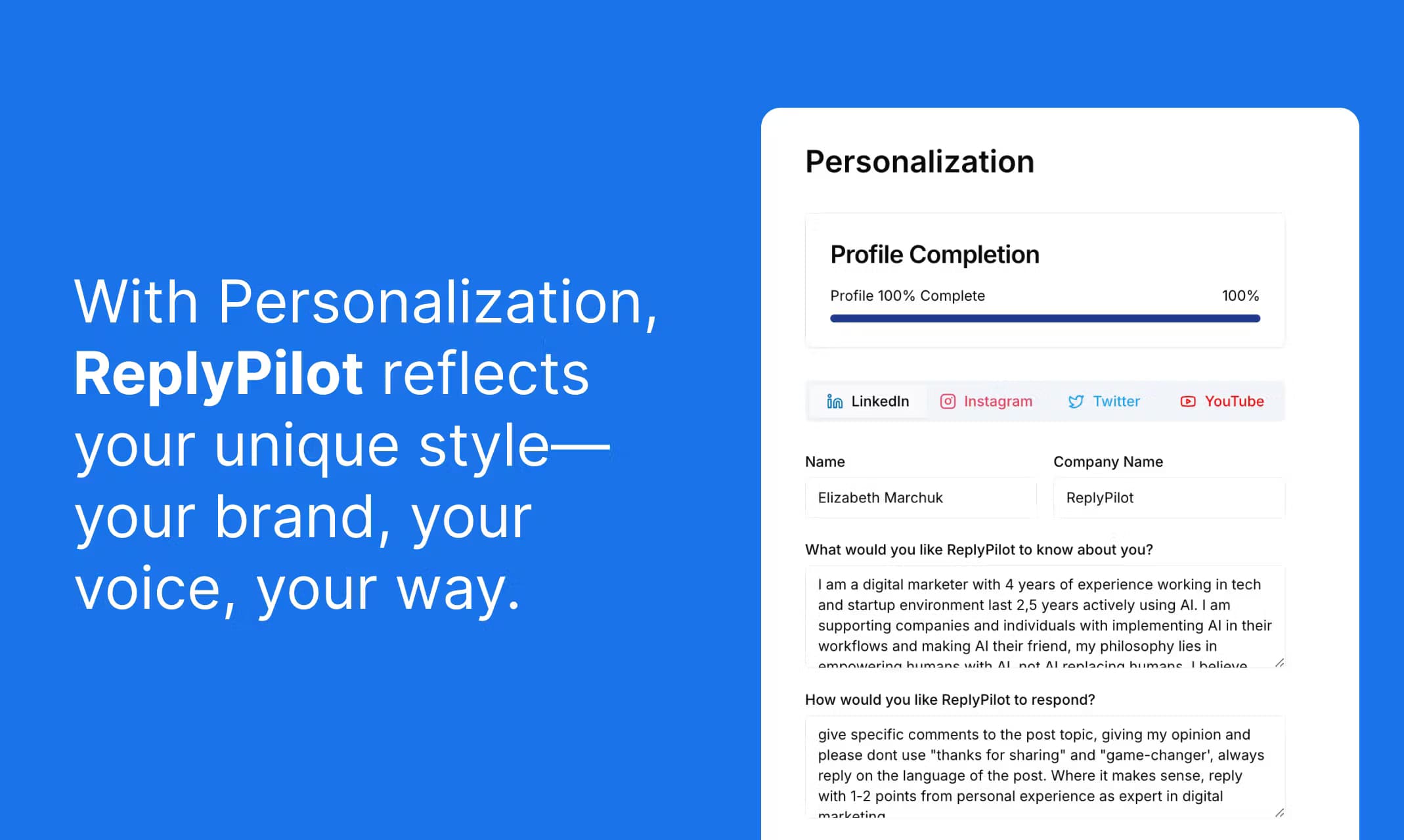
Saved personalization holds your name, company, role, and the wording style you prefer, and you can set it up per platform. When the switch is on, the draft draws on that background, which is what keeps replies sounding like you rather than a generic assistant. You still review and enable it for each draft, since a saved profile doesn't apply automatically.
Media analysis for posts with images or video
The Analyze Media switch asks for extra processing of the media attached to a post, so a draft can respond to what's in an image or video. The site is candid that this doesn't prove the whole clip was understood, so any claim about what a video says still needs your own check. It's a help for context, not a guarantee of accuracy.
Engagement Mode for conversation starters
Engagement Mode nudges the draft toward interaction by giving it a question or a reason to continue the thread. It's useful when you want replies that invite a response rather than close a topic. The guidance here is to give it a real question. A forced follow-up reads as filler.
Multi-language replies
ReplyPilot supports multiple languages, and you can ask for a target language in the instructions field. That lets a single user engage audiences in more than one market without a separate translation step. Treat the language request as guidance. Check the meaning and register yourself before posting.
Pros and cons
Pros
- Works inside the comment box you already use, so drafting adds no new tool to learn.
- Personalization profiles per platform keep replies close to your own voice instead of a generic tone.
- The same /rp flow covers LinkedIn, Instagram, X, and TikTok, which saves juggling separate add-ons.
- You can request a target language and adjust length, sentiment, and tone for each task.
Cons
- It only drafts; it doesn't post for you, so the workflow still needs a manual review and send step.
- Support stops at public comment boxes on four platforms, and the site doesn't commit to direct messages, email, or mobile apps.
- Personalization doesn't guarantee an exact voice match, so you still edit for anything you wouldn't say.
- Plans cap monthly replies on the lower tiers, so heavy users need the higher allowance.
Frequently asked questions
ReplyPilot is a Chrome extension that drafts social media replies and comments. You type /rp in a supported comment box, describe the point you want to make, and it returns a first draft you edit before posting.
Related content
Explore related tools, skills, and articles for ReplyPilot.
ReplyPilot Alternatives

ngram 2.0
ngram · Video · Marketingngram 2.0 is an AI video generator for teams. It turns a prompt, a screen recording, or a product URL into a narrated explainer, product demo, or AI avatar video, and every scene stays editable.

shippedit.me
Krawlup · Marketing · Businessshippedit.me now redirects to Krawlup, a web platform that audits SEO, AEO and page speed every week, then hands the fixes to AI coding agents over MCP.

MePersona
MePersona, Inc. · Writing · Productivity · MarketingMePersona is an AI unified inbox for creators. It learns your voice, drafts replies to fan messages from 12 platforms, and sends only what you approve.