
RepoDoc
RepoDoc · Coding · Productivity
RepoDoc is an AI documentation generator for GitHub repositories. Connect the account, pick a repo, and it writes structured docs that cover architecture, setup steps, and diagrams in one pass. The output reads less like a raw code dump and more like a small handbook a teammate could actually follow. Think of it as a developer documentation tool that drafts the first pass for you.
About RepoDoc
What Is RepoDoc
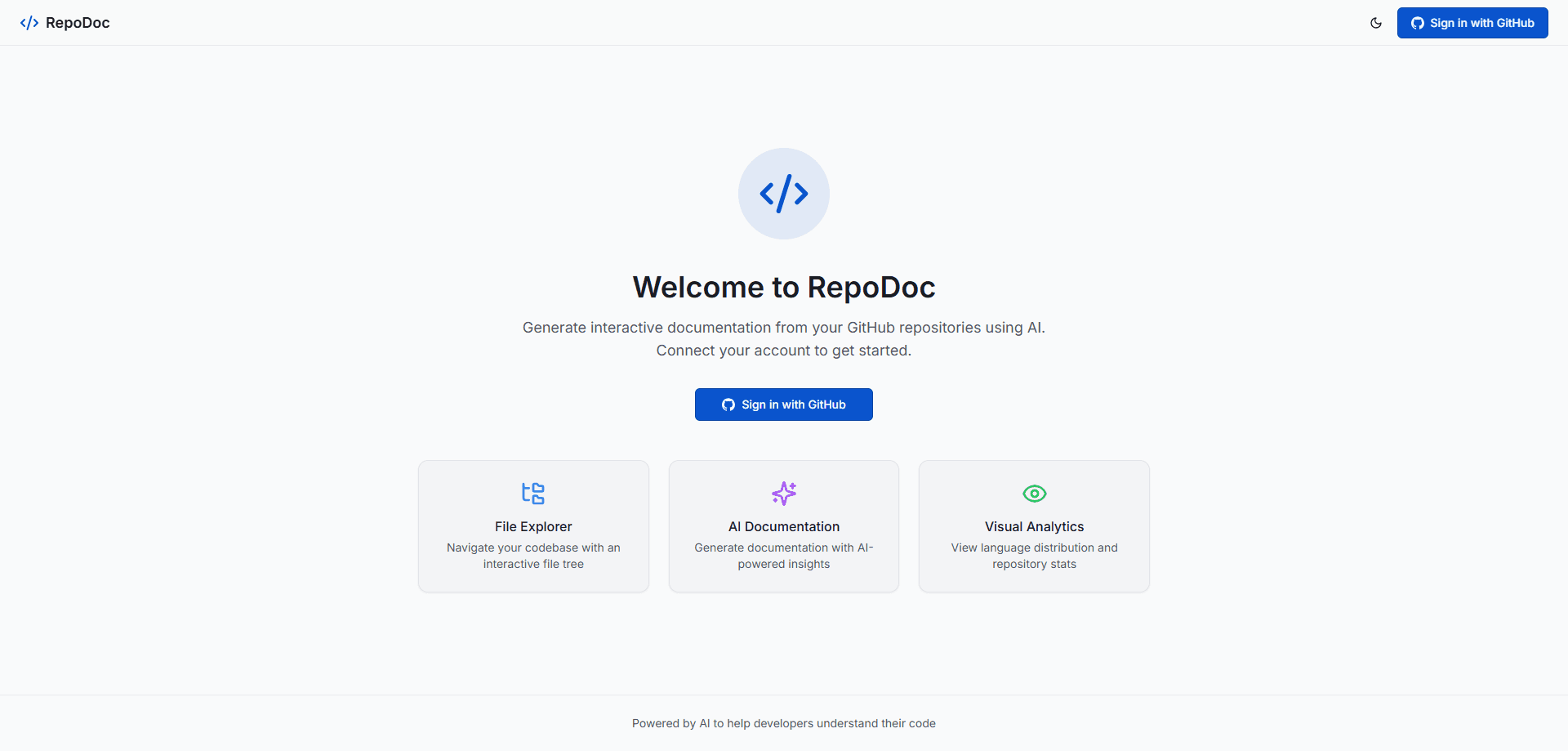
Most repositories explain themselves badly. The code works, the README doesn't. RepoDoc targets that gap by reading a GitHub repo and producing written documentation from what it finds, then layering interactive visuals on top. That codebase visualization matters. You move between the source and the explanation without hunting for the right file.
The tool handles public repositories through a GitHub sign-in. You choose a repo from a sidebar, and it builds an overview plus per-file pages. Diagrams appear automatically where they make sense. You can tune the writing tone and depth before generation rather than editing every paragraph by hand afterward.
The main limit is scope. RepoDoc documents what exists in the repo it can read; it doesn't run your app, test your endpoints, or verify that a setup guide actually works on a clean machine. Treat the result as a strong first draft, not a verified manual. It's also web-only. No desktop client to install.
Getting Started
- Sign in with your GitHub account on the RepoDoc site.
- Pick a repository from the sidebar, or search for any public repo.
- Let RepoDoc scan the structure and auto-detect a project template, or choose one yourself from the seven available types.
- Adjust the writing tone and depth settings, then generate.
- Browse the file tree to read per-file docs, export to Markdown or PDF, and regenerate later when the code changes.
Product Information
A quick look at RepoDoc's pricing, supported platforms, and performance.
Best for
The users, tasks, and scenarios where this tool fits best.
Users
- Open-source maintainers
- New developers joining a codebase
- Solo builders and indie hackers
Tasks
- Generating a README-style overview
- Mapping a codebase before refactoring
- Getting onboarding docs ready
Scenarios
- Handing off a project to someone else
- Auditing an unfamiliar open-source library
- Documenting a small internal tool
Key features
AI-Generated Repository Documentation
Point RepoDoc at a GitHub repo and it writes documentation from the actual code. You get an overview plus per-file pages that explain what each part does. That beats grepping through a folder trying to guess the entry point. The project offers seven templates, covering Frontend, Backend, Full Stack, Library, CLI, Mobile App, and General, and it will auto-detect the right one for a given repo so you don't have to guess at the structure before you start. It's a practical source of auto-generated code docs, not rigid boilerplate.
Automatic Architecture and Flow Diagrams
Diagrams get generated alongside the prose, including architecture views, class diagrams, sequence flows, and entity relationships. The rendering is powered by Mermaid, so the diagrams cover flowcharts, sequence diagrams, ER diagrams, gantt charts, git graphs, and more, all without you writing a single line of diagram syntax yourself.
Interactive Codebase Explorer
Every repository becomes a browsable file tree paired with a documentation panel. Click a file to read its generated docs or view the repo overview. That side-by-side layout is the real draw here, because it keeps the code structure and the written explanation in the same view instead of forcing you to toggle between a browser tab and your editor.
Adjustable Tone and Depth
The generator doesn't lock you into one voice. You choose from three tones, Formal, Friendly, or Technical, and set how detailed the output should be before the tool starts writing, which means you can match the docs to your audience without rewriting every paragraph after the fact. Formal suits enterprise docs, Friendly reads like a walkthrough, and Technical assumes a developer audience already fluent in the jargon. Pick the wrong one and the tone fights the content.
Export to Markdown and PDF
Finished docs aren't trapped in the browser. RepoDoc exports to Markdown, so the content drops straight into an existing docs site or repo, or to PDF for sharing and archiving. Markdown export matters most for teams that already keep documentation in version control. Export, commit, done.
Live Regeneration
Repositories change, and documentation that lags behind is worse than none. RepoDoc can refresh a repo's data and regenerate docs. You can force a full rewrite so the output reflects the current state of the code rather than a stale snapshot, which matters most for actively developed projects where the structure shifts week to week.
Pros and cons
Pros
- Works from GitHub sign-in with no local setup, since everything runs in the browser.
- Seven project templates plus auto-detection remove the blank-page problem when you start documenting.
- Diagrams are generated automatically through Mermaid, so architecture visuals aren't a separate chore.
- Markdown and PDF export let you move generated docs into existing pipelines instead of locking them inside one tool.
- Tone and depth controls give you a usable range from a friendly quickstart to formal enterprise notes.
Cons
- It documents repos rather than running them, so a generated setup guide can describe steps that don't match a clean environment.
- Limited to GitHub repositories and public repos through sign-in, so teams on GitLab or Bitbucket are out of luck for now.
- The site doesn't publish clear pricing or plan tiers, which makes it hard to know what a paid tier would include before you commit a team to the tool.
Frequently asked questions
It reads a GitHub repository and writes documentation from the code. That covers an overview, per-file pages, and auto-generated diagrams. The goal is a readable explanation of a codebase you can browse online.
Related content
Explore related tools, skills, and articles for RepoDoc.
RepoDoc Alternatives
Forefront
Forefront · CodingForefront is a web platform for building with open-source AI. It lets you fine-tune leading open-source language models on your own data, evaluate how they perform, and run them through an API or export them to host yourself. Developers who want the convenience of a closed-source platform but insist on owning their models and data are the target audience here.

Startkit
StartKit.AI · CodingStartkit is a boilerplate for building AI SaaS and AI wrapper products. Think of it as an AI startup boilerplate with the boring parts already wired up: authentication, Stripe and Lemon Squeezy payments, usage limits, transactional email, and an AI API starter that talks to OpenAI, Anthropic, Groq, or Llama. You clone the repo, set your price, and start on the part of your product that people actually pay for. It's Next.js under React and Tailwind, so most of the boilerplate code already feels familiar.
Testim
Tricentis · CodingTestim is an AI-powered test automation platform for building and running end-to-end tests across web, mobile, and Salesforce applications. It leans on machine learning to keep tests stable when an interface changes, so teams spend less time fixing broken selectors. Not bad for an automated testing tool you can start using today. You create tests by recording actions in a browser, then optionally add JavaScript when you need more control. It's a solid pick for busy QA teams.