

ResearchPal
Veracious AI · Writing · Business
ResearchPal is an AI research assistant and literature review generator that searches academic databases, summarizes papers, and manages citations in one browser workspace.
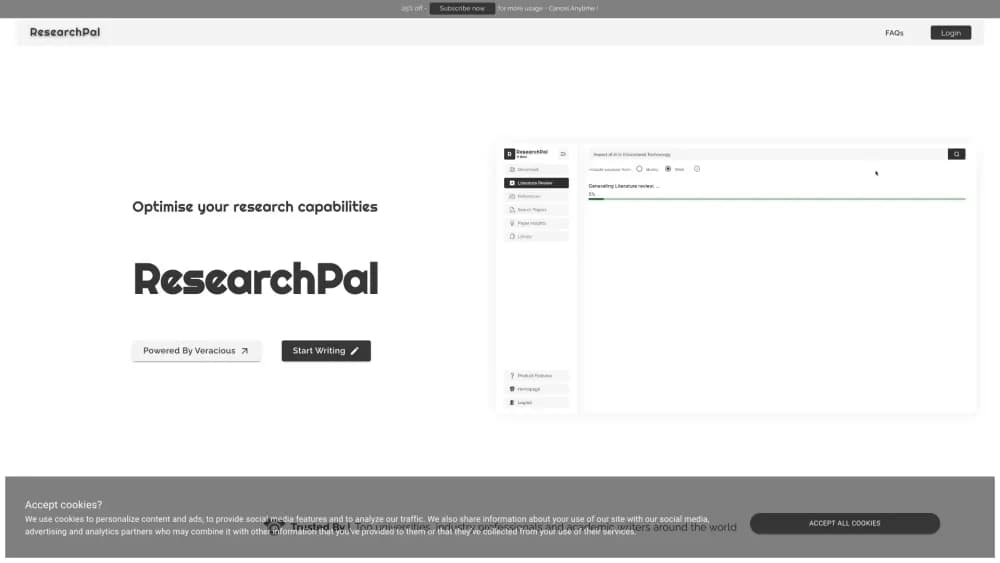
About ResearchPal
What Is ResearchPal
ResearchPal is a web app from the studio behind Veracious AI, packaged as a research workspace rather than a general chatbot. It connects academic search, paper analysis, writing tools, and research management in a single citation library, so you stop shuffling between a search engine, a PDF reader, a reference manager, and a word processor.
The thing it solves best is the mechanical part of research. Pulling twenty abstracts into a coherent review, tracking which author said what, and formatting the whole list in APA takes hours by hand. ResearchPal runs that sequence in one flow and keeps every claim tied to a real paper instead of inventing sources.
The limit is scope. It's built for scholarly work, so marketing copy, code, or long-form fiction aren't its job. Output also reads like a solid first draft, and you still check what it synthesized before it goes into your thesis.
Getting Started
- Create a free account on the ResearchPal site. No credit card is needed for the free plan.
- Pick a tool from the left rail, such as Search Papers, Literature Review, or Citations.
- Type your research question, or upload a PDF and start asking questions about it.
- Save the result to the document editor, where you can keep writing and drop citations inline.
Product Information
A quick look at ResearchPal's pricing, supported platforms, and performance.
Best for
The users, tasks, and scenarios where this tool fits best.
Users
- Graduate students
- PhD candidates
- Undergraduate essay writers
Tasks
- Writing a literature review
- Reading a dense paper
- Formatting references
Scenarios
- Starting a thesis chapter
- Revising a supervisor's comments
- Prepping a submission
Key features
AI Research Agent
The agent handles a research task from one chat window. Ask it to find work on a topic, summarize an upload, or explain a contested finding, and it plans the steps and pulls from academic indexes. The difference from a plain assistant shows up in grounding: answers come with links to papers you can open and check.
Citation-Backed Literature Reviews
Feed in a research question and ResearchPal returns a structured review rather than a wall of text. Fast mode gives a short overview for early exploration, while Deep Research searches a wider set of papers and produces a longer draft with headings, themes, and inline citations. A suggested-papers panel lets you swap sources and regenerate the section.
Academic Paper Search
The search tool reaches roughly 200 million works through OpenAlex, plus PubMed, Semantic Scholar, and clinical trial registries. You can filter to open access, read smart abstracts, save a paper to your library, and follow its citations into related work.
Paper Insights and PDF Chat
Upload a paper and the tool extracts findings, methodology, limitations, and contributions into a structured table, which makes comparing several studies far quicker than reading each one cover to cover. In the chat view, answers cite the page they came from, so you can verify a quote in seconds.
Academic Writing and Paraphrasing
The writing workspace covers drafting abstracts, essay outlines, thesis structures, and research proposals. A text tuner rewrites for clarity and tone, shortens or expands a passage, and translates between languages, all inside the same document where your citations live.
Citation Generator and Library
Type a DOI, URL, arXiv ID, or paper title and get a formatted reference in APA, Harvard, MLA, Chicago, or BibTeX. Every citation you generate or collect from a review lands in a central library, where you can switch styles in one click and export a clean reference list.
Zotero and Mendeley Import
You can pull your existing reference collection straight into ResearchPal instead of rebuilding it by hand. Imported files then work with PDF chat and paper insights, so a library you built over years becomes usable inside the AI workflow.
Pros and cons
Pros
- One workspace for search, analysis, writing, and citations, which cuts the number of tabs and subscriptions you maintain.
- References come from real indexed papers, so citation lists survive a spot check.
- Citation styles cover the formats most journals and departments ask for, including BibTeX for LaTeX users.
- Zotero and Mendeley imports let you keep a library you already trust.
- The free plan includes a working agent, literature reviews, and citation checks, so you can test the workflow before paying.
Cons
- Gated by plan limits: free users get five agent chats and one literature review, so you hit the ceiling quickly during a real writing push.
- Deep research takes time, and the longer reviews need editing before they read like your own prose.
- The platform is web only, so offline work and native desktop integration aren't available.
- No public API is documented, which rules it out for teams that want to wire research into their own systems.
Frequently asked questions
ResearchPal combines academic paper search, literature review generation, PDF analysis, academic writing, and citation management in one web workspace. You research, read, write, and cite without switching tools.
Related content
Explore related tools, skills, and articles for ResearchPal.
ResearchPal Alternatives

Google EmbeddingGemma 2
Google DeepMind · Writing · Image · CodingGoogle EmbeddingGemma 2 is a 740M-parameter open model that turns text, code, images, audio, and video frames into vectors in one 768-dimension space, running on phones and laptops.

MePersona
MePersona, Inc. · Writing · Productivity · MarketingMePersona is an AI unified inbox for creators. It learns your voice, drafts replies to fan messages from 12 platforms, and sends only what you approve.

Fluence
Yay Software (Yannick Huchard) · Writing · Voice & Language · ProductivityFluence is an Android app that reads PDFs, EPUBs, Word files and web articles aloud, follows each sentence as it speaks, and answers questions about the text on the phone itself.