

Review My eLearning
Review My eLearning · Leaning
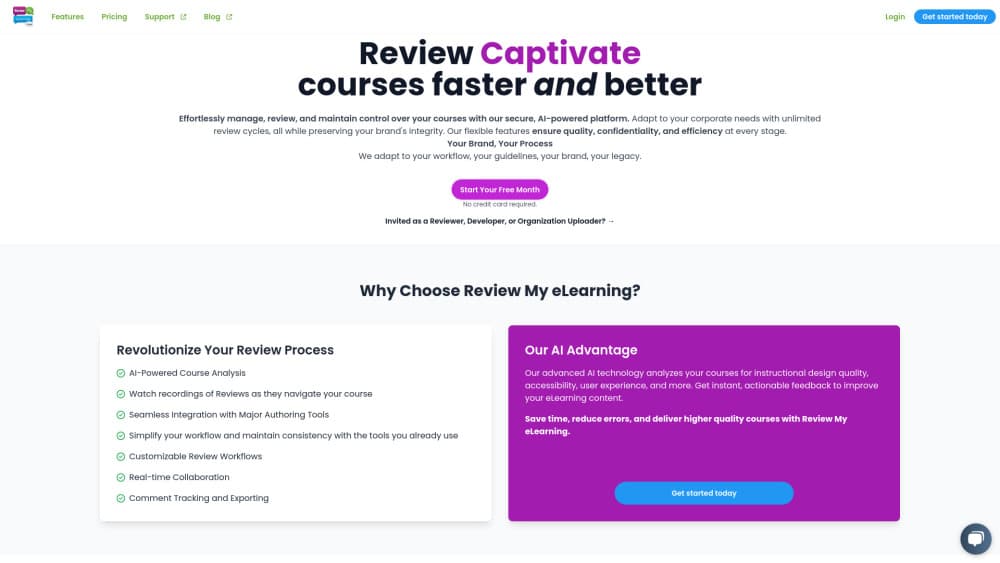
Review My eLearning is an AI course review platform where instructional designers collect feedback, run automated accessibility checks, and connect Claude or ChatGPT to their reviews.
About Review My eLearning
What Is Review My eLearning
Review My eLearning is a web platform built for one job: getting an eLearning course reviewed without the mess of email threads, spreadsheets, and screenshots. Designers upload a course built in Articulate Storyline, Rise, Captivate, or just about anything else, and reviewers open it in the browser and leave comments on the exact slide where something is wrong. Every comment stays tied to its slide, so you never have to guess which piece of feedback belongs to which portion of the build.
The platform's headline feature is an AI reviewer. It scans a finished course for instructional design problems, accessibility gaps, and user experience issues, then hands back a written report. You can run it before a human ever opens the file, which catches the obvious problems early and leaves your reviewers free to focus on the substance.
It won't replace a human reviewer, and it doesn't try to. The AI suggestions come back as a starting point you still have to weigh, and the tool is aimed at teams that already have a review process they want to speed up. If you are a solo designer who never needs outside feedback, most of what it does will go unused.
Getting Started
- Create an account on the reviewmyelearning.com website. A 14-day free trial covers the paid features before you commit.
- Upload your course as a zip file. Review My eLearning publishes a web version you can share with a link, whatever tool you built it in.
- Invite reviewers by email. They open the course in the browser, no authoring software needed on their end.
- Let reviewers comment on specific slides, attach files, and use @mentions to loop in teammates.
- Run an AI review on the course for an automatic pass on accessibility and design quality, then export the compiled feedback to a spreadsheet.
Product Information
A quick look at Review My eLearning's pricing, supported platforms, and performance.
Best for
The users, tasks, and scenarios where this tool fits best.
Users
- Instructional designers
- Learning and development teams
- eLearning agencies
Tasks
- Collecting stakeholder feedback on a Storyline course
- Running an accessibility check before launch
- Managing a review cycle with deadlines
- Exporting feedback for a project backlog
Scenarios
- A client course that needs sign-off from three departments
- A recurring compliance course that gets updated every year
- An agency juggling several client projects at once
Key features
AI Reviewers
Review My eLearning runs an AI pass over your course that checks instructional design quality, accessibility, and user experience. It returns written feedback you can act on before a human reviewer ever sees the course. This is marked as a beta feature, so expect it to keep changing.
Works With Any Authoring Tool
The platform takes a zipped course from Storyline 360, Rise, Captivate, Lectora, or iSpring and turns it into a shareable web version. Reviewers open it in a browser with nothing installed. PowerPoint decks and hand-coded courses work too, since the tool doesn't depend on one vendor's format.
LX Replay Sessions
Replay lets you watch recordings of reviewers clicking through your course, so you see where they hesitated, skipped ahead, or got stuck. Static screenshots can't show that. It is still in beta, so treat the recordings as a rough guide rather than a complete picture.
Comment Tracking and Exporting
Comments carry a status you can assign, track, and approve, so feedback stops being a pile of notes and starts being work you can close out. You can sort comments by category, jump to the slide a comment refers to, and export a whole review cycle to a spreadsheet in one click.
Branding and Custom Portfolios
On paid plans you can put your own logo, colors, and subdomain on the review pages, so they look like your work instead of a generic tool. A custom portfolio lets you display finished courses and track how many people have viewed them, useful when you want to show clients what you've built.
Deadlines and Reviewer Visibility
You can set a deadline that locks reviewers out of a course once it passes, which stops late comments from derailing a scheduled launch. The same view shows when each reviewer opened the course, so you know who has actually looked at it.
API and MCP Access
Every paid tier includes API and MCP access. Developers can push courses into an account through a REST API without a manual upload, and teams using Claude or ChatGPT can connect the assistant to their reviews and ask about them in plain language.
Rich Commenting
Reviewers can format text, attach files, use @mentions, and drop inline media into a comment. That makes feedback specific enough to act on without a follow-up call to clarify what someone meant.
Pros and cons
Pros
- Reviewers only need a browser, so stakeholders without authoring software can still give slide-level feedback.
- The AI reviewer catches accessibility and design problems before human review, which saves a round of back-and-forth.
- Comment status, deadlines, and exporting turn loose feedback into something you can assign and finish.
- Any zipped course works, which keeps it useful across teams that use different authoring tools.
- API and MCP access are included at every paid tier, not held back for the top plan.
Cons
- There is no free tier, only a 14-day trial, so you're paying from the start if your review needs are occasional.
- The AI reviewers and LX Replay features are both in beta, meaning behavior can shift and coverage may have gaps.
- The Basic plan caps you at 5 courses and one uploader, which is tight for a team that reviews steadily.
- Cost is per account rather than per reviewer, so it rewards teams with many reviewers and few uploaders.
Frequently asked questions
Review My eLearning is used to collect and manage feedback on eLearning courses before they launch. Designers upload a course, reviewers comment on specific slides in the browser, and an AI reviewer runs an automatic check for accessibility and design issues.
Related content
Explore related tools, skills, and articles for Review My eLearning.
Review My eLearning Alternatives
Kaggle AI
Google · Coding · LeaningKaggle AI is a community platform where people build, test, and compare machine learning models against shared data. It combines data science competitions, tens of thousands of public datasets, and free cloud notebooks with GPU and TPU access, so anyone with a browser can train a model without buying hardware. Google owns the platform, and joining costs nothing.

Bunch
Bunch AI · Leaning · BusinessBunch is an AI leadership coaching app that turns a few spare minutes a day into real management practice. It hands you one short, personalized tip each day, tracks how you respond, and lets you compare notes with peers inside private groups. The pitch is simple: you lead better by practicing a little, often, instead of sitting through a weekend seminar. Think of it as a leadership training app you actually open.

AI Mock Interview
SQLPad · Coding · LeaningAI Mock Interview is a practice tool built into SQLPad that simulates real job interviews and gives you instant feedback on both what you say and how you say it. You pick a role template or upload a job description, answer questions out loud in real time, and then review a transcript with notes on structure, clarity, and grammar. It's aimed at data professionals prepping for SQL, Python, data engineering, machine learning, and system design roles, and it works entirely in the browser. No install needed.