
ReviewHawk AI
ReviewHawk · Marketing
ReviewHawk AI reads App Store and Google Play reviews and turns them into one summary, with sentiment scores, feature requests, and complaints you can act on.
About ReviewHawk AI
What Is ReviewHawk AI
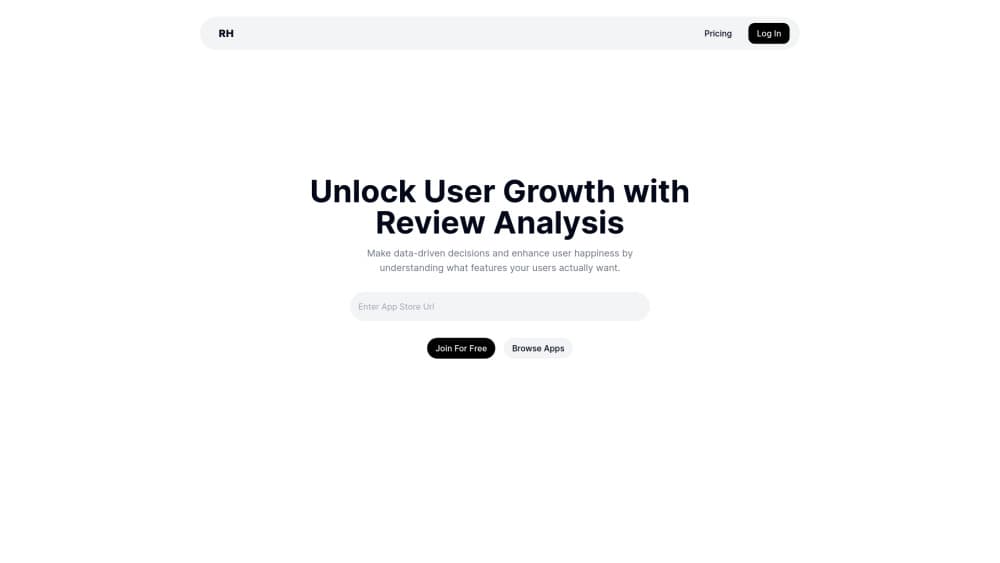
ReviewHawk AI is a browser-based app review analysis tool built for mobile teams. You pick an app that's live in the App Store or Google Play, and the service pulls its public reviews and rebuilds them as a digest: average rating, review count, category, version, a written summary, a sentiment read, plus separate lists of feature requests, complaints, and open issues. The job it takes off your plate is reading hundreds of short, angry reviews to find the three things that keep coming up. Reading user feedback this way takes minutes, not an afternoon.
Most teams treat app store reviews as a support inbox. ReviewHawk treats them as product research. Complaints get grouped by theme, requests get pulled out as a list you can rank, and the summary is written in plain sentences instead of a star average. For a team shipping every few weeks, that's the difference between guessing why installs stop converting and knowing which screen annoys people.
The scope is narrow on purpose, and that's the main limit. ReviewHawk reads public store reviews only. It doesn't touch support tickets, in-app surveys, G2, Trustpilot, or Discord chatter, so a product with a web app and a mobile app sees half its feedback picture. There's also no public API, which means the output lives inside ReviewHawk rather than in your own dashboard.
Getting Started
- Open reviewhawk.app and sign in with a Google account.
- Find your app in the catalog by name or store ID, or open its public page under the apps directory.
- Wait for the summary to generate. The page shows a loading state while the reviews are pulled and analyzed.
- Work through the Sentiment, Requests, Complaints, and Issues sections to see what the model grouped.
- Turn the top items into tasks for your next sprint, then compare the sentiment read after the release ships.
Product Information
A quick look at ReviewHawk AI's pricing, supported platforms, and performance.
Best for
The users, tasks, and scenarios where this tool fits best.
Users
- Indie iOS and Android developers
- Product managers at small app teams
- Founders working on retention
- Freelance ASO and app marketing consultants
Tasks
- Finding out why users churn after an update
- Building a feature request backlog from app store reviews
- Auditing a competitor's weak spots
- Preparing a retention review for stakeholders
Scenarios
- A one-star spike shows up two days after a release
- You're sizing up a category before launch
- Monthly product review with no research budget
Key features
One Summary Across Both Stores
ReviewHawk merges App Store and Google Play feedback into a single written summary, so you don't compare two dashboards to get one answer. The summary describes what users actually talk about: performance, pricing, missing features, crashes, and support. Each app page keeps the store rating, review count, category, and version next to the text, which makes it easy to see whether a complaint wave lines up with a specific build.
Sentiment Read On The Review Set
Alongside the summary, ReviewHawk scores the mood of the reviews it analyzed. This is the fastest way to separate a loud minority from a real slide. A rating average hides the difference between twenty furious reviews and two hundred mildly disappointed ones. The sentiment view doesn't, and it updates as new reviews land.
Feature Requests Pulled Out As A List
Requests buried in reviews usually read like complaints with a please attached. ReviewHawk separates them into their own list, which turns scattered "can you add dark mode" and "please support Android tablets" notes into a ranked backlog. It's the part of app review analytics that saves the most copy-paste work.
Complaints Grouped Into Themes And Issues
Complaints arrive one star at a time and repeat the same three problems in twenty different phrasings. ReviewHawk clusters them, so the list shows recurring themes rather than individual rants. Issues get their own view, which helps when you need to hand a bug pattern to engineering with evidence instead of an anecdote.
Task Lists Tied To Retention
Every insight ends up as something you can assign. ReviewHawk frames the output as tasks to reduce churn, which pulls review management out of the "someday" pile and into a sprint board. The free plan caps how many requests and complaints you can see per app, so the task list on a large app only becomes complete after upgrading.
Public App Catalog For Benchmarks
The apps directory lists real apps with their rating and review data, including well-known products such as Duolingo, Grammarly, and Wealthfront. You can browse without an account, which makes it a usable benchmark tool for competing in a category. Treat the public pages as a starting read, since the deeper analysis sits behind a sign-in.
Pros and cons
Pros
- Combines App Store and Google Play into a single summary, which removes the usual tab juggling.
- Groups complaints and requests by theme, so you rank findings instead of reading raw reviews.
- Free tier is real, with basic summary access and capped requests and complaints per app.
- Pricing sits under $8 a week at entry, far below enterprise review analytics suites.
- Sign-in takes one Google click and there's nothing to install.
Cons
- Store reviews only. No support tickets, in-app surveys, or third-party review sites, so web and desktop products get an incomplete picture.
- No public API, so insights can't feed Jira, Sheets, or a BI tool automatically.
- The free plan's per-app caps block a full backlog review on a high-volume app.
- Premium lists unlimited review responses, but that benefit showed as unavailable when we checked the pricing page.
Frequently asked questions
It analyzes public App Store and Google Play reviews and returns a written summary, sentiment read, feature request list, complaint themes, and issues, framed as tasks that help with churn reduction.
Related content
Explore related tools, skills, and articles for ReviewHawk AI.
ReviewHawk AI Alternatives

ngram 2.0
ngram · Video · Marketingngram 2.0 is an AI video generator for teams. It turns a prompt, a screen recording, or a product URL into a narrated explainer, product demo, or AI avatar video, and every scene stays editable.

shippedit.me
Krawlup · Marketing · Businessshippedit.me now redirects to Krawlup, a web platform that audits SEO, AEO and page speed every week, then hands the fixes to AI coding agents over MCP.

MePersona
MePersona, Inc. · Writing · Productivity · MarketingMePersona is an AI unified inbox for creators. It learns your voice, drafts replies to fan messages from 12 platforms, and sends only what you approve.