

Rewording Tool
Enzipe · Writing
Rewording Tool is a web and mobile AI reworder that rewrites sentences, paragraphs, and essays in nine writing modes while keeping the original meaning intact.
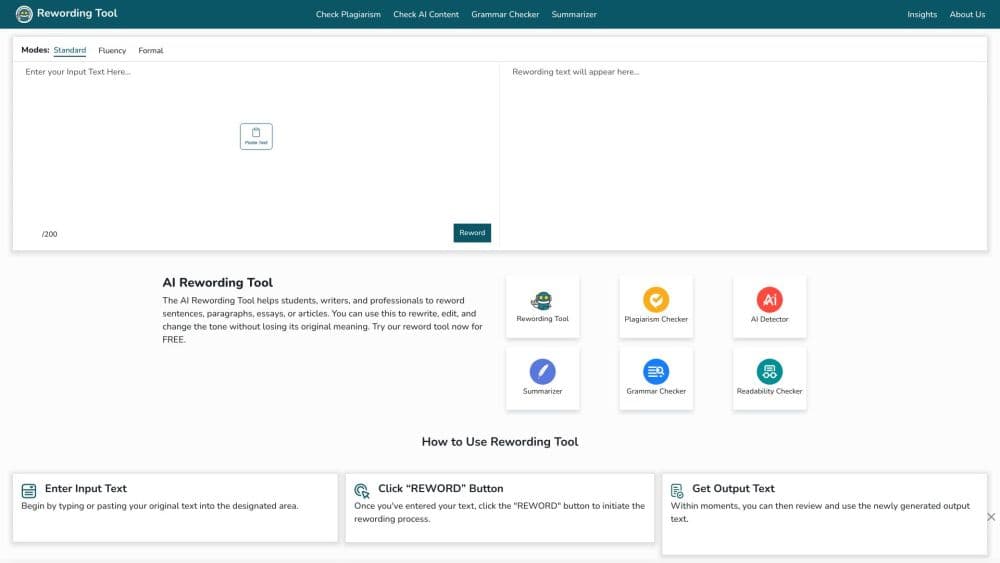
About Rewording Tool
What Is Rewording Tool
Rewording Tool (rewordingtool.io) is an online paraphrasing tool built for people who need a second version of a text without losing what it says. Paste a paragraph, drop in a file, or upload a PDF, pick a mode, and the AI reworder returns a rewrite you can copy or download.
It's built to reword sentences, paragraphs, and whole essays, with schoolwork, marketing copy, and blog drafts as the common cases. The site also ships a companion plagiarism checker, so you can rewrite a passage and then test whether it reads as original.
The main limit is scale. The free version handles 1,000 words per attempt, and a single submission caps at 2,500 words on the monthly plan, so long reports need to be split before they go in. There's no public API either, which rules it out for anyone who wants to automate rewriting inside their own product.
Getting Started
- Open rewordingtool.io and choose the content language from the dropdown, since the reword generator needs it before it runs.
- Paste text into the box, or upload a .txt, .doc, .docx, or .pdf file from your device.
- Pick a mode. Reworder is the general option, Professional and Formal shift the register, and Creative stays locked until you upgrade.
- Hit Reword Now, then copy the output or download it. Nothing gets saved to an account.
Product Information
A quick look at Rewording Tool's pricing, supported platforms, and performance.
Best for
The users, tasks, and scenarios where this tool fits best.
Users
- Students
- Copywriters
- Bloggers
Tasks
- Rewording a paragraph that reads awkwardly
- Raising the register of an email or cover letter
- Restating source material in your own words
Scenarios
- Last minute editing before a submission
- Rewriting on a phone between classes or meetings
- Checking a draft for accidental copying
Key features
Nine Rewriting Modes
Mode selection is the whole product. Reworder gives a straight rewrite, Professional and Formal raise the tone, and the remaining modes cover shorter or more creative passes. The free tier exposes a subset, with Creative locked behind the paid plans.
File Upload and Paste Input
You can paste text straight into the editor or upload a document. The tool reads .txt, .doc, .docx, and .pdf files, which saves retyping when the source lives in Word or a shared PDF.
Meaning Preservation
The reword generator works at the sentence level and swaps wording rather than rebuilding your argument. In practice that means the output keeps your points and your order, and you're editing phrasing instead of rewriting structure.
Built-In Plagiarism Checker
A separate checker sits alongside the reworder. You rewrite a passage, then test the result against it, which is the workflow students and content teams actually need rather than two disconnected tools.
Word Limits That Scale With the Plan
Free users get 1,000 words per attempt. Premium lifts the per-submission cap to 2,500 words on the monthly plan and 3,000 on the annual plan, with monthly word pools of 500,000 and 3,000,000 respectively.
Apps Alongside the Browser
The same tool ships as an Android app, an iOS app, a Windows app, and a Snap package for Linux. Handy if you edit on a phone and don't want to keep a browser tab open.
Pros and cons
Pros
- Runs in a browser with no sign-up, so a one-off rewrite takes seconds.
- Nine modes give you real choices in tone, not just a single generic paraphrase.
- Document upload covers Word and PDF, which cuts out copy-paste formatting damage.
- The annual plan at $49.50 covers 3,000,000 words, a low per-word cost for heavy users.
Cons
- The free tier stops at 1,000 words per attempt and locks the Creative mode, so longer work pushes you toward a paid plan quickly.
- There's no API, which means no way to plug the reworder into your own publishing workflow.
- Output still needs a human pass: synonyms can land slightly off in technical or legal text, and you have to catch that yourself.
Frequently asked questions
Yes, with limits. The free version rewrites up to 1,000 words per attempt and gives you a smaller set of modes. Paid plans start at $6.50 per week.
Related content
Explore related tools, skills, and articles for Rewording Tool.
Rewording Tool Alternatives

Emailwritr
Emailwritr · Writing · MarketingEmailwritr is an AI email copywriting tool built for affiliates, course creators, and online businesses that want more revenue from the list they already own. Instead of blank pages or generic chatbot prompts, this AI email writer generates welcome sequences, launch campaigns, cart recovery emails, and promo series from frameworks modeled on well-known direct-response copywriters. You connect your autoresponder, answer a few questions about your offer, and it writes the copy for you.

Swms
Swms AI · Writing · Productivity · BusinessSwms is an AI safety compliance tool that turns a plain description of a job into ready-to-use safety documents. Describe your project, trade, and known hazards, and it writes a safe work method statement, job hazard analysis, safe work procedure, RAMS, or safety data sheet in seconds. It also ships with Oscar, a chat assistant that answers workplace safety questions in any language. Teams in construction, mining, transport, and warehousing use it to cut the paperwork that usually eats into a workday.

Prosp
Prosp · Writing · Voice & Language · MarketingProsp is an AI LinkedIn outreach tool built for agencies and sales teams, and it writes the message and the voice note in your own voice for each prospect so they actually reply. You connect your accounts, find leads, and let the AI draft and send personalized messages at scale, all from one inbox. It's built for people running outbound at volume. That's the whole pitch. Every touchpoint still has to feel human.