

RewriteBar
Mathias Michel · Writing · AI Detection
RewriteBar is a macOS AI writing assistant that fixes grammar, rewrites tone, and translates text inside any app from one keyboard shortcut.
About RewriteBar
What Is RewriteBar
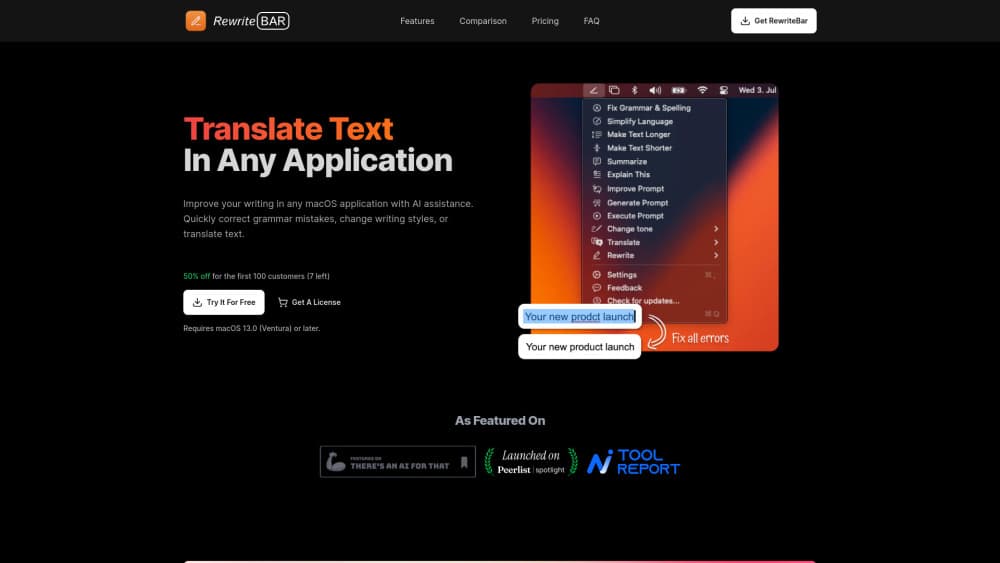
RewriteBar is a menu bar app for Macs that puts AI text rewriting behind a single shortcut. Select a sentence in Mail, Slack, Figma, a code editor, or a browser form, press the hotkey, and a small window opens with your selection and a list of actions. Pick one, compare the result with the original, then drop it back into the same field.
The app comes from Mathias Michel, an independent developer who ships updates every few weeks. It's aimed at people who write all day: founders, support teams, developers, and anyone working in a second language. RewriteBar connects to 38 AI providers and more than 500 models, including local options such as Ollama, LM Studio, and Apple Intelligence.
The limits are platform and setup. There's no Windows, web, or mobile version. Local models need a separate runtime and a Mac with enough memory, and a menu bar tool only helps while you're sitting at your desk.
Getting Started
- Download the app from rewritebar.com and move it into Applications. The trial asks for no card and includes 35,000 one-time credits.
- Grant accessibility permission so RewriteBar can read the current selection and paste the rewritten text back.
- Connect an AI provider: paste an API key, subscribe to RewriteBar Gateway, or point the app at a local model server.
- Set a global shortcut, select text in any app, and run an action such as Fix Grammar or Translate.
Product Information
A quick look at RewriteBar's pricing, supported platforms, and performance.
Best for
The users, tasks, and scenarios where this tool fits best.
Users
- Founders and product managers
- Non-native English speakers
- Support and sales teams
Tasks
- Fixing an email before it goes out
- Translating a message in place
- Turning notes into a structured update
Scenarios
- Clearing a support backlog
- Editing inside a CMS or docs tool
- Handling confidential material
Key features
One Shortcut in Any App
RewriteBar lives in the menu bar and hooks into whatever text field has focus. That covers native Mac apps, Electron tools, and most web forms. The action list opens over the current window, so you finish the edit without switching context or copying text into a chat window.
Grammar, Spelling, and Tone in One Pass
The Fix Grammar action reads the whole selection and returns a corrected version, which makes it a practical grammar checker for Mac users who write in a hurry. Separate actions adjust tone, shorten or expand a passage, and turn text into title case. You can edit the underlying prompt of each built-in action if the default voice doesn't match your style.
Translation Across 500+ Languages
The translate action works as a lightweight AI translation app: pick a language pair and the text is rewritten in place. It handles full messages, single words, and code snippets, and it can also convert between regional variants such as UK and US English.
Custom Actions and Chained Flows
You can build your own custom AI actions from a preset, add variables, and save them to a prompt library. Actions can run in sequence, so one shortcut can expand a rough note, translate it, and add emoji before you review the result. This is where the app earns its place for repeatable work.
Side-by-Side Diff
Every rewrite lands in a review window that shows the new text next to the original. You can compare line by line or word by word, then accept, edit, or discard. Nothing is replaced until you confirm, which makes the tool safe to use on text you can't afford to lose.
Local AI Models and 38 Providers
Local AI models run through Ollama, LM Studio, oMLX, Osaurus, or Apple Intelligence, so text never leaves the Mac. Cloud options cover OpenAI, Anthropic, Google, Groq, OpenRouter, and more. You can switch providers per action when one model handles translation better than another.
PopClip and Shortcuts Integration
PopClip integration adds RewriteBar to the selection popup, which suits people who already use PopClip for other actions. The app also exposes commands to Apple Shortcuts, so a rewrite can sit inside a longer automation.
Pros and cons
Pros
- One-time license: Standard costs $29 and Pro costs $59, with no monthly fee unless you want the Gateway subscription.
- Provider freedom: bring an API key, use the bundled gateway, or run a local model. The choice changes both cost and privacy.
- The review window prevents blind replacement, and the word-level diff makes small changes easy to spot.
- It works in apps that will never ship their own AI features, including older editors and internal tools.
Cons
- macOS only. Windows and iPhone users have no version to install, and there's no web app for a work laptop you don't control.
- Local models take setup: you install a runtime, download a model, and have the memory for it. Not a five-minute job for a non-technical user.
- The trial's 35,000 credits are one-time, and cloud usage after that depends on your own API billing or a Gateway subscription. Heavy daily use needs a plan for that cost.
Frequently asked questions
RewriteBar is a macOS menu bar app that rewrites, translates, and corrects text inside any application. You select text, press a shortcut, and choose an action from a small window.
Related content
Explore related tools, skills, and articles for RewriteBar.
RewriteBar Alternatives

Emailwritr
Emailwritr · Writing · MarketingEmailwritr is an AI email copywriting tool built for affiliates, course creators, and online businesses that want more revenue from the list they already own. Instead of blank pages or generic chatbot prompts, this AI email writer generates welcome sequences, launch campaigns, cart recovery emails, and promo series from frameworks modeled on well-known direct-response copywriters. You connect your autoresponder, answer a few questions about your offer, and it writes the copy for you.

Swms
Swms AI · Writing · Productivity · BusinessSwms is an AI safety compliance tool that turns a plain description of a job into ready-to-use safety documents. Describe your project, trade, and known hazards, and it writes a safe work method statement, job hazard analysis, safe work procedure, RAMS, or safety data sheet in seconds. It also ships with Oscar, a chat assistant that answers workplace safety questions in any language. Teams in construction, mining, transport, and warehousing use it to cut the paperwork that usually eats into a workday.

Prosp
Prosp · Writing · Voice & Language · MarketingProsp is an AI LinkedIn outreach tool built for agencies and sales teams, and it writes the message and the voice note in your own voice for each prospect so they actually reply. You connect your accounts, find leads, and let the AI draft and send personalized messages at scale, all from one inbox. It's built for people running outbound at volume. That's the whole pitch. Every touchpoint still has to feel human.