

Riffusion
Riffusion, Inc. (now part of Google) · Voice & Language
Riffusion is a text to music generator that turns short prompts into songs or instrumentals. It grew out of an open source project and now sits inside Google's Flow Music studio.
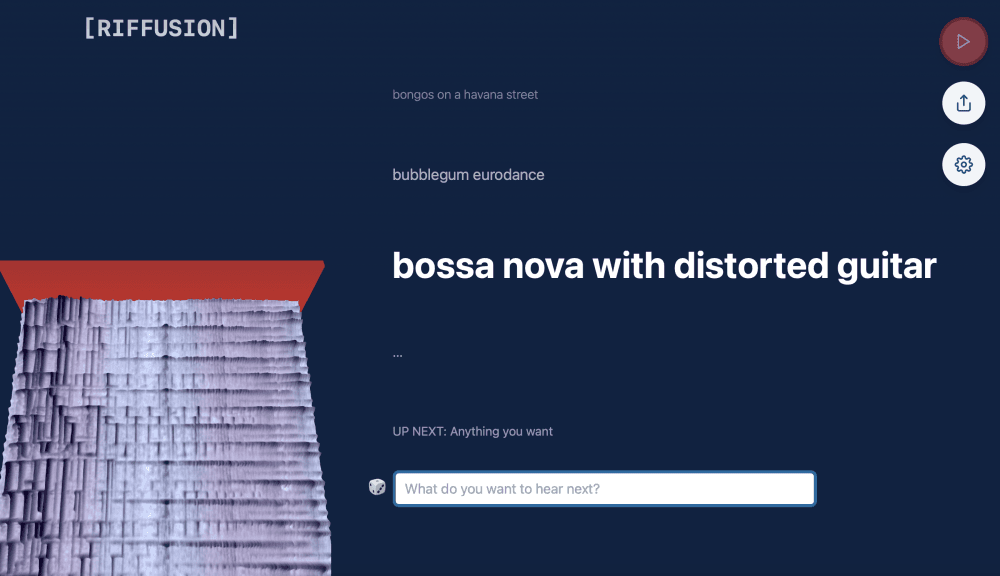
About Riffusion
What Is Riffusion
Riffusion started as an experiment that applied image generation to sound. Its creators took Stable Diffusion, a model built for pictures, and fine tuned it to draw spectrograms. A spectrogram is a picture of sound where time runs left to right and pitch runs bottom to top. Riffusion reads that image and plays back the frequencies it sees, so describing a genre or a mood in words turns into an actual audio clip. According to the team, this trick made it one of the first tools that could generate music in real time from a text prompt you kept typing and editing.
The project grew into a full AI song generator. Later versions moved past short instrumental loops toward complete tracks with lyrics, vocals, and separated stems you could remix. The original web app is open source, so anyone with a GPU can run it themselves. The hosted version traded that control for convenience.
There is one big caveat in 2026. Riffusion no longer runs as its own standalone product. Its site now points to Google's Flow Music, an AI music studio built on the Lyria model family. If you searched for Riffusion expecting the old interactive spectrogram toy, you will land in a different tool. The upside is a more polished studio. The tradeoff is that the raw, hands on spectrogram editing that made Riffusion unusual is gone.
Getting Started
- Open the Riffusion site or the Flow Music studio it now redirects to, and sign in to start a new project.
- Describe the sound you want in plain words, such as a lo-fi beat for studying or a synth pop anthem about city lights. You can also paste your own lyrics.
- Pick a style, choose vocals or an instrumental, then set the track length.
- Generate the track and listen back in the player, adjust the prompt, and regenerate until it fits.
- Download your favorites or export them for use in a video or editing project.
Product Information
A quick look at Riffusion's pricing, supported platforms, and performance.
Best for
The users, tasks, and scenarios where this tool fits best.
Users
- Hobbyist musicians
- Content creators
- Students learning about AI audio
Tasks
- Turning a written idea into demo audio
- Generating instrumental backing tracks
- Building song sketches with lyrics
- Sampling unusual sounds
Scenarios
- Late night jam sessions at home
- Quick turnaround for social video
- Learning how spectrograms map to sound
Key features
Text to Music Generation
You write a prompt and Riffusion produces audio that matches the description. It reads musical genres, instruments, moods, and named styles, so a few words are enough to start. This is the core of the tool and the part most people come for first.
Spectrogram Based Synthesis
Riffusion works by generating spectrograms, the visual maps of sound, and turning them into audio. This is what set it apart from other generators when it launched. It also means the sound has a slightly textured, electronic character that suits loops and ambient work.
Real Time Prompt Editing
The original tool let you type in one prompt and hear the result build as you changed the text. You could bend a track from one style toward another by editing words on the fly. That immediacy is what made it feel like play rather than production.
Interpolation Between Styles
Riffusion could blend two prompts into a single track that travels from one sound to the other. With the right settings you could set a starting mood and an ending mood and let the model fill the space between them. It was a simple way to get transitions that would be fiddly to build by hand.
Open Source Self Hosting
The Riffusion app is open source, so you can run it on your own machine if you have a compatible GPU. That gives you control over your prompts and your data, plus the freedom to modify the code. It is the main reason technically minded users still seek it out.
Vocals and Full Songs
Newer versions expanded well beyond short instrumentals. You can now generate songs with lyrics and vocals in a range of genres, then pull out separate stems for vocals and instruments. That makes the output usable in real editing work, not just as a curiosity.
Pros and cons
Pros
- Turns plain text descriptions into playable audio in seconds, which suits fast idea testing.
- The spectrogram view makes the link between sound and image visible, which is rare in music tools.
- Open source code means you can self host and inspect how it works.
- Style interpolation gives you smooth transitions without manual editing.
- Newer versions handle full songs with vocals, not just loops.
Cons
- The standalone Riffusion site now redirects to Google's Flow Music, so the original experience is not available as before.
- Output quality has a distinctive electronic edge, which can feel off for acoustic or classical styles.
- Self hosting needs a capable GPU, which rules it out for many casual users.
- Vocal results vary, so a track may need several runs before the words and melody line up.
Frequently asked questions
Riffusion is an AI music generator that turns text prompts into music. You describe a genre, mood, or instrument and it produces an audio clip or a full song, depending on the version you use.
Related content
Explore related tools, skills, and articles for Riffusion.
Riffusion Alternatives

Foley
Hanamori Labs, LLC · Voice & Language · Productivity · AI AssistantFoley is a voice to-do list that turns a spoken sentence into a filed task, complete with project, date and time, then helps you plan the day around what is already there.

HireKey
HireKey · Voice & Language · Productivity · LeaningHireKey is an AI job search copilot built by a former tech recruiter. It checks role fit, tailors resumes, runs interview practice and tracks every application.

Fluence
Yay Software (Yannick Huchard) · Writing · Voice & Language · ProductivityFluence is an Android app that reads PDFs, EPUBs, Word files and web articles aloud, follows each sentence as it speaks, and answers questions about the text on the phone itself.