

rolyai
RolyAI · Coding · Productivity
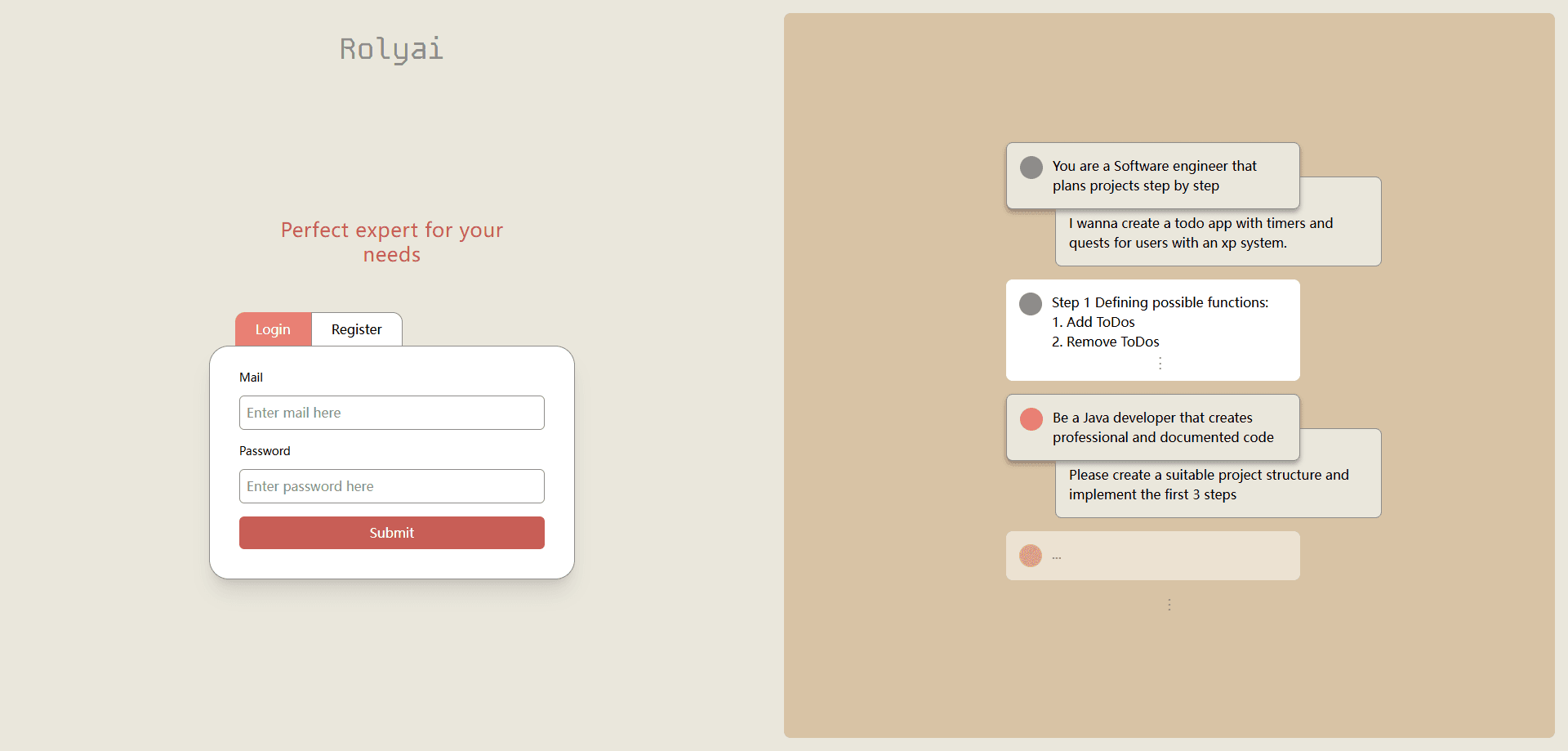
RolyAI is a web app where you build your own AI roles and talk to several of them in a single group-style chat, picking who replies next so planning and coding stay in one thread.
About rolyai
What Is RolyAI
RolyAI is a role-based AI chat platform. Instead of one general assistant answering everything, you create named roles, each with its own instructions or expertise, and keep them together in one conversation. When you need a different kind of answer, you route the question to the role you want rather than opening a new chat.
The product targets the context loss that shows up when you jump between tools. A solo founder might start with a product brief, then ask for a technical breakdown, then want launch copy. On a typical single-assistant setup, that means cramming everything into one prompt or starting fresh threads that each need their background re-explained. RolyAI keeps the thread and the shared context alive across all of it.
RolyAI is still an early-stage product. The official site (rolyai.net) is mostly an access point rather than a deep documentation hub, so templates and integrations are thin, and the quality of each role depends on how well you write its instructions. A vague role gives vague output, and very different topics may still work better in a separate thread.
Getting Started
- Open rolyai.net and sign in to create your account.
- Create roles by giving each one a name and a narrow job, such as planner, backend engineer, or reviewer.
- Start a single chat thread and describe the project once so every role shares the same background.
- Send a message, then pick which role should answer it.
- Switch roles as the work moves from planning to building to review, and keep the thread going.
Product Information
A quick look at rolyai's pricing, supported platforms, and performance.
Best for
The users, tasks, and scenarios where this tool fits best.
Users
- Solo founders
- Developers
- Product managers
Tasks
- Turning a product brief into a technical breakdown
- Getting launch copy after technical work
- Reviewing a plan from more than one angle
Scenarios
- Moving from planning into implementation in one sitting
- Early project exploration
- Repeated task switching through the day
Key features
Custom AI Roles
You build each role yourself, giving it a name and a specific job or area of expertise. A role can be a planner, a reviewer, or a specialist such as a Java developer with instructions to write documented code. Narrow, well-defined roles produce sharper answers than broad ones.
Group-Chat Format
Multiple roles live inside one conversation, much like participants in a normal group chat. You do not manage separate windows or threads for each assistant, and the shared project background stays visible to everyone in the room.
Directed Replies
You decide who responds to any given message. Rather than letting a single assistant answer, you point a question at the role whose viewpoint fits, which keeps each reply on topic and avoids mixing unrelated styles in one answer.
Context That Survives Role Switches
The conversation keeps its history when you move between roles. You describe a project once and the next role picks up with the same context, which cuts the repeated setup that usually comes with switching assistants.
Simple Conversational Interface
The app mirrors a familiar group chat rather than a complex dashboard. That keeps the learning curve low, and most of your effort goes into writing good roles instead of learning the tool.
Roadmap Toward Branching Threads
The team has signaled ideas such as a source-control-like way to branch a chat and return to an earlier point. These are stated directions rather than shipped features, so treat them as future possibilities.
Pros and cons
Pros
- Keeps project context in one thread, cutting the need to restate background when you switch tasks.
- Flexible role setup fits people who already move between planning, coding, and review.
- Group-chat interface feels familiar, so the tool is quick to pick up.
- Free entry point makes it easy to test before committing.
Cons
- Early-stage product, so advanced features and integrations are still missing.
- Role quality depends on your instructions, and vague roles return vague results.
- Very different topics may still be better served by a fresh thread.
- Documentation and ready-made role templates are limited, so new users build roles from scratch.
Frequently asked questions
RolyAI is a role-based AI chat app where you create custom AI roles and talk to several of them in one group-style thread. You choose which role answers each message.
Related content
Explore related tools, skills, and articles for rolyai.
rolyai Alternatives

Base Code
Base44 (Wix) · Coding · ProductivityBase Code is a shared cloud development environment from Base44. Teammates describe changes to an existing GitHub codebase in chat, preview them live and send them back as pull requests.

Google EmbeddingGemma 2
Google DeepMind · Writing · Image · CodingGoogle EmbeddingGemma 2 is a 740M-parameter open model that turns text, code, images, audio, and video frames into vectors in one 768-dimension space, running on phones and laptops.

GitGlow
GitGlow · Coding · ProductivityGitGlow is a local-first desktop Git client that lets independent developers review their own code and their AI agents' changes in one place before shipping.