

RSTGameTranslation
thanhkeke97 · Writing · Voice & Language
RSTGameTranslation is a free, open-source real-time game translation tool for Windows that reads on-screen text with OCR and converts it into your language while you play. As a real-time game translator, it pairs multiple OCR engines with AI translation services, so you can turn a Japanese RPG or a Spanish indie title into something readable in seconds. It runs as an overlay or a side chat window. It can translate spoken dialogue too.
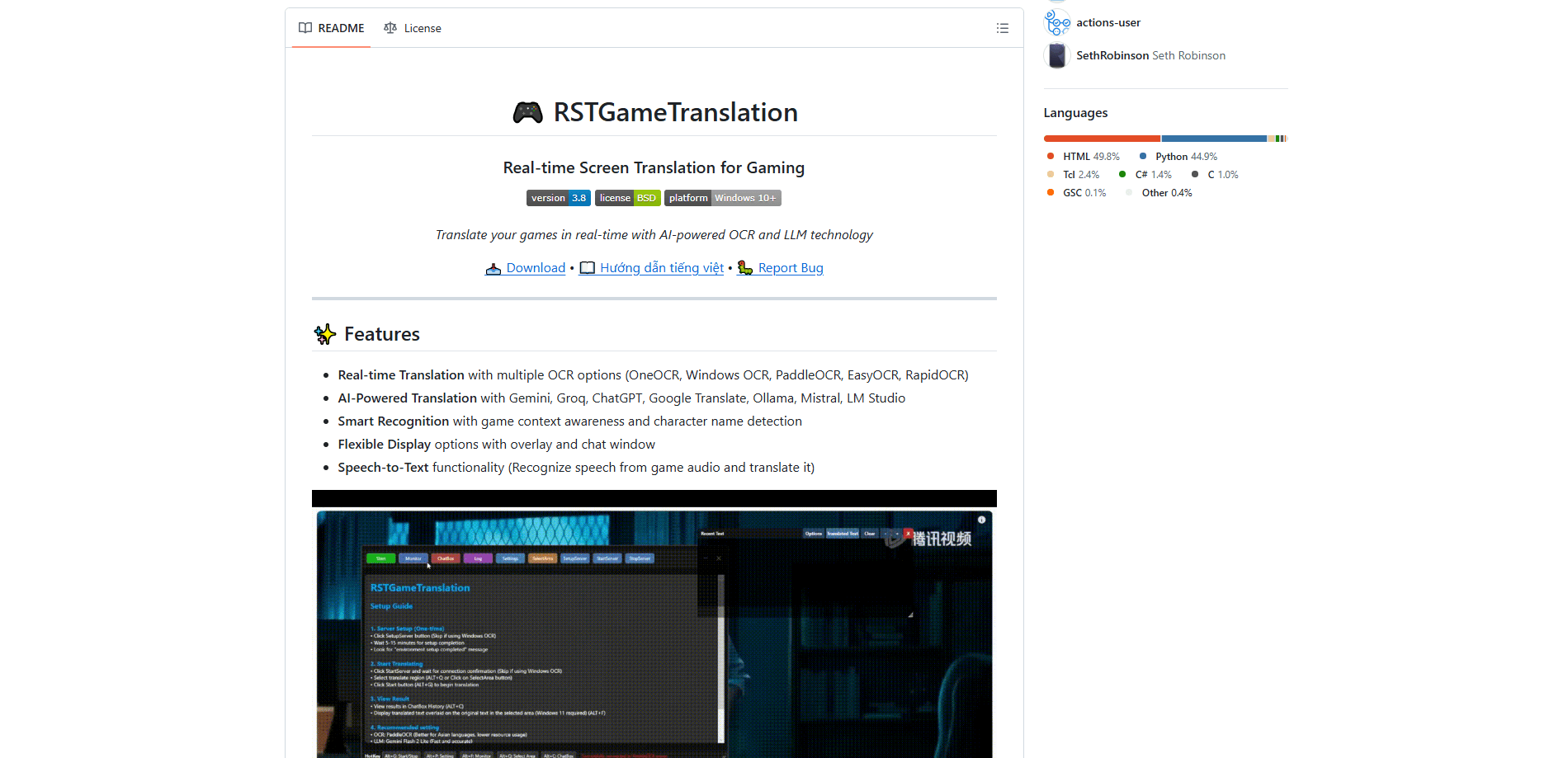
About RSTGameTranslation
What Is RSTGameTranslation
RSTGameTranslation is an open-source desktop app that captures text and speech from a running game, sends it through OCR and a translation engine, and shows the result without pulling you out of the game. It targets Windows 10 and above, and the developer recommends running games in windowed or borderless mode so the capture layer can see the screen.
The main problem it solves is accessibility. Plenty of well-reviewed games never get an official localization. Machine translation inside a browser won't help when the text is baked into a game window. RST grabs that text directly and handles the conversion for you. It also works with voice, which matters for games that lean on dialogue over subtitles. Can it replace a proper localization? No. But it beats playing blind.
The biggest limitation is the setup. Translation quality depends on which OCR and AI service you pick. The tool rewards users who don't mind configuring API keys and choosing between local and cloud engines. As a game text translator for Windows, it's platform-locked, so Mac and Linux players are out of luck for now.
Getting Started
- Download the latest release from the project's GitHub Releases page and extract the archive to a folder.
- Launch rst.exe and open Settings to pick an OCR engine. OneOCR and Windows OCR work out of the box with no extra install.
- In Settings, choose your source and target languages.
- Pick a translation service. Google Translate needs no key, while Gemini, Groq, Mistral, or ChatGPT require API keys. Ollama and LM Studio run locally.
- Press Select Application to pick the game window, press Alt+Q to draw the capture area, then Alt+F to toggle the overlay and Alt+G to start or stop translation.
Product Information
A quick look at RSTGameTranslation's pricing, supported platforms, and performance.
Best for
The users, tasks, and scenarios where this tool fits best.
Users
- Players of untranslated games
- Non-English speakers tackling English games
- Streamers and content creators
Tasks
- Translating in-game dialogue
- Voice translation
- Reading menu and item text
Scenarios
- Playing a Japanese RPG on an English-only setup
- Testing an indie build before localization
- Learning a language through games
Key features
Real-Time OCR Capture
The tool reads on-screen text continuously and translates it while the game runs, so you're not pausing to copy anything. It supports OneOCR and Windows OCR as built-in engines, both of which need no separate install. For most 2D or menu-heavy games, that's enough to keep the text flowing. Latency is low.
Multiple Translation Backends
You can choose between cloud AI services like Gemini, ChatGPT, Groq, and Mistral, or a lightweight option like Google Translate that needs no API key. Because the tool supports several engines, you can trade accuracy against speed and cost depending on the game. Swapping engines is a settings change. No reinstall needed.
Fully Offline Mode
The Supertonic text-to-speech engine runs entirely on your CPU through ONNX Runtime, with a one-time model download of about 400 MB. After that, offline game translation works with no internet and no API key, in 31 languages. That's a real advantage for anyone who doesn't want game audio or text leaving their machine.
Chat Window and Overlay Display
Translated text can appear as a translucent overlay on top of the game or in a separate chat-style window beside it. The overlay keeps you immersed, while the chat window gives more room for longer passages. You switch between them based on how much text a scene throws at you.
Speech-to-Text Translation
Beyond reading text, RST recognizes speech from game audio and translates it. This covers games that rely on voiced dialogue rather than subtitles, which is common in modern AAA titles. It pairs with the TTS backends to give you a full listen-translate-read loop.
Game Context Awareness
The translator factors in game context and detects character names, which reduces the odd mistranslations you get when a filter sees a single line in isolation. Names stay names instead of becoming random nouns. That matters more than it sounds. It's not perfect, but it cuts down on the most confusing errors.
Pros and cons
Pros
- Free and open source under GPL-3.0, with no subscription or per-game fee.
- Handles both text and voice translation in one tool, covering subtitle and dialogue-heavy games.
- Offline voice option means no API keys, no cloud uploads, and no ongoing cost for TTS.
- Overlay and chat window give you flexibility on how much screen space translation takes.
- Works with a range of translation engines, so you can pick speed, cost, or quality.
Cons
- Setup is technical. Choosing OCR engines, API keys, and capture areas takes some patience, which can put off casual users.
- Windows only, so Mac and Linux players can't use it at all.
- Cloud translation quality varies by engine and language pair, and weaker pairs may need manual fixes.
- Games must run in windowed or borderless mode, and fullscreen exclusive titles can't be captured.
- OCR accuracy drops on stylized fonts or low-contrast text, which means some games translate worse than others.
Frequently asked questions
Yes. The app is open source under the GPL-3.0 license and costs nothing to download. You only pay if you choose a paid cloud service like ElevenLabs or hit usage limits on a translation API, but the tool itself and its offline engines are free.
Related content
Explore related tools, skills, and articles for RSTGameTranslation.
RSTGameTranslation Alternatives

Google EmbeddingGemma 2
Google DeepMind · Writing · Image · CodingGoogle EmbeddingGemma 2 is a 740M-parameter open model that turns text, code, images, audio, and video frames into vectors in one 768-dimension space, running on phones and laptops.

MePersona
MePersona, Inc. · Writing · Productivity · MarketingMePersona is an AI unified inbox for creators. It learns your voice, drafts replies to fan messages from 12 platforms, and sends only what you approve.

Fluence
Yay Software (Yannick Huchard) · Writing · Voice & Language · ProductivityFluence is an Android app that reads PDFs, EPUBs, Word files and web articles aloud, follows each sentence as it speaks, and answers questions about the text on the phone itself.