
Rubii
Rubii · Writing · Chatbot
Rubii is an AI character chat and roleplay platform for anyone who wants to talk with AI companions or build original characters.
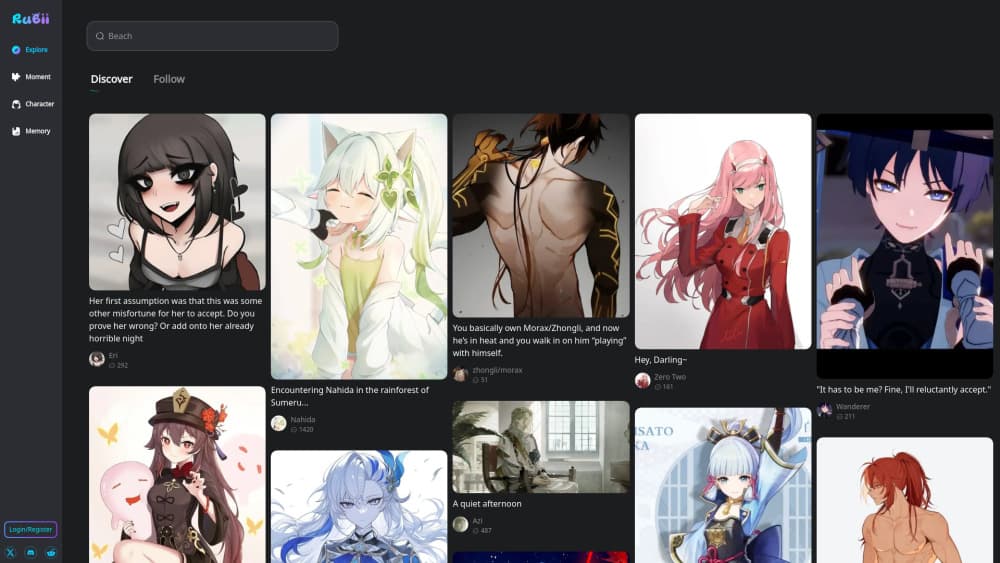
About Rubii
What Is Rubii
Rubii is a web and mobile platform built around AI character chat. You browse a library of public characters, open a conversation, and the character stays in its role, responds in natural language, and keeps the scene going for as long as you want. The main draw is AI roleplay, whether that means a quick chat with an AI companion or a longer story with a defined setting. Some users come looking for an AI girlfriend or boyfriend character. Others just want a good story.
Beyond chatting, Rubii hands you the tools to make the characters yourself. You can create an AI character, give it a personality and backstory, generate matching art, and publish the result so other people can talk to it too. Think of it as an AI character generator plus a chat app in one place.
The limits are worth knowing up front. The most capable tools, extra messages, and heavier image or video generation run on credits, so free use has a ceiling. That ceiling comes sooner than you'd think once you start generating art. Content is moderated, which matters if you want a fully unrestricted sandbox. And since characters come from the community, quality varies a lot from one to the next. Some are great. Some aren't.
Getting Started
- Open rubii.ai on the web or install the app, then create an account with an email or social login.
- Browse the Explore page and pick a character, or open the Create Center to start one from scratch.
- Describe your character's personality, backstory, and speaking style, then add reference art if you want.
- Start the chat by setting the scene, tone, or goal, and let the character carry the story forward.
- Publish your character or chats if you want the community to find and interact with them.
Product Information
A quick look at Rubii's pricing, supported platforms, and performance.
Best for
The users, tasks, and scenarios where this tool fits best.
Users
- AI roleplay fans
- Aspiring character creators
- Casual AI companion seekers
Tasks
- Free-form roleplay
- Character design
- Creative writing warm-ups
- AI character generator work
- Community publishing
Scenarios
- Killing a commute with an ongoing story carried over from your phone to the web app.
- Building a character over a weekend and watching how strangers talk to it.
- Practicing dialogue for a story idea without a writing partner around.
Key features
AI Character Chat That Stays in Role
The core experience is AI character chat, and the character holds its persona across a session. You set the scene, tone, or goal once, and the character responds inside that frame instead of drifting back to generic assistant talk. That continuity is what makes an AI roleplay app worth using for more than five minutes. It's the difference between a novelty and a habit.
Character Creation Tools
Rubii combines an AI character generator with the chat itself. You define a personality, backstory, and speaking style, then publish the result to the community. It's a single flow from concept to a character other people can actually talk to. No separate design tool required.
AI Companion Roles
The library covers everything from a plain AI companion to a dedicated AI girlfriend or boyfriend character, and you pick which tone you want. The character then responds inside that frame for the rest of the session. That flexibility means one platform handles both casual chat and deeper story-driven connection, which is a big part of why people stay on it once they've found a character that clicks.
Image and Video Generation
Characters aren't limited to text. Rubii includes image and video tools so you can create character art and roleplay scenes that match the personality you wrote. It's the difference between a name and a character you can picture.
Voice Support
Voice is part of the character toolkit, so companions can talk rather than only type. For anyone who finds spoken interaction more natural, it changes how the chat feels.
Community Characters and Discovery
The Explore page is a large library of public characters, sorted by tags like fantasy, anime, and RPG. You can follow creators and jump into work other people have already published, which is the fastest way to see what the platform can do.
Cross-Device Access
Rubii runs on the web, iOS, and Android, and you can install it as a web app straight from the browser without touching an app store. A conversation you start on your phone is there when you open your laptop, so the ongoing stories you've invested time in aren't suddenly tied to a single device. Switch devices mid-scene and nothing breaks.
PUBLISH AND SHARE
Public chats, creator content, and media assets can be shared with the community. Publishing is how a private character turns into something other users discover and interact with, which is the whole point of the social side of Rubii.
Pros and cons
Pros
- Free to start, so you can explore as an AI roleplay app before spending anything.
- Character creation and chat live in one place, with no separate art tool needed.
- Web, iOS, and Android apps keep ongoing characters and stories in sync.
- A large community library means new characters to try without building your own.
- Voice, image, and video tools add depth beyond plain text chat.
Cons
- Free use has credit limits; heavy chat and media generation push you toward paying.
- Community characters vary widely in quality, so it takes some browsing to find good ones.
- Content moderation rules mean some roleplay scenarios simply aren't allowed.
- No public API, so you can't wire Rubii into your own apps or workflows.
Frequently asked questions
Yes. You can browse public characters and start chatting without paying. Credits cover the heavier features like extended chat and image or video generation, and topping up is optional.
Related content
Explore related tools, skills, and articles for Rubii.
Rubii Alternatives

Google EmbeddingGemma 2
Google DeepMind · Writing · Image · CodingGoogle EmbeddingGemma 2 is a 740M-parameter open model that turns text, code, images, audio, and video frames into vectors in one 768-dimension space, running on phones and laptops.

MePersona
MePersona, Inc. · Writing · Productivity · MarketingMePersona is an AI unified inbox for creators. It learns your voice, drafts replies to fan messages from 12 platforms, and sends only what you approve.

Fluence
Yay Software (Yannick Huchard) · Writing · Voice & Language · ProductivityFluence is an Android app that reads PDFs, EPUBs, Word files and web articles aloud, follows each sentence as it speaks, and answers questions about the text on the phone itself.