
SaleSmartly
SAASBASE PTE. LTD. · Marketing · Business · Chatbot
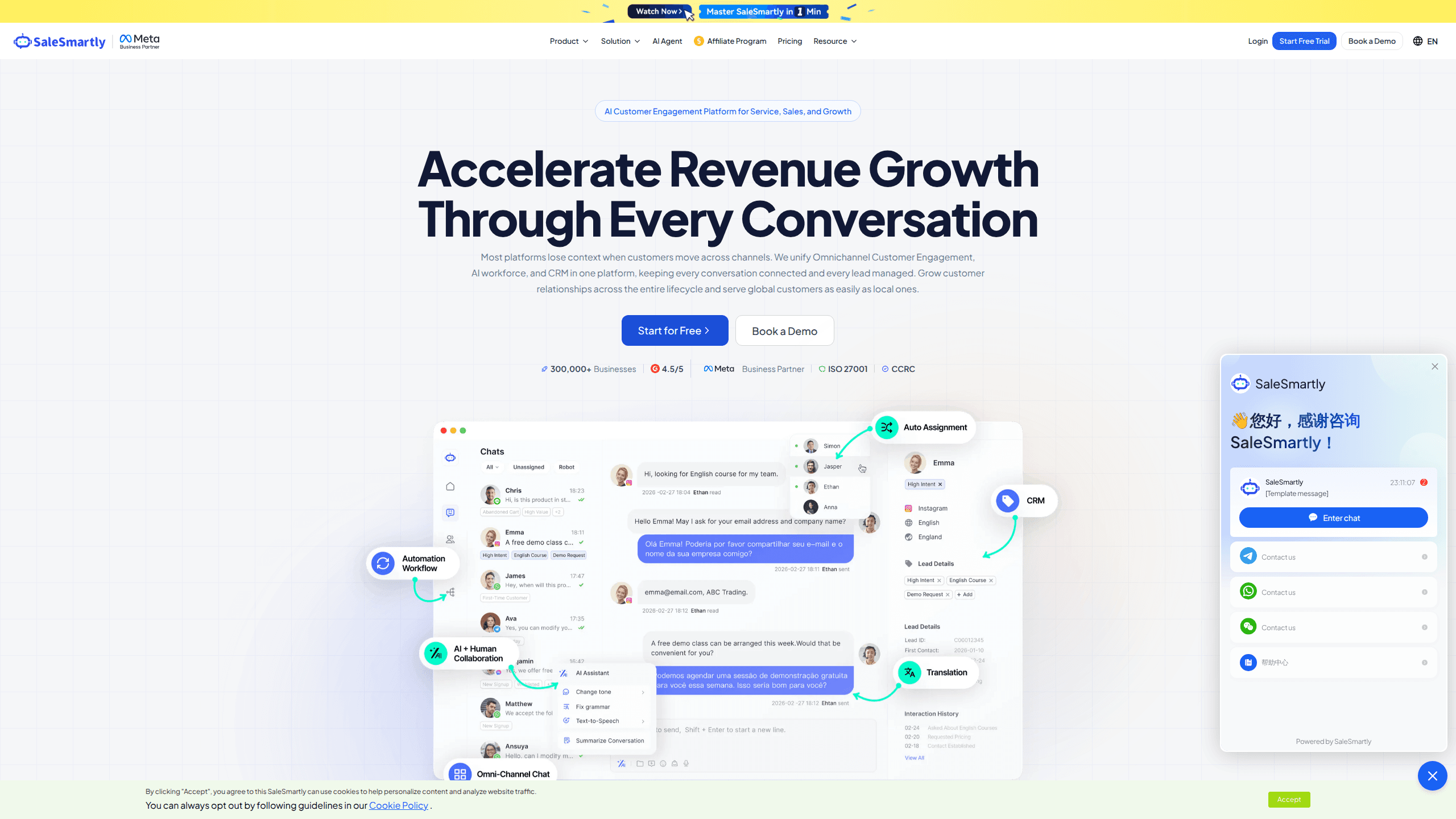
SaleSmartly is an omnichannel inbox for service and sales teams: 14 chat channels, AI agents that answer around the clock, real-time translation, and a CRM in one workspace.
About SaleSmartly
What Is SaleSmartly
SaleSmartly is a customer engagement platform built for businesses that sell through chat apps. A store in Jakarta, a support desk in Manila, and a marketing team in São Paulo can all work from the same inbox, even when the customer writes in a language none of them speak. The product combines three things that usually sit in separate tools: a shared inbox, an AI agent, and a lightweight CRM.
The problem it solves is familiar to anyone running cross-border sales. Messages arrive on WhatsApp, Instagram, TikTok, Messenger, Telegram, LINE, email, and a website chat widget. Each app has its own notification, its own search, and its own idea of who the customer is. SaleSmartly pulls those threads into one screen, keeps a single profile for each contact, and lets a teammate pick up a conversation without asking the customer to repeat themselves.
Limits matter here too. The free plan covers one social channel and 100 monthly active contacts, which is enough to test the workflow but not to run a team. API access and webhooks appear on the Max plan, so a developer who needs programmatic control has to pay for the top tier. The interface carries a lot of options, and new users often need the help center to find routing and automation settings.
Getting Started
- Create an account at salesmartly.com and pick a workspace name. No card is needed for the free plan.
- Open the integration menu and connect a channel. WhatsApp, Messenger, Instagram, Telegram, LINE, email, WeChat, VKontakte, and a website chat plugin each have their own short authorization flow.
- Set working hours, assignment rules, and a greeting message so new chats reach the right person.
- Add answers to the AI knowledge base, or upload a document and let the AI agent draft replies from it.
- Install the chat widget on your store, then watch the first conversations arrive in the shared inbox.
Product Information
A quick look at SaleSmartly's pricing, supported platforms, and performance.
Best for
The users, tasks, and scenarios where this tool fits best.
Users
- Small cross-border e-commerce teams
- Customer support agents who handle several brands
- Sales staff who follow up on chat leads
Tasks
- Answering the same five questions all day
- Replying to a customer in another language
- Running a promotion across channels
Scenarios
- A Ramadan sale brings three times the usual messages
- A Shopify store adds live chat
- A brand expands from one market to four
Key features
Omnichannel Shared Inbox
Every connected account lands in one queue, with filters for channel, assignee, tag, and status. Agents see the customer's full history beside the reply box, including earlier chats on other channels. The inbox supports 14 messaging channels, among them WhatsApp, WhatsApp Business API, Facebook Messenger, Instagram, TikTok, Telegram, LINE, email, VKontakte, and WeChat.
AI Agents With Human Handoff
The AI customer service agent answers common questions, qualifies leads, and collects order details before a person joins. It draws on a knowledge base you build from documents, links, and saved replies, and it passes the conversation to a human with the transcript attached when confidence drops. Replies can run 24/7, which matters for stores whose customers live in another time zone.
Real-Time Translation
Incoming messages are translated into the agent's language, and outgoing replies are translated back before sending. SaleSmartly lists support for more than 100 languages. The feature is most useful in marketplaces where buyers write in local languages and the support team works in English or Chinese.
Social CRM and Customer Profiles
Each contact gets a profile with tags, notes, lifecycle stage, order information, and every past conversation. Segments can be built from purchase behavior, channel, or last contact date, then reused in broadcasts and follow-up campaigns. For shops already on Shopify or WooCommerce, order data arrives through the integration instead of manual entry, which turns the inbox into a working WhatsApp CRM for chat-heavy stores.
Chatbot Automation and Broadcast
Visual flows handle greetings, away messages, quick replies, and menu-style bots without code. Broadcast campaigns send templated messages to a filtered audience on WhatsApp, email, SMS, or Messenger, and the report shows delivery, open, and reply rates. Trigger-based follow-ups bring quiet leads back into the inbox.
Integrations and Conversation API
SaleSmartly connects to Shopify, WooCommerce, Shoplazza, Shopline, WordPress, and Slack, so orders and internal alerts sit next to the conversation. The Max plan adds an API interface and webhook notifications for teams that push chats into their own systems or build a custom dashboard.
Pros and cons
Pros
- One inbox for 14 channels cuts the tab switching that makes small support teams slow.
- The free plan includes a real workspace with AI points and 100 monthly active contacts, so testing costs nothing.
- Real-time translation lets a single-language team serve buyers in several markets.
- AI answers stay tied to a knowledge base you control, and every handoff keeps the transcript.
- Setup is mostly authorization flows and a chat widget, with no developer needed for the first channel.
Cons
- Pricing scales by members, social accounts, and hosted devices, so a growing team can end up paying well above the entry price.
- API access and webhooks are limited to the Max plan, which starts at $159.20 a month on annual billing.
- The free plan allows one social channel and 100 monthly active contacts, and the SaleSmartly brand stays on the widget.
- The settings menu is dense, and routing, automation, and AI training each live in a different section.
Frequently asked questions
SaleSmartly collects customer conversations from chat apps, email, and a website widget into one inbox. Teams use it to answer support questions, follow up on sales leads, send broadcast campaigns, and keep a record of every contact in a built-in CRM.
Related content
Explore related tools, skills, and articles for SaleSmartly.
SaleSmartly Alternatives

ngram 2.0
ngram · Video · Marketingngram 2.0 is an AI video generator for teams. It turns a prompt, a screen recording, or a product URL into a narrated explainer, product demo, or AI avatar video, and every scene stays editable.

shippedit.me
Krawlup · Marketing · Businessshippedit.me now redirects to Krawlup, a web platform that audits SEO, AEO and page speed every week, then hands the fixes to AI coding agents over MCP.

MePersona
MePersona, Inc. · Writing · Productivity · MarketingMePersona is an AI unified inbox for creators. It learns your voice, drafts replies to fan messages from 12 platforms, and sends only what you approve.